April 16, 2012
Answered

Live Streaming from static video file

  • April 16, 2012
  • 1 reply
  • 9899 views

Hi everybody,

I'm using Amazon Cloud & Flash MMedia Server 4.5.
I would like to take one of my exits videos (a static file), and turn it into a live stream. People can view this video (synchronous). I'm using Flash Media Live Encoder 3.2, but it only capture video from devices as camera...

How I can do it?

Cheers.

    This topic has been closed for replies.
    Correct answer Shiraz Anwar

    Hi Huy,

    Please find the zip attached where I have written the scripts for you to deploy on your local FMS server, in context of option 2:

    You may like to follow these steps:

    1. unzip the folder.

    2. deploy FLVpublishonLoad (in case your recorded file is a FLV use case) on your lcoal server

    3. deploy toPublish on your remote aws server

    4. make sure to correct the path for aws in FLVPublishonLoad application @ line#19:

    // Please mention your aws instance hostname instead of localhost , and application name ....
    nc.connect("rtmp://localhost/toPublish");

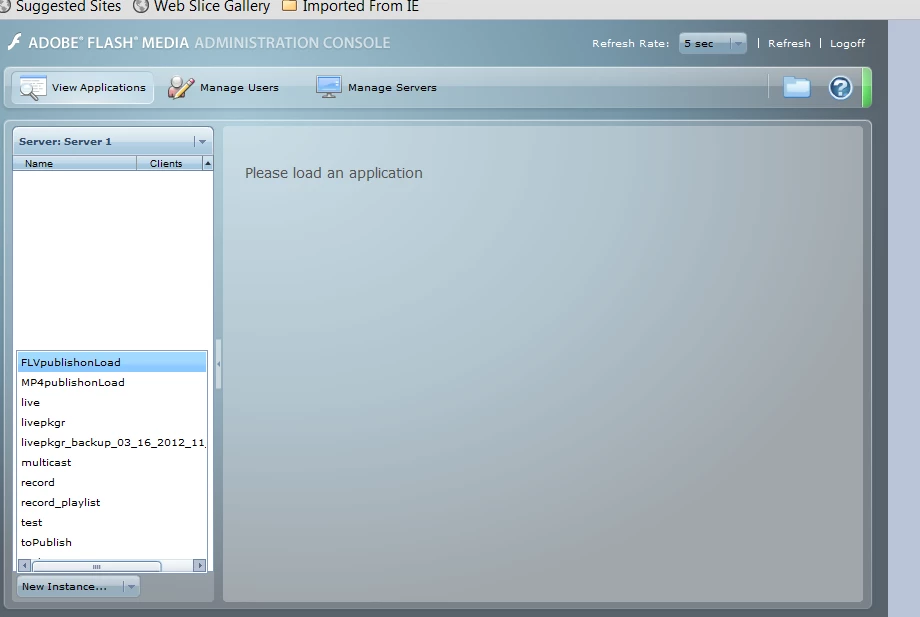
    5. go to admin console of your local development server and load the instance of FLVPublishonLoad as shown in the howtoLoadfromAdminConsole.png image attached for refrence purpose.

    6. it will automatically connect to the "toPublish" app on your remote server and start publishing your local vod file as a live stream to your aws instance

    7. start your subscriber app and subscribe to the stream you have used in FLVPublishonLoad app for Stream.get() method, see line#29 and the subscriberScreenExample.png file attached for the illustration purpose.

    few points to note here:

    1. I have removed the sample.flv and "sample1_1500kbps.f4v" for keeping the zip size lower.

    2. You need to put your stream name at line#55 where you call mystream.play()

    3. The stream name that you specify in Stream.get() will be used by subscribers.

    4. if your use case is mp4, then please use "MP4PublishonLoad" instead of "FLVPublishonLoad" application.

    =============

    As I am unable to attach the files here therefore copy-pasting the code for you and others to be re-used:

    =======

    main.asc code for FLVPublishonLoad:

    --------------------------------------

    var nc;

    var ns;

    application.onAppStart = function()

    {

        trace("hello client: ");

        publishIt();

    }

    function publishIt()

    {

        trace("publishing");

        nc = new NetConnection();


        // Please mention your aws instance hostname instead of localhost , and application name ....

        nc.connect("rtmp://localhost/toPublish");


        nc.onStatus = function(info)

        {

            trace(info.code);

        }


        ns = new NetStream(nc);


        // Exact stream name available for subscribers .....

        mystream = Stream.get("myvodfile");


        mystream.onStatus = function(sinfo)

        {

            trace("mystream.onStatus: "+sinfo.code);

            if(sinfo.code == "NetStream.Publish.Start")

            {

                attach_retVal = ns.attach(mystream);


                if(attach_retVal==true)


                    {

                        trace("stream attach was successful ...");

                        startPublish();

                    }


                else

                {

                    trace("The attempt to attach stream source to NetStream failed");

                }

            }

        }


        // Please put the stream name here inside double-quotes that you want to publish and is available there in streams/_definst_ folder ......

        mystream.play("sample",0,-1,true);


    }

    function startPublish()

    {

        ns.publish(mystream.name,"live");

    }

    --------------------------------------

    main.asc code for MP4PublishonLoad:

    --------------------------------------

    var nc;

    var ns;

    application.onAppStart = function()

    {

        trace("hello client ");

        publishIt();

    }

    function publishIt()

    {

        trace("publishing");

        nc = new NetConnection();


        // Please mention your aws instance hostname instead of localhost , and application name ....

        nc.connect("rtmp://localhost/toPublish");


        nc.onStatus = function(info)

        {

            trace(info.code);

        }


        ns = new NetStream(nc);


        // Exact stream name available for subscribers .....

        mystream = Stream.get("mp4:myvodfile.f4v");


        mystream.onStatus = function(sinfo)

        {

            trace("mystream.onStatus: "+sinfo.code);

            if(sinfo.code == "NetStream.Publish.Start")

            {

                attach_retVal = ns.attach(mystream);


                if(attach_retVal==true)


                    {

                        trace("stream attach was successful ...");

                        startPublish();

                    }


                else

                {

                    trace("The attempt to attach stream source to NetStream failed");

                }

            }

        }


        // Please put the stream name that you want to publish and is available there in streams/_definst_ folder ......

        mystream.play("mp4:sample1_1500kbps.f4v",0,-1,true);


    }

    function startPublish()

    {

        trace("#### " + mystream.name);

        ns.publish("mp4:" + mystream.name,"live");

    }

    --------------------------------------

    main.asc code for "toPublish" app

    =====================

    application.onPublish = function(clientObj, streamObj)

    {

        trace("published: " + streamObj.name);

    }

    =====================

    Please revert back to me in case of further query.

    Regards,

    Shiraz Anwar
    1 reply

    Adobe Employee
    April 16, 2012

    Hi Huy,

    For your issue there are several routes availiable:

    1. You can provide input to FMLE using a DVD player and a sound card and then your FMLE will publish this stream from DVD player to FMS like a live stream.

    2. Alternatively, you can install the Development Edition of FMS on your local machine, write a Server-Side Action Script cpde that can publish this stream to your FMS hosted on your cloud.

    3. Alternatively, put the tatic file as VoD, but am not sure if that is your valid use case.

    4. Alternatively, you can use tools like manycam to get the video stream, and a sound card to capture the audio and publish it to FMS using FMLE, but I believe it will run into synchronization issues.

    Please see if any of these options are viable and then probably we can help you more if you run into some other issues while using these alternative methods.

    Regards,

    Shiraz Anwar

    April 16, 2012

    Hi zarihs,

    Thanks your reply, now I'm interested case 1 & 2. Because case 3 is not valid my use case. And case 4 is inconvenience to share my screen.

    Can you specific description for me about:

    1. I need a "DVD player device" (example  here) and sound card for PC, then plug "DVD player device" to PC, and run video on "DVD player device", FMLE can capture it? Can you give me some name of popular "DVD player"  ?

    2. About write Server-side action script, do you have tutorial or document about streaming ? I don't have more knowledge about streaming. It too difficult ?

    Regard,

    Mai Huy

    Shiraz AnwarCorrect answer
    Adobe Employee
    April 16, 2012

    Hi Huy,

    Please find the zip attached where I have written the scripts for you to deploy on your local FMS server, in context of option 2:

    You may like to follow these steps:

    1. unzip the folder.

    2. deploy FLVpublishonLoad (in case your recorded file is a FLV use case) on your lcoal server

    3. deploy toPublish on your remote aws server

    4. make sure to correct the path for aws in FLVPublishonLoad application @ line#19:

    // Please mention your aws instance hostname instead of localhost , and application name ....
    nc.connect("rtmp://localhost/toPublish");

    5. go to admin console of your local development server and load the instance of FLVPublishonLoad as shown in the howtoLoadfromAdminConsole.png image attached for refrence purpose.

    6. it will automatically connect to the "toPublish" app on your remote server and start publishing your local vod file as a live stream to your aws instance

    7. start your subscriber app and subscribe to the stream you have used in FLVPublishonLoad app for Stream.get() method, see line#29 and the subscriberScreenExample.png file attached for the illustration purpose.

    few points to note here:

    1. I have removed the sample.flv and "sample1_1500kbps.f4v" for keeping the zip size lower.

    2. You need to put your stream name at line#55 where you call mystream.play()

    3. The stream name that you specify in Stream.get() will be used by subscribers.

    4. if your use case is mp4, then please use "MP4PublishonLoad" instead of "FLVPublishonLoad" application.

    =============

    As I am unable to attach the files here therefore copy-pasting the code for you and others to be re-used:

    =======

    main.asc code for FLVPublishonLoad:

    --------------------------------------

    var nc;

    var ns;

    application.onAppStart = function()

    {

        trace("hello client: ");

        publishIt();

    }

    function publishIt()

    {

        trace("publishing");

        nc = new NetConnection();


        // Please mention your aws instance hostname instead of localhost , and application name ....

        nc.connect("rtmp://localhost/toPublish");


        nc.onStatus = function(info)

        {

            trace(info.code);

        }


        ns = new NetStream(nc);


        // Exact stream name available for subscribers .....

        mystream = Stream.get("myvodfile");


        mystream.onStatus = function(sinfo)

        {

            trace("mystream.onStatus: "+sinfo.code);

            if(sinfo.code == "NetStream.Publish.Start")

            {

                attach_retVal = ns.attach(mystream);


                if(attach_retVal==true)


                    {

                        trace("stream attach was successful ...");

                        startPublish();

                    }


                else

                {

                    trace("The attempt to attach stream source to NetStream failed");

                }

            }

        }


        // Please put the stream name here inside double-quotes that you want to publish and is available there in streams/_definst_ folder ......

        mystream.play("sample",0,-1,true);


    }

    function startPublish()

    {

        ns.publish(mystream.name,"live");

    }

    --------------------------------------

    main.asc code for MP4PublishonLoad:

    --------------------------------------

    var nc;

    var ns;

    application.onAppStart = function()

    {

        trace("hello client ");

        publishIt();

    }

    function publishIt()

    {

        trace("publishing");

        nc = new NetConnection();


        // Please mention your aws instance hostname instead of localhost , and application name ....

        nc.connect("rtmp://localhost/toPublish");


        nc.onStatus = function(info)

        {

            trace(info.code);

        }


        ns = new NetStream(nc);


        // Exact stream name available for subscribers .....

        mystream = Stream.get("mp4:myvodfile.f4v");


        mystream.onStatus = function(sinfo)

        {

            trace("mystream.onStatus: "+sinfo.code);

            if(sinfo.code == "NetStream.Publish.Start")

            {

                attach_retVal = ns.attach(mystream);


                if(attach_retVal==true)


                    {

                        trace("stream attach was successful ...");

                        startPublish();

                    }


                else

                {

                    trace("The attempt to attach stream source to NetStream failed");

                }

            }

        }


        // Please put the stream name that you want to publish and is available there in streams/_definst_ folder ......

        mystream.play("mp4:sample1_1500kbps.f4v",0,-1,true);


    }

    function startPublish()

    {

        trace("#### " + mystream.name);

        ns.publish("mp4:" + mystream.name,"live");

    }

    --------------------------------------

    main.asc code for "toPublish" app

    =====================

    application.onPublish = function(clientObj, streamObj)

    {

        trace("published: " + streamObj.name);

    }

    =====================

    Please revert back to me in case of further query.

    Regards,

    Shiraz Anwar
