
Participating Frequently
October 31, 2011
Question

Multiple Flash player in One WebPage.

  • October 31, 2011
  • 1 reply
  • 1008 views

hi,

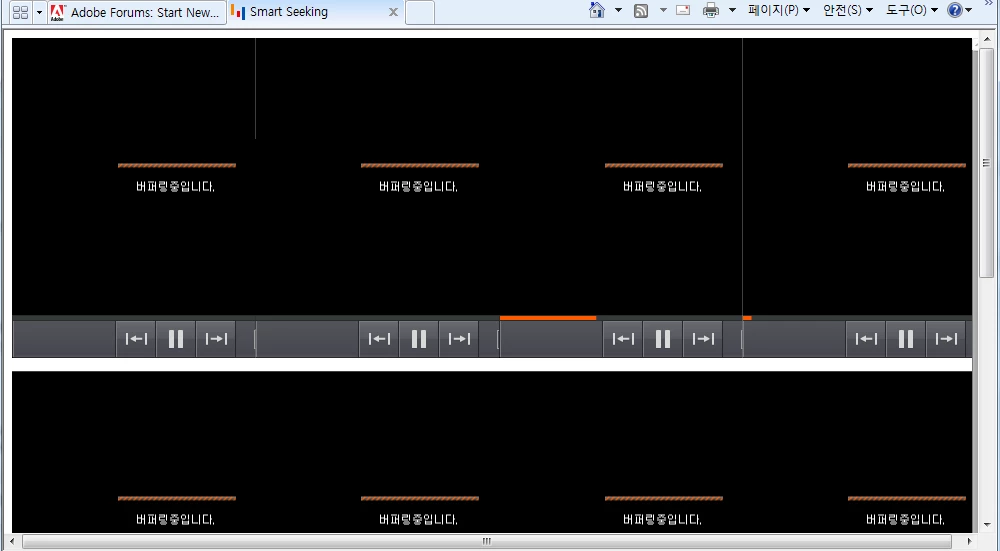
I tried to test Smart Seeking with multiple flash player in One WebPage.

So, Only one player is started and the others is buffering.

What's problem ?

I changed properties like 'MaxIOThread', 'MaxConnection'. but it's useless.

Please advice to me.

Thanks,

    This topic has been closed for replies.

    1 reply

    Adobe Employee
    October 31, 2011

    You mean multiple clients on single page right?

    goodmiraAuthor
    Participating Frequently
    October 31, 2011

    right!

    here is my source.

    <!DOCTYPE HTML PUBLIC "-//W3C//DTD HTML 4.01 Transitional//EN" "http://www.w3.org/TR/html4/loose.dtd">
    <htm style="width:100%;height:1000"l>
    <head>
    <title>Smart Seeking</title>

    <script type="text/javascript">

    var flashid = 0;
    function flashWrite(url,w,h,id,bg,vars,win){
    var flashStr=
    "<object classid='clsid:d27cdb6e-ae6d-11cf-96b8-444553540000' codebase='http://fpdownload.macromedia.com/pub/shockwave/cabs/flash/swflash.cab#version=8,0,0,0' width='"+w+"' height='"+h+"' id='"+id+"' name='"+id+"' align='middle'>"+
    "<param name='allowScriptAccess' value='always' />"+
    "<param name='allowFullScreen' value='true' />"+
    "<param name='movie' value='"+url+"' />"+
    "<param name='FlashVars' value='"+vars+"' />"+
    "<param name='wmode' value='"+win+"' />"+
    "<param name='menu' value='false' />"+
    "<param name='scaleMode' value='noScale' />"+
    "<param name='showMenu' value='false' />"+
    "<param name='align' value='CT' />"+
    "<param name='quality' value='high' />"+
    "<param name='bgcolor' value='"+bg+"' />"+
    "<embed src='"+url+"' FlashVars='"+vars+"' wmode='"+win+"' menu='false' quality='high' bgcolor='"+bg+"' width='"+w+"' height='"+h+"' name='"+id+"' id='"+id+"' align='middle' allowScriptAccess='always' type='application/x-shockwave-flash' pluginspage='http://www.macromedia.com/go/getflashplayer' />"+
    "</object>";
    document.write(flashStr);
    }

    </script>
    </head>
    <body style="width:100%;height:1000">
    <script type="text/javascript">
    flashWrite('TestPlayer.swf','100%','1000','swf','','css=assets/css/NasmoPlayerStyle.css&configURL: config/config.xml&filepath :2010-05-12/sion1219_20100512210001.asf','transparent');
    </script>
    </body>
    </html>

    Adobe Employee
    November 3, 2011

    When you say others are buffering - so do they connect or they connect, start the play and then start buffering.