
Participant
February 18, 2013
Question

Stream on internet, Can't connect to my ip

  • February 18, 2013
  • 1 reply
  • 906 views

Hello,

I want to stream to the internet but i can't connect to my ip found on http://whatismyipaddress.com/

i can connect to localhost and my local network ip but i want to stream world-wide.

How can i do this?

this is my setup atm:
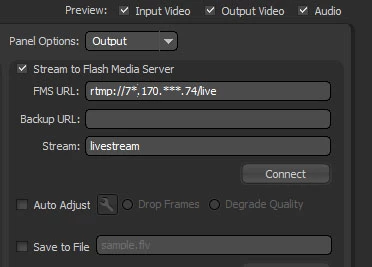
7*.170.***.74 is my ip (partly for privacy matters).

    This topic has been closed for replies.

    1 reply

    Adobe Employee
    February 18, 2013

    Can you try below:

    In your fms.ini (ams.ini), change ADAPTOR.HOSTPORT = :1935 to ADAPTOR.HOSTPORT = 7*.170.***.74:1935

    Restart your server

    Make sure port 1935 is open on your firewall for incoming traffic.

    And then try to connect - please try to connect from outside your LAN or from different machine.

    MartjojoAuthor
    Participant
    February 18, 2013

    Turned off the firewall, so port should be open..

    In my modem i also opened the port tcp&udp

    When i enter for fms url: 7*.170.***.74 it says that it could not connect, neither i could connect to localhost anymore.

    sorry for the inconvenience, it is ams not fms, it says fms in encoder but i use ams...? should this be any problem?

    Adobe Employee
    February 19, 2013

    Is this "77.170.124.74" your public Ip? Also after your restart can you check AMS has successfully bound to your IP- check edge and master logs.I mean can you telnet this 77.170.124.74:1935 from different machine outside your local network (I am not asking from same laptop). Also I suppose you need to point to the IP of your router (your internet IP), and configure the router to forward port 1935 to your local IP.