

the f4m document contains errors url missing from media tag - Adobe Media Server 5.0.9
Hi,
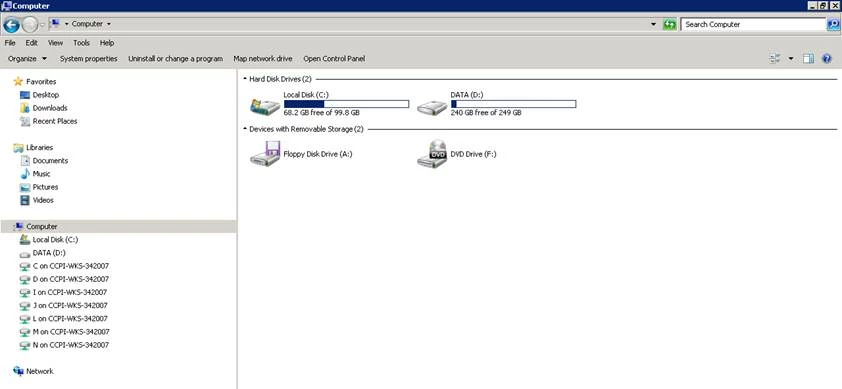
I have the Adobe Media Server 5.0.9 and I had configured the Server as dynamic streaming server with 4 streams just for live streaming. Actually we are not using VOD. This server was working fine until we decide to change some settings on it. This change was change the location of the carpet applications, from c:\applications to d:\applications. To do that, I change this locations on the files: ams.ini and httpd.conf
Now every time we access the index.html to access the streaming we receive the following message:
the f4m document contains errors url missing from media tag

I can see the streams being recorded in the following directories
D:\applications\livepkgr\streams\_definst_\liveevent1
D:\applications\livepkgr\streams\_definst_\liveevent2
D:\applications\livepkgr\streams\_definst_\liveevent3
D:\applications\livepkgr\streams\_definst_\liveevent4
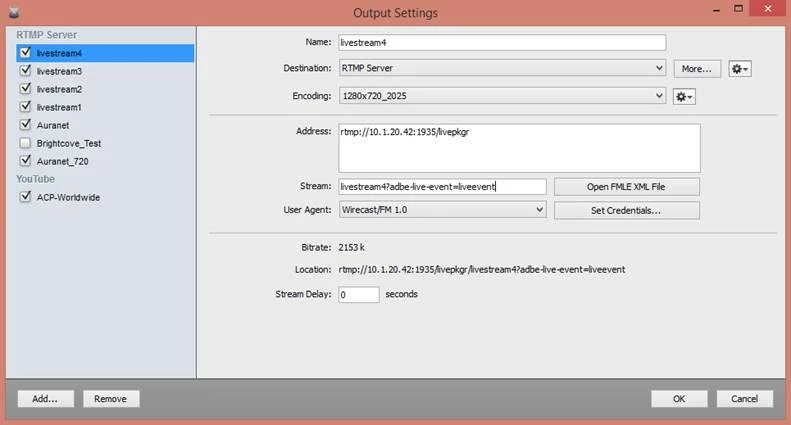
We are using wirecast 6.0.5 studio as encoder:
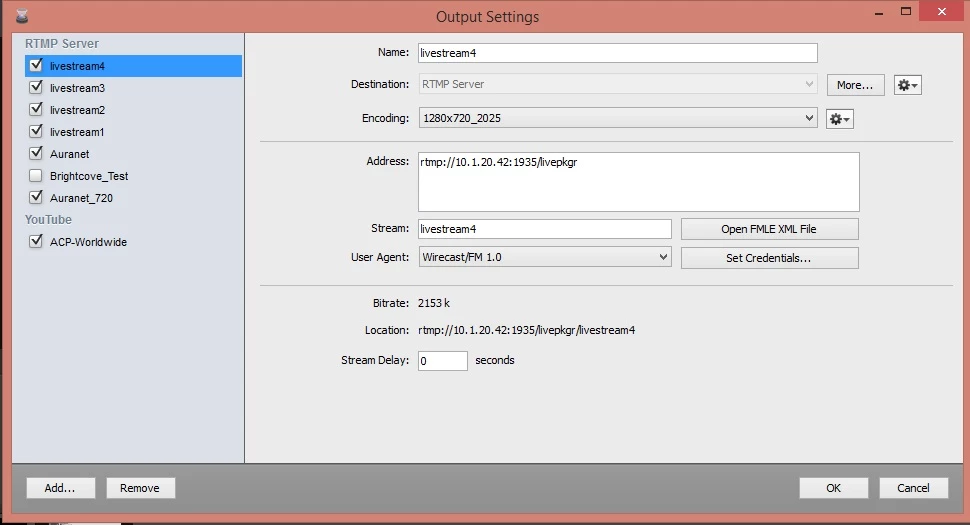
Can you explain me how can I get the gold support for the Adobe Media Server. We've bought this service and we need to obtain support regarding this issue as soon as posible because we have stopped our streaming service in our organization...
This is the Event.xml file:
*************************************************************************************************
<Event>
<EventID>liveevent</EventID>
<Recording>
<FragmentDuration>4000</FragmentDuration>
<SegmentDuration>16000</SegmentDuration>
<DiskManagementDuration>1</DiskManagementDuration>
<IOBufferSize>8192</IOBufferSize>
</Recording>
</Event>
*************************************************************************************************
This is the ams.ini:
*************************************************************************************************
###########################################################################
# ams.ini contains substitution variables for Adobe Media Server #
# configuration files. Lines beginning with '#' are considered comments. #
# A substitution variable is in the form <name>=<value>. Everything up to #
# the first '=' is considered the name of the substitution variable, and #
# everything after the first '=' is considered the substitution value. If #
# you want a substitution variable to have leading or trailing spaces, #
# enclose the value around double quotes. For example, foo=" bar " #
###########################################################################
###############################################################
# This section contains configurable parameters in Server.xml #
###############################################################
# Username for server admin
# For example:
# SERVER.ADMIN_USERNAME = foo
#
SERVER.ADMIN_USERNAME = audiovisuales
# IP address and port Adobe Media Admin Server should listen on
# For example:
# SERVER.ADMINSERVER_HOSTPORT = :1111
#
SERVER.ADMINSERVER_HOSTPORT = :1111
# User id in which to run the process (Linux Only)
# For example:
# SERVER.PROCESS_UID = 500
#
SERVER.PROCESS_UID =
# Group id in which to run the process (Linux Only)
# For example:
# SERVER.PROCESS_GID = 500
#
SERVER.PROCESS_GID =
# License key for Adobe Media Server
# For example:
# SERVER.LICENSEINFO = XXXX-XXXX-XXXX-XXXX-XXXX-XXXX
#
SERVER.LICENSEINFO = 1651-5000-8978-0543-0738-4953
# LIVE_DIR denotes the full path of sample "Live" application's
# folder for storing any live stream recorded by server.
# For example:
# LIVE_DIR = <AMS_Installation_Dir>\applications\live
#
LIVE_DIR = D:\Program Files\Adobe\Adobe Media Server 5\applications\live
# VOD_COMMON_DIR denotes the full path of sample "VOD" application's
# folder for storing onDemand and Progressive Download .flv/.mp3 files.
# File stored in this folder can be streamed and are also PD-able.
# Note : If you are using the default installation of Apache as a webserver,
# and if you modify VOD_COMMON_DIR, please change the document root
# accordingly in httpd.conf.
# For example:
# VOD_COMMON_DIR = <AMS_Installation_Dir>\webroot\vod
#
VOD_COMMON_DIR = D:\Program Files\Adobe\Adobe Media Server 5\webroot\vod
# VOD_DIR denotes the full path of sample "VOD" application's
# folder for storing onDemand only .flv/.mp3 files. Files stored in
# this folder are not PD-able
# For example:
# VOD_DIR = <AMS_Installation_Dir>\applications\vod\media
#
VOD_DIR = D:\Program Files\Adobe\Adobe Media Server 5\applications\vod\media
# The maximum size of the FLV cache, in megabytes.
# The default is 500MB.
#
SERVER.FLVCACHE_MAXSIZE=500
# Whether to start and stop the included HTTP server along
# with AMS.
#
SERVER.HTTPD_ENABLED = true
# Whether to start and stop the cache cleaning tool along
# with HTTP server.
#
SERVER.HTCACHECLEAN_ENABLED = true
# The path specifying the cache root for webserver caching - this path is passed on to htcacheclean which periodically cleans cache files stored in this location.
# Note: Make sure that the same cache root path is also specified for Apache httpd using the CacheRoot directive in httpd.conf
SERVER.HTCACHEROOT = D:\Program Files\Adobe\Adobe Media Server 5\Apache2.4\cacheroot
################################################################
# This section contains configurable parameters in Adaptor.xml #
################################################################
# IP address and port(s) Adobe Media Server should listen on
# For example:
# ADAPTOR.HOSTPORT = :1935,80
#
ADAPTOR.HOSTPORT = :1935
# IP (address and) port that Adobe Media Server should proxy
# unknown HTTP requests to. Leave empty to disable proxying.
# With no address, specifies a localhost port.
# For example:
# HTTPPROXY.HOST = webfarm.example.com:80
#
HTTPPROXY.HOST = :8134
#This tag specifies an IP address for the player to use instead of a hostname when
#making the RTMPT connection to AMS. If nothing is specified, AMS will automatically
#determine the IP to use.
#
ADAPTOR.HTTPIDENT2 = 10.1.20.42
##############################################################
# This section contains configurable parameters in Vhost.xml #
##############################################################
# Application directory for the virtual host
# For example:
# VHOST.APPSDIR = C:\myapps
#
#VHOST.APPSDIR = D:\Program Files\Adobe\Adobe Media Server 5\applications
VHOST.APPSDIR = D:\applications
####################################################################
# This section contains configurable parameters in Application.xml #
####################################################################
# List of semi-colon delimited paths in which to search for script to load
# For example:
# APP.JS_SCRIPTLIBPATH = C:\scripts;C:\Program Files\Foo\scripts
#
APP.JS_SCRIPTLIBPATH = D:\Program Files\Adobe\Adobe Media Server 5\scriptlib
###############################################################
# This section contains configurable parameters in Logger.xml #
###############################################################
LOGGER.LOGDIR =
####################################################################
# This section contains configurable parameters in Users.xml #
####################################################################
# Enable or disable using HTTP requests to execute admin commands.
# Set to "true" to enable, otherwise it will be disabled. The
# actual commands permitted for server admin and virtual host admin
# users can be set in Users.xml.
USERS.HTTPCOMMAND_ALLOW = true
*************************************************************************************************
This is the archive liveevent.f4m:
*************************************************************************************************
<manifest xmlns="http://ns.adobe.com/f4m/2.0">
<baseURL>http://10.1.20.42/hds-live/livepkgr/_definst_/liveevent/</baseURL>
<media href="livestream1.f4m" bitrate="415"/>
<media href="livestream2.f4m" bitrate="785"/>
<media href="livestream3.f4m" bitrate="1150"/>
<media href="livestream4.f4m" bitrate="2025"/>
</manifest>
**************************************************************************************************
*************************************************************************************************
This is the archive httpd.conf:
*************************************************************************************************
#
# This is the main Apache server configuration file. It contains the
# configuration directives that give the server its instructions.
# See <URL:http://httpd.apache.org/docs/2.4/> for detailed information.
# In particular, see
# <URL:http://httpd.apache.org/docs/2.4/mod/directives.html>
# for a discussion of each configuration directive.
#
# Please see httpd.conf.orig for the configuration of a default
# (non-AMS) installation of apache.
Define AMS_BASE_PATH ".."
Define WEB_ROOT "/webroot"
Define AMS_WEB_ROOT ${AMS_BASE_PATH}${WEB_ROOT}
Listen 80
Listen 8134
LoadModule slotmem_shm_module modules/mod_slotmem_shm.so
# If you plan to run AMS as root on linux, you _must_ specify a
# valid user, with access to the AMS installation direction, or
# apache will not run.
#
# If you've used the default installer, nobody (or whatever other
# username you gave to the installer) will work here.
#
# If you're running a developer build under your own home directory,
# you should use your own username.
AccessFileName .htaccess
ServerSignature On
UseCanonicalName Off
HostnameLookups Off
Timeout 120
KeepAlive On
MaxKeepAliveRequests 100
KeepAliveTimeout 15
ErrorLog logs/error_log
LogLevel info
LogFormat "%h %l %u %t \"%r\" %>s %b \"%{Referer}i\" \"%{User-Agent}i\"" combined
CustomLog logs/access_log combined
# Proxy rtmpt to AMS
ProxyRequests Off
ProxyPass /open/ http://localhost:1935/open/
ProxyPass /close/ http://localhost:1935/close/
ProxyPass /idle/ http://localhost:1935/idle/
ProxyPass /send/ http://localhost:1935/send/
ProxyPass /fcs/ http://localhost:1935/fcs/
ProxyPass /fms/ http://localhost:1935/fms/
DocumentRoot ${AMS_WEB_ROOT}
DirectoryIndex index.html index.html.var index.php index.php3 index.php4 index.php5 index.py index.pl index.rb
LoadModule access_compat_module modules/mod_access_compat.so
<Directory />
Options FollowSymLinks
AllowOverride None
Order allow,deny
Allow from all
Satisfy all
</Directory>
<Directory ${AMS_WEB_ROOT}>
Options -Indexes +FollowSymLinks
AllowOverride None
Order allow,deny
Allow from all
</Directory>
Alias /documentation ../documentation/
<Directory ../documentation/>
Options FollowSymLinks
AllowOverride None
Order allow,deny
Allow from all
</Directory>
Alias /icons/ "icons/"
<Directory "icons">
Options MultiViews FollowSymLinks
AllowOverride None
Order allow,deny
Allow from all
</Directory>
Alias /error/ "error/"
ScriptAlias /cgi-bin/ "cgi-bin/"
<Directory "cgi-bin">
AllowOverride None
Options None
Order allow,deny
Allow from all
</Directory>
<Location /server-status>
SetHandler server-status
Order deny,allow
Deny from all
Allow from 10.0.0.0/8
Allow from 172.16.0.0/12
Allow from 192.168.0.0/16
Allow from 127.
</Location>
ExtendedStatus On
<Location /server-info>
SetHandler server-info
Order deny,allow
Deny from all
Allow from 10.0.0.0/8
Allow from 172.16.0.0/12
Allow from 192.168.0.0/16
Allow from 127.
</Location>
<FilesMatch "^\.ht">
Order allow,deny
Deny from all
</FilesMatch>
<IfModule mpm_winnt_module>
ThreadsPerChild 250
MaxRequestsPerChild 0
</IfModule>
<IfModule worker_module>
StartServers 2
MaxClients 150
MinSpareThreads 25
MaxSpareThreads 75
ThreadsPerChild 25
MaxRequestsPerChild 0
</IfModule>
LoadModule actions_module modules/mod_actions.so
#LoadModule alias_module modules/mod_alias.so
LoadModule asis_module modules/mod_asis.so
LoadModule auth_basic_module modules/mod_auth_basic.so
LoadModule auth_digest_module modules/mod_auth_digest.so
LoadModule authn_anon_module modules/mod_authn_anon.so
LoadModule authn_core_module modules/mod_authn_core.so
#LoadModule authn_dbm_module modules/mod_authn_dbm.so
#LoadModule authn_default_module modules/mod_authn_default.so
LoadModule authn_file_module modules/mod_authn_file.so
LoadModule authz_core_module modules/mod_authz_core.so
#LoadModule authz_dbm_module modules/mod_authz_dbm.so
#LoadModule authz_default_module modules/mod_authz_default.so
LoadModule authz_groupfile_module modules/mod_authz_groupfile.so
LoadModule authz_host_module modules/mod_authz_host.so
LoadModule authz_user_module modules/mod_authz_user.so
LoadModule autoindex_module modules/mod_autoindex.so
#LoadModule cern_meta_module modules/mod_cern_meta.so
#LoadModule mpm_event_module modules/mod_mpm_event.so
<IfModule mpm_winnt_module>
LoadModule cgi_module modules/mod_cgi.so
</IfModule>
<IfModule worker_module>
LoadModule cgid_module modules/mod_cgid.so
</IfModule>
LoadModule dav_module modules/mod_dav.so
LoadModule dav_fs_module modules/mod_dav_fs.so
LoadModule filter_module modules/mod_filter.so
#LoadModule deflate_module modules/mod_deflate.so
LoadModule dir_module modules/mod_dir.so
LoadModule env_module modules/mod_env.so
#LoadModule expires_module modules/mod_expires.so
#LoadModule file_cache_module modules/mod_file_cache.so
LoadModule headers_module modules/mod_headers.so
#LoadModule imagemap_module modules/mod_imagemap.so
LoadModule include_module modules/mod_include.so
LoadModule info_module modules/mod_info.so
<IfModule mpm_winnt_module>
LoadModule isapi_module modules/mod_isapi.so
</IfModule>
LoadModule log_config_module modules/mod_log_config.so
LoadModule mime_module modules/mod_mime.so
LoadModule mime_magic_module modules/mod_mime_magic.so
LoadModule proxy_module modules/mod_proxy.so
LoadModule proxy_ajp_module modules/mod_proxy_ajp.so
LoadModule proxy_balancer_module modules/mod_proxy_balancer.so
LoadModule proxy_connect_module modules/mod_proxy_connect.so
LoadModule proxy_http_module modules/mod_proxy_http.so
LoadModule proxy_ftp_module modules/mod_proxy_ftp.so
LoadModule negotiation_module modules/mod_negotiation.so
LoadModule rewrite_module modules/mod_rewrite.so
LoadModule setenvif_module modules/mod_setenvif.so
#LoadModule speling_module modules/mod_speling.so
LoadModule status_module modules/mod_status.so
LoadModule unique_id_module modules/mod_unique_id.so
LoadModule userdir_module modules/mod_userdir.so
#LoadModule usertrack_module modules/mod_usertrack.so
#LoadModule vhost_alias_module modules/mod_vhost_alias.so
##############################################################################
# Uncomment following for enabling https based key serving(SSL)
# for HLS.Also uncomment the include directive at the end of this file
#
#LoadModule ssl_module modules/mod_ssl.so
#LoadModule socache_shmcb_module modules/mod_socache_shmcb.so
#
##############################################################################
##############################################################################
# The following section enables disk caching of http content #
# htcacheclean tool manages the amount of data that is cached on disk. #
# See Apache documentation for its usage. #
# http://httpd.apache.org/docs/2.4/programs/htcacheclean.html #
# Make sure the directory specified by the CacheRoot directive exists. The #
# default is a directory named cacheroot that is directly under the Apache #
# installation directory. #
# For more information on content caching, see Apache documentation #
# http://httpd.apache.org/docs/2.4/caching.html #
##############################################################################
#Comment out the following to disable disk caching
LoadModule cache_module modules/mod_cache.so
<IfModule mod_cache.c>
LoadModule cache_disk_module modules/mod_cache_disk.so
CacheMinExpire 60
<IfModule mod_cache_disk.c>
CacheEnable disk /hds-vod
CacheEnable disk /hls-vod
CacheEnable disk /hds-live
CacheEnable disk /hls-live
CacheRoot "D:/Program Files/Adobe/Adobe Media Server 5/Apache2.4/cacheroot"
CacheLockPath "D:/Program Files/Adobe/Adobe Media Server 5/Apache2.4/mod_cache-lock-def"
CacheMaxFileSize 10000000
CacheLock On
</IfModule>
</IfModule>
<IfModule mod_deflate.c>
AddOutputFilterByType DEFLATE application/vnd.apple.mpegurl
Header append Vary Accept-Encoding env=!dont-vary
</IfModule>
LoadModule alias_module modules/mod_alias.so
LoadModule f4fhttp_module modules/mod_f4fhttp.so
<IfModule f4fhttp_module>
<Location /vod>
HttpStreamingEnabled true
HttpStreamingContentPath "${AMS_WEB_ROOT}/vod"
Options -Indexes +FollowSymLinks
</Location>
# Drop the Range header when more than 5 ranges.
# CVE-2011-3192
SetEnvIf Range (,.*?){5,} bad-range=1
RequestHeader unset Range env=bad-range
# map old style url to new (as of AMS 4.5), more compact url
Redirect 301 /live/events/livepkgr/events /hds-live/livepkgr
Redirect 301 /live/events/livepkgr/streams/livepkgr /hds-live/streams/livepkgr
# If you are using any other location directive and 'audio-only=true' in the query parameter for AMS 5.0,
# please replace hls-live or hls-vod with that location directive below
RewriteEngine On
RewriteCond %{QUERY_STRING} audio-only=true
RewriteCond %{QUERY_STRING} codec=aac
RewriteRule ^/hls-vod/(.+).m3u8$ /hls-vod/audio-only-aac/$1.m3u8? [R=301,L]
RewriteCond %{QUERY_STRING} audio-only=true
RewriteRule ^/hls-vod/(.+).m3u8$ /hls-vod/audio-only/$1.m3u8? [R=301,L]
RewriteCond %{QUERY_STRING} audio-only=true
RewriteCond %{QUERY_STRING} codec=aac
RewriteRule ^/hls-live/(.+).m3u8$ /hls-live/audio-only-aac/$1.m3u8? [R=301,L]
RewriteCond %{QUERY_STRING} audio-only=true
RewriteRule ^/hls-live/(.+).m3u8$ /hls-live/audio-only/$1.m3u8? [R=301,L]
<Location /hds-live>
HttpStreamingEnabled true
# HttpStreamingLiveEventPath "${AMS_BASE_PATH}/applications"
# HttpStreamingContentPath "${AMS_BASE_PATH}/applications"
HttpStreamingLiveEventPath "D:\applications"
HttpStreamingContentPath "D:\applications"
HdsFmsDirPath ".."
HttpStreamingF4MMaxAge 2
HttpStreamingBootstrapMaxAge 2
HttpStreamingDrmmetaMaxAge 3600
HttpStreamingFragMaxAge -1
Options -Indexes +FollowSymLinks
</Location>
</IfModule>
LoadModule hlshttp_module modules/mod_hlshttp.so
<IfModule hlshttp_module>
<Location /hls-live>
HLSHttpStreamingEnabled true
# HttpStreamingLiveEventPath "${AMS_BASE_PATH}/applications"
# HttpStreamingContentPath "${AMS_BASE_PATH}/applications"
HttpStreamingLiveEventPath "D:\applications"
HttpStreamingContentPath "D:\applications"
HLSMediaFileDuration 8000
HLSSlidingWindowLength 6
HLSFmsDirPath ".."
HttpStreamingUnavailableResponseCode 503
HLSAMFToId3MappingFilePath conf/AMF_to_Id3_Mapping.xml
########################################
# Cache-control header configuration start
# Specify the max-age(in secs) to set in the Cache-Control header
# for different response types (m3u8, ts, drmmeta,...).
# A value of -1 turns off setting the cache control header.
HLSM3U8MaxAge 2
HLSTSSegmentMaxAge -1
HLSMetaMaxAge 3600
HLSMaxEventAge 300
# Cache-control header configuration end
########################################
# Uncomment the following directives to enable encryption
# for this location.
# HLSEncryptionScope server
# HLSEncryptCipherKeyFile "../creds/liveeventkey.bin"
# HLSEncryptKeyURI "https://<ServerName>/hls-key/liveeventkey.bin"
Options -Indexes +FollowSymLinks
</Location>
<Location /hls-vod>
HLSHttpStreamingEnabled true
HLSMediaFileDuration 8000
HttpStreamingContentPath "${AMS_WEB_ROOT}/vod"
HLSFmsDirPath ".."
HLSJITConfAllowed true
HLSAMFToId3MappingFilePath conf/AMF_to_Id3_Mapping.xml
########################################
# Cache-control header configuration start
# Specify the max-age(in secs) to set in the Cache-Control header
# for different response types (m3u8, ts, drmmeta,...).
# A value of -1 turns off setting the cache control header.
HLSM3U8MaxAge 86400
HLSTSSegmentMaxAge 86400
HLSMetaMaxAge 3600
# Cache-control header configuration end
########################################
# Uncomment the following directives to enable encryption
# for this location.
# HLSEncryptionScope server
# HLSEncryptCipherKeyFile "../creds/vodkey.bin"
# HLSEncryptKeyURI "https://<ServerName>/hls-key/vodkey.bin"
Options -Indexes +FollowSymLinks
</Location>
</IfModule>
LoadModule jithttp_module modules/mod_jithttp.so
<IfModule jithttp_module>
<Location /hds-vod>
HttpStreamingJITPEnabled true
HttpStreamingContentPath "${AMS_WEB_ROOT}/vod"
HttpStreamingJITConfAllowed true
JitFmsDirPath ".."
Options -Indexes +FollowSymLinks
# Uncomment the following directives to enable encryption
# for this location.
# EncryptionScope server
# ProtectionScheme phds
</Location>
</IfModule>
LoadModule ctrlplane_module modules/mod_ctrlplane.so
<IfModule ctrlplane_module>
<Location /ctrlplane>
SetHandler ctrlplane
HdsHttpStreamingLiveEventPath "${AMS_BASE_PATH}/applications"
HlsHttpStreamingLiveEventPath "${AMS_BASE_PATH}/applications"
MaxBootstrapAge 300
Options -Indexes +FollowSymLinks
</Location>
</IfModule>
TypesConfig conf/mime.types
MIMEMagicFile conf/magic
AddType video/x-flv .flv
AddType video/MP2T .ts
AddType application/x-compress .Z
AddType application/x-gzip .gz .tgz
AddType application/x-mpegurl .m3u8
AddHandler send-as-is asis
AddHandler type-map var
AddType text/html .shtml
AddOutputFilter INCLUDES .shtml
<IfModule ssl_module>
SSLRandomSeed startup builtin
SSLRandomSeed connect builtin
</IfModule>
<IfModule userdir_module>
UserDir disable
</IfModule>
<IfModule dav_fs_module>
DAVLockDB tmp/dav/lockdb
</IfModule>
IndexOptions FancyIndexing VersionSort NameWidth=* HTMLTable
AddIconByEncoding (CMP,/icons/compressed.gif) x-compress x-gzip
AddIconByType (TXT,/icons/text.gif) text/*
AddIconByType (IMG,/icons/image2.gif) image/*
AddIconByType (SND,/icons/sound2.gif) audio/*
AddIconByType (VID,/icons/movie.gif) video/*
AddIconByType (VID,/icons/movie.gif) application/x-shockwave-flash
AddIcon /icons/binary.gif .bin .exe
AddIcon /icons/binhex.gif .hqx
AddIcon /icons/tar.gif .tar
AddIcon /icons/world2.gif .wrl .wrl.gz .vrml .vrm .iv
AddIcon /icons/compressed.gif .Z .z .tgz .gz .zip
AddIcon /icons/a.gif .ps .ai .eps
AddIcon /icons/layout.gif .html .shtml .htm .pdf
AddIcon /icons/text.gif .txt
AddIcon /icons/c.gif .c
AddIcon /icons/p.gif .pl .py
AddIcon /icons/f.gif .for
AddIcon /icons/dvi.gif .dvi
AddIcon /icons/uuencoded.gif .uu
AddIcon /icons/script.gif .conf .sh .shar .csh .ksh .tcl
AddIcon /icons/tex.gif .tex
AddIcon /icons/bomb.gif core
AddIcon /icons/back.gif ..
AddIcon /icons/hand.right.gif README
AddIcon /icons/folder.gif ^^DIRECTORY^^
AddIcon /icons/blank.gif ^^BLANKICON^^
DefaultIcon /icons/unknown.gif
ReadmeName README.html
HeaderName HEADER.html
IndexIgnore .??* *~ *# HEADER* README* RCS CVS *,v *,t
AddLanguage ca .ca
AddLanguage cs .cz .cs
AddLanguage da .dk
AddLanguage de .de
AddLanguage el .el
AddLanguage en .en
AddLanguage eo .eo
AddLanguage es .es
AddLanguage et .et
AddLanguage fr .fr
AddLanguage he .he
AddLanguage hr .hr
AddLanguage it .it
AddLanguage ja .ja
AddLanguage ko .ko
AddLanguage ltz .ltz
AddLanguage nl .nl
AddLanguage nn .nn
AddLanguage no .no
AddLanguage pl .po
AddLanguage pt .pt
AddLanguage pt-BR .pt-br
AddLanguage ru .ru
AddLanguage sv .sv
AddLanguage zh-CN .zh-cn
AddLanguage zh-TW .zh-tw
LanguagePriority en ca cs da de el eo es et fr he hr it ja ko ltz nl nn no pl pt pt-BR ru sv zh-CN zh-TW
ForceLanguagePriority Prefer Fallback
AddDefaultCharset UTF-8
<IfModule mod_negotiation.c>
<IfModule mod_include.c>
<Directory "error">
AllowOverride None
Options IncludesNoExec
AddOutputFilter Includes html
AddHandler type-map var
Order allow,deny
Allow from all
LanguagePriority en es de fr
ForceLanguagePriority Prefer Fallback
</Directory>
</IfModule>
</IfModule>
BrowserMatch "Mozilla/2" nokeepalive
BrowserMatch "MSIE 4\.0b2;" nokeepalive downgrade-1.0 force-response-1.0
BrowserMatch "RealPlayer 4\.0" force-response-1.0
BrowserMatch "Java/1\.0" force-response-1.0
BrowserMatch "JDK/1\.0" force-response-1.0
BrowserMatch "Microsoft Data Access Internet Publishing Provider" redirect-carefully
BrowserMatch "MS FrontPage" redirect-carefully
BrowserMatch "^WebDrive" redirect-carefully
BrowserMatch "^WebDAVFS/1.[0123]" redirect-carefully
BrowserMatch "^gnome-vfs/1.0" redirect-carefully
BrowserMatch "^XML Spy" redirect-carefully
BrowserMatch "^Dreamweaver-WebDAV-SCM1" redirect-carefully
#Uncomment following for enabling https based key serving
#for HLS.
#Include conf/httpd-hls-secure.conf


 AdChoices