
Participant
July 31, 2010
Question

Very new to FMS, please help!!

  • July 31, 2010
  • 1 reply
  • 661 views

I just installed FMS and am able to get to the admin panel, but can not login. using the correct username and password. localhost is in the server location text box. I read that this is where the server should be located. Not sure if this matters at all, but I do have a webserver installed on the same computer. If anyone FMS guru could help me out it owuld be much appreciated.
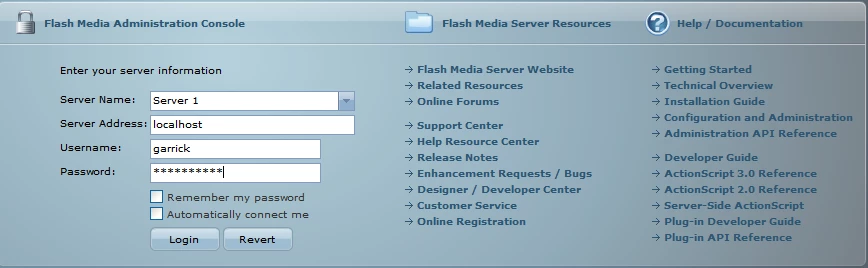
Thanks in advanced

    This topic has been closed for replies.

    1 reply

    Participant
    August 1, 2010

    I am not sure, but the problem may be related to these conditions:

    1- Are you using flashPlayer.exe to view admin flash file for loging in? if you are, try to browse admin panel via the web browser and use localhost style address, not file system address. the domain policies may have blocked accessing the server.(http://localhost/yourplace/admin.swf and not c:\yourplace\admin.swf)

    2- Check to sure fms server is up and running.

    Participant
    August 2, 2010

    Here is the address that I am going to in order to login: http://localhost/fms_adminConsole.htm.

    I am not completely sure how to make sure that the server is running. I click on the " Start Adobe Media Flash Server" and can not see anything that actually states that it is running. How do I make sure it is running?

    I appreciate you help on this.

    Participating Frequently
    August 3, 2010

    Go to Services and see if you can see Flash Media Server and next to it see if it says "Started"

    You can go to Services by typing "services.msc" in Run command.

    Other way to check is just open your task manager and see if you can see following processes: FMSMaster,FMSCore,FMSEdge and FMSAdmin.