


Participant
February 1, 2013
Question

Creating tagged pdf via pdfmark

  • February 1, 2013
  • 2 replies
  • 3655 views

Dear all,

Using pdfmark syntax we are creating tagged pdf. We are placing pdfmark syntax in postscript file.

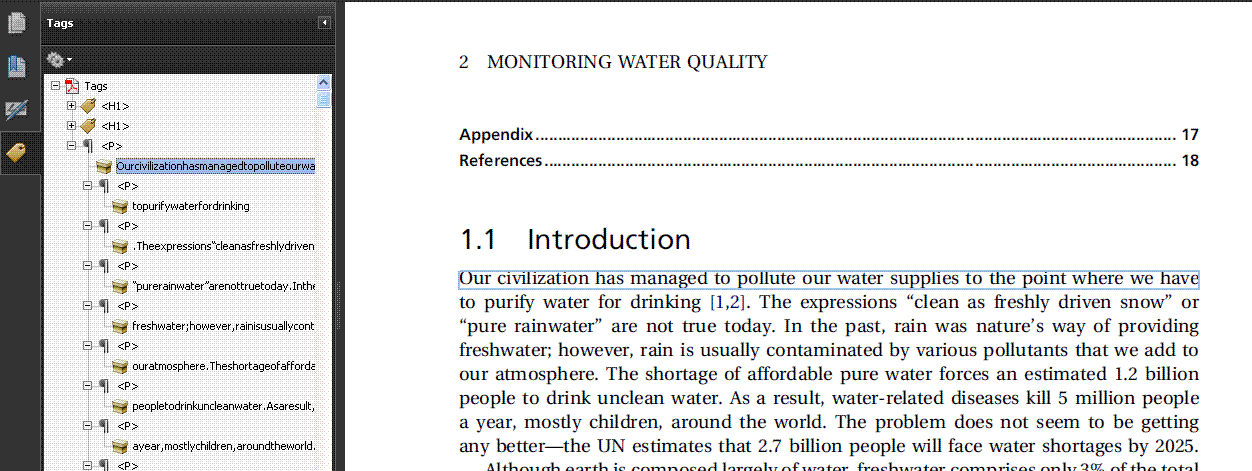
After pdf creation i found that the text is appearing without spacing in the Acrobat PDF tagged panel.

Please find the screen shot and PDFmark syntax in postscript
 

[/Subtype /P /Class /CM4 /StPNE pdfmark

[/StBMC pdfmark

[/_objdef {C4} /type /dict /OBJ pdfmark

[{C4} <</O /Layout /SpaceAfter 1 /SpaceBefore 3 /TextAlign /Left>>

/PUT pdfmark

[/CM4 {C4} /StClassMap pdfmark

/f2 /AdvPS-UTR 175.73 0 0 -175.73 0 0 MF

sv 334 Y -1888(Our)D 366(civili)D 380(zation)D 555(has)D 334(managed)D 799(to)D

220(pollute)D 621(our)D 334(water)D 504(supplie)D 587(s)D 135(to)D 220(the)D

315(point)D 486(where)D 548(we)D 284(have)D r

[/EMC pdfmark

[/StPop pdfmark

Please help me!!!!

Regards,

JKV

This topic has been closed for replies.

2 replies

Participating Frequently
February 4, 2013

This seems to be an Acrobat bug (BTW, what version are you using?) similar to a bug I found in 2005.

As Acrobat tends to replace word boundaries ("spaces") by positional terms, Acrobat's tag handling procedures only take

the contents of the character strings (the characters between parantheses in your code snippet).

If you can manage to represent the word boundaries by real space characters, the issue will go.

Perhaps you should file a bug at Adobe's

Helge

Inspiring
February 9, 2013

Don't use Acrobat command D

Just use SP  and create postscript variable

/SP currentpoint pop 6 add 0 rmoveto  def  %  6 is the space distance - you can increase or reduce

plase the above line at the begining of your code

This will give you solution - if Adobe has bug at this point.

Adam

Participating Frequently
February 9, 2013

Looking at the original post again, I think the Acrobat bug is triggered by the fact that the word boundaries are

made up by horizontal displacements only (syntactically analogous to kerning or character spreading).

The only way to get around this bug is to insert space characters as word separators – if htis cannot be

achieved by modifying how the application which created the PostScript stream, by a suitable postprocessing

tool.

I cannot see what the definition of the "/SP" could do here.

Helge

Legend
February 2, 2013

I don't know much about the details of tags, but it seems to me that in this fragment it is correct, that there are no spaces.

Now, when you copy text Acrobat uses guesswork and fuzzy logic to guess where spaces are, but this would not be suitable behaviour for what are supposed to be deterministic tags. So, it seems to me you must include spaces, either directly of via the tagging mechanism.

There is an Acrobat Standards & Accessibility forum where you may find more expertise.