Participant
February 18, 2019
Answered

Installing PostScript Printer driver in Windows 10

  • February 18, 2019
  • 5 replies
  • 69221 views

Hi All,

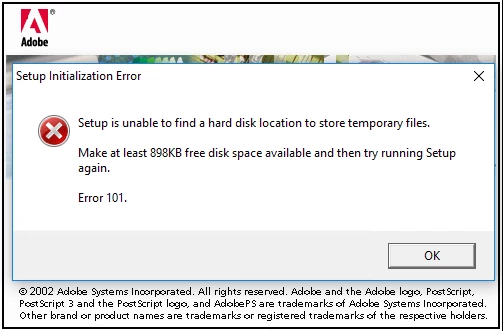
         I am trying to install Post Script driver in my PC which has Windows 10 installed. I am getting the following error message every time:

This is a very old installation file which we had previously. Does any one know where I can find the latest Post Script installer file for Windows 10  ?

    Correct answer Dov Isaacs

    To expand on the previous response, what you tried to install was an Adobe PostScript Printer Driver Installer dating back to 2002 in terms of its last update. It was designed to install the AdobePS PostScript Printer Driver on Windows'95, Windows'98, and Windows'ME as well as a special version of the AdobePS PostScript Printer Driver on Windows NT 4.0. It also supported associating a PPD file with the standard Windows PostScript driver, a joint project of Adobe and Microsoft, that shipped with Windows 2000 and later versions, to create a driver instance associated with the printer type described in the PPD file selected.


    Support for the driver installer ended with Windows XP 32 bit. It either doesn't work at all or improperly runs on any newer version of Windows including all 64-bit versions of Windows and all varieties of Windows Vista, Windows 7, Windows 8.x, and Windows 10. For that reason, Adobe stopped distribution of this driver installer many years ago. There are no plans to update it.


    To install PostScript printer drivers now, you use the Add a printer or scanner function of the Printers & Scanners settings dialog. It will assist you in creating a proper PostScript printer driver instance with the correct PPD file and parameters using the built in PSCRIPT5.DLL driver that ships with Windows 10.


    Alternatively, most printers come with a driver installer or one may be downloaded from the printer vendor's website. Given that older printers packaged with the device may not be compatible with Windows 10, checking the vendor's website is the safest bet. May sure you choose the proper printer model, the PDL you want (i.e. PostScript as opposed to PCL or whatever), and operating system version (i.e., Windows 10, 32 or 64-bit).


     

    5 replies

    Participant
    May 11, 2020

    "To install PostScript printer drivers now, you use the Add a printer or scanner function of the Printers & Scanners settings dialog. It will assist you in creating a proper PostScript printer driver instance with the correct PPD file and parameters using the built in PSCRIPT5.DLL driver that ships with Windows 10."

    A better explanation would be helpful. Windows does not present options based on a DLL name. I chose the "Microsoft PS Class Driver" and I do get a PS file, but Ghostscript can't seem to process it. Perhaps I got the right one, but I'm not sure and I don't know what the PPD file is (guessing Postscript Printer Definition file).

    Participant
    May 11, 2020

    I was able to check another computer of mine and was reminded that I'd used a Lexmark C510 PS (MS) driver when the Adobe Generic PS driver installation program had stopped working and that did the job.

    December 17, 2019

    I am also trying to install the PostScript driver in my system but I am getting an error every time. This is my Epson WF-3640 Blurry Printing model. If anyone can help me out, please reply to this forum.

    Dov Isaacs
    Dov IsaacsCorrect answer
    Legend
    February 18, 2019

    To expand on the previous response, what you tried to install was an Adobe PostScript Printer Driver Installer dating back to 2002 in terms of its last update. It was designed to install the AdobePS PostScript Printer Driver on Windows'95, Windows'98, and Windows'ME as well as a special version of the AdobePS PostScript Printer Driver on Windows NT 4.0. It also supported associating a PPD file with the standard Windows PostScript driver, a joint project of Adobe and Microsoft, that shipped with Windows 2000 and later versions, to create a driver instance associated with the printer type described in the PPD file selected.


    Support for the driver installer ended with Windows XP 32 bit. It either doesn't work at all or improperly runs on any newer version of Windows including all 64-bit versions of Windows and all varieties of Windows Vista, Windows 7, Windows 8.x, and Windows 10. For that reason, Adobe stopped distribution of this driver installer many years ago. There are no plans to update it.


    To install PostScript printer drivers now, you use the Add a printer or scanner function of the Printers & Scanners settings dialog. It will assist you in creating a proper PostScript printer driver instance with the correct PPD file and parameters using the built in PSCRIPT5.DLL driver that ships with Windows 10.


    Alternatively, most printers come with a driver installer or one may be downloaded from the printer vendor's website. Given that older printers packaged with the device may not be compatible with Windows 10, checking the vendor's website is the safest bet. May sure you choose the proper printer model, the PDL you want (i.e. PostScript as opposed to PCL or whatever), and operating system version (i.e., Windows 10, 32 or 64-bit).

     

    - Dov Isaacs, former Adobe Principal Scientist (April 30, 1990 - May 30, 2021)
    Bani Verma
    Community Manager
    Community Manager
    February 18, 2019

    Moving this query to Adobe PostScript​ community.

    Legend
    February 18, 2019

    It is a Windows component, installed automatically when you install any PostScript printer through the printers control panel.