
brockleypublishing
Participant
June 22, 2016
Answered

A question of type

  • June 22, 2016
  • 1 reply
  • 364 views

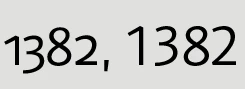
Hi, I'm trying to work out why the characters below are displaying differently in InDesign (current version). They are the same font, weight, size etc but the first one was supplied to me and the second one is what happens when I type it manually using the style guide. It must be obvious, but I'm going type blind looking at it!
    This topic has been closed for replies.
    Correct answer Dov Isaacs

    The first characters are numbers formatted with “old style figures” and the second set are the normal figures. Some fonts provide for such variants which can be controlled by specifications in the Paragraph Style and overridden with Character Style, and/or manual specification of OpenType features from the top bar in InDesign.

              - Dov

    1 reply

    Dov Isaacs
    Dov IsaacsCorrect answer
    Legend
    June 22, 2016

    The first characters are numbers formatted with “old style figures” and the second set are the normal figures. Some fonts provide for such variants which can be controlled by specifications in the Paragraph Style and overridden with Character Style, and/or manual specification of OpenType features from the top bar in InDesign.

              - Dov

    - Dov Isaacs, former Adobe Principal Scientist (April 30, 1990 - May 30, 2021)
    brockleypublishing
    Participant
    June 23, 2016

    Brilliant, thank you!