Answered
Adobe TypeKit
How do I disable or stop this obnoxious Adobe TypeKit from popping up EVERY time I open a Illustrator file?
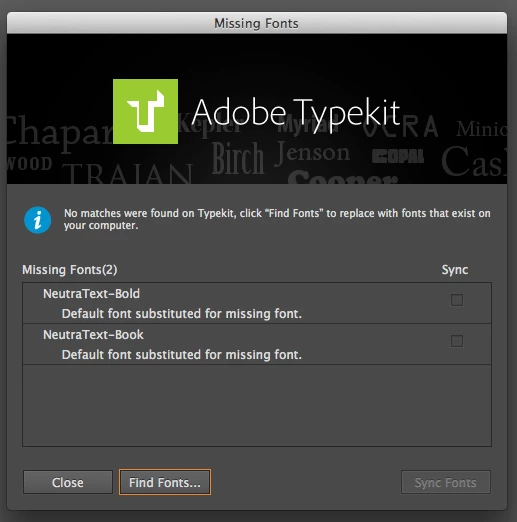

How do I disable or stop this obnoxious Adobe TypeKit from popping up EVERY time I open a Illustrator file?
I guess I don't understand... how can this be anyone's problem but TypeKits. It's the TypeKit window that pops up that I don't want to see. If I have TypeKit turned off, why am I still getting the window. I've used Illustrator for years now and never has it given me any problems until I moved to the CC version. So, I just don't understand what your saying. The TypeKit window is my problem, not Illustrator. Illustrator has always been great informing me of fonts missing etc. I just don't want the TypeKit box popping up every time I open a document, that's all.
Thank you for your efforts in correcting this and I just hope and pray to have the patience to put up with it until it's fixed.
Hi Kelly,
I appreciate your feedback and I'm sorry I haven't been more clear. That window is the missing fonts dialog box from Illustrator and isn't a window coming from Typekit. In this new CC version of the app, our logo was added to let people know they could sync fonts from Typekit as an option to resolve missing font issues. This has created a bit of confusion for users which is what we're working to resolve. I hope that makes sense.
I want Illustrator to work well for you again. We're working with them on this. Thanks again for your patience and feedback. Have a great weekend.
Cheers,
Benjamin
Already have an account? Login
Enter your E-mail address. We'll send you an e-mail with instructions to reset your password.


 AdChoices