
Inspiring
January 15, 2014
Answered

Arabic composite font problems

  • January 15, 2014
  • 1 reply
  • 1189 views

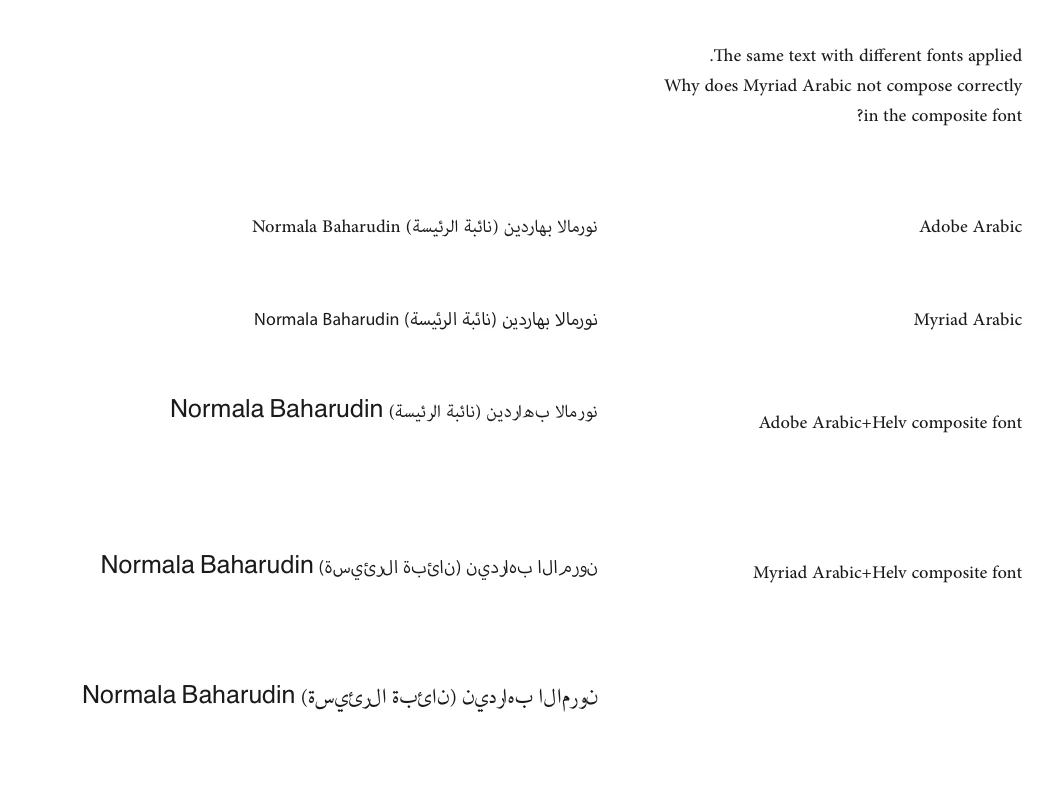
We've been having problems with Adobe Arabic fonts in the very useful composite font feature now available in ME versions of Indesign. Arabic text either doesn't compose at all (see Myriad Arabic in attached image), or has composition problems (see Adobe Arabic - the bottom one I think is Adobe Naskh). I would first suspect this tø be an Indesign issue, but we use other non-Adobe Arabic fonts and we don't recall ever having the same problem with them. And the fact that results vary with different fonts also point to it being a font-related issue.
    This topic has been closed for replies.
    Correct answer Peter Leverage

    In Indesign it's a way to set different ranges of glyphs (writing script, punctuation etc) to render in different fonts, but to appear as a single font on the menu. It was a feature in Japanese Indesign from day 1, but it's been in the ME version since CS6.

    I've since discovered that the problem only seems to occur with Arabic fonts that contain Roman glyphs, so I guess it is in fact an Indesign issue.

    1 reply

    MiguelSousa
    Community Manager
    Community Manager
    January 16, 2014

    What is a composite font? Is this something that you make using InDesign? I've never used that feature, so I don't know.

    Peter LeverageAuthorCorrect answer
    Inspiring
    January 16, 2014

    In Indesign it's a way to set different ranges of glyphs (writing script, punctuation etc) to render in different fonts, but to appear as a single font on the menu. It was a feature in Japanese Indesign from day 1, but it's been in the ME version since CS6.

    I've since discovered that the problem only seems to occur with Arabic fonts that contain Roman glyphs, so I guess it is in fact an Indesign issue.