
Participant
June 23, 2016
Answered

Downloading Old Adobe Font Folio Without Disc Drive (New Computer)?

  • June 23, 2016
  • 2 replies
  • 616 views

I purchased Adobe Font Folio a couple of years ago and had it installed on my computer. That computer died, and now my new computer does not have a disc drive. I tried to register the product with Adobe using my serial number (I still have the box and everything), but doing so did not give me any further options (see photo below).
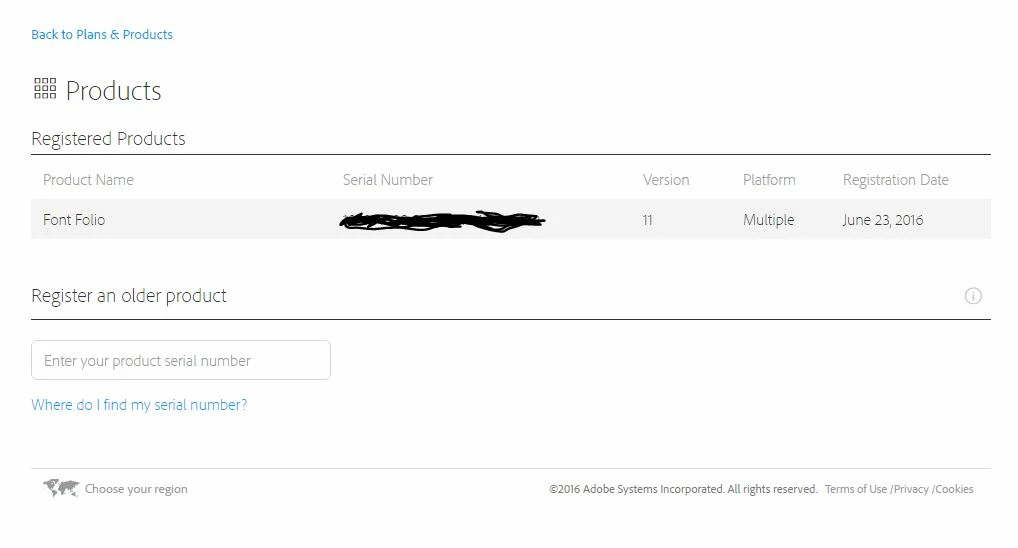
Please tell me how I can access the fonts that I purchased from Adobe! This is super frustrating!

    This topic has been closed for replies.
    Correct answer Dov Isaacs

    Given the nature of the product, a disk full of font files, and that it doesn't have a serial number driven installer, we don't provide direct access to a download of Font Folio contents.

    Assuming you have the original optical media and access to a computer with an optical drive and a USB thumb drive, on such a system, you could simply copy the contents of the optical media to the USB thumb drive and then use the USB thumb drive as your Font Folio disk.

    Otherwise, call Adobe Customer Support (not Technical Support) and explain your situation to them. They might be able to arrange for a one-time download of all the contents of the Font Folio.

              - Dov

    2 replies

    Legend
    July 3, 2016

    I know it's over a week but... a plug-in disk drive is cheap (about the price of two fonts), easy to use and pretty much essential. For gaining access to old and very expensive data and apps, it's a no-brainer.

    Dov Isaacs
    Dov IsaacsCorrect answer
    Legend
    June 23, 2016

    Given the nature of the product, a disk full of font files, and that it doesn't have a serial number driven installer, we don't provide direct access to a download of Font Folio contents.

    Assuming you have the original optical media and access to a computer with an optical drive and a USB thumb drive, on such a system, you could simply copy the contents of the optical media to the USB thumb drive and then use the USB thumb drive as your Font Folio disk.

    Otherwise, call Adobe Customer Support (not Technical Support) and explain your situation to them. They might be able to arrange for a one-time download of all the contents of the Font Folio.

              - Dov

    - Dov Isaacs, former Adobe Principal Scientist (April 30, 1990 - May 30, 2021)