Gustavo S.
Known Participant
February 21, 2010
Answered

Fonts not showing in CS4

  • February 21, 2010
  • 1 reply
  • 9692 views

Hello,

I am sure this has been asked before, though I could not find any discussion thread.  There are a number of fonts, for instance several Adobe OpenType, that do not show up in CS4 (Photoshop, Illustrator).  I run CS4 on a Mac [Leopard].  I also have Extensis Suitcase Fusion ver 2.  I did find differences in installation between the Mac HD and my user font folders.  However, copying a font type from one folder to the other does not make it appear in the CS4 application.

I am attaching a screenshot of Suitcase Fusion showing some of the fonts,

Any help is extremely welcome.

Best,

Gustavo

^^^^^^^^^^^^^^^^^^^^^^^^^^

Owl Design Studios

Santa Fe, NM
www.owldesignstudios.com

    This topic has been closed for replies.
    Correct answer MiguelSousa

    Actually, those two fonts do show (I am using Illustrator).  But some of the others do not.  For instance 'Adobe Song Std' does not show.

    FYI: I did not use Suitcase Fusion to install the fonts.  I installed them straight out.  I had just happened to download a trial version of Suitcase Fusion, for font management.  That's why I showed it on the screenshot.

    Thanks,

    Gustavo


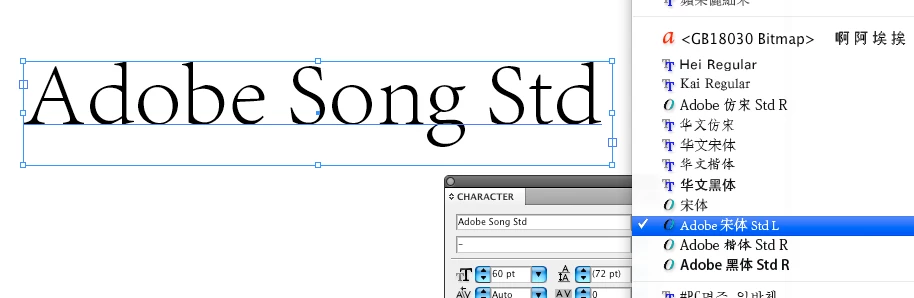
    By default, all East Asian fonts, like 'Adobe Song Std', appear towards the bottom of the font menu (after Zapf Dingbats or Zapfino), and their names are not in English. Assuming these fonts are correctly installed, you can get to them simply by typing their name on the Character panel, as shown in this screenshot.

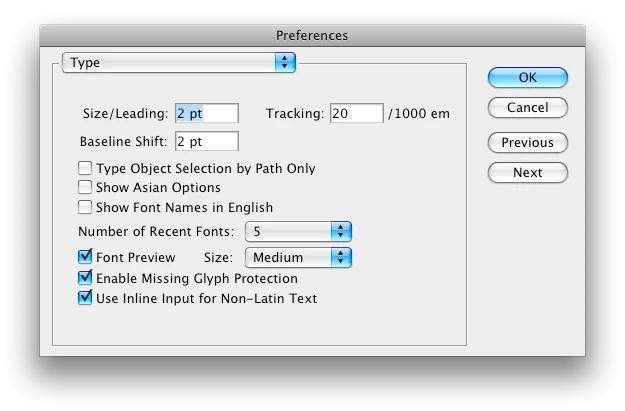
    If you want the font names on the font menu to appear in English, just go to Preferences > Type and check the option "Show Font Names in English".

    1 reply

    MiguelSousa
    Community Manager
    Community Manager
    February 22, 2010

    Gustavo,

    Which of the fonts are you having problems with?

    I saw the attached screenshot but I'm not a user of Suitcase Fusion so I'm no sure how to interpret it.

    Participant
    February 22, 2010

    Hi Miguel,

    I am having trouble with the Adobe OpenType fonts, but it may also be others.  I haven't done an exhaustive search/comparison between what's in CS4 versus what's in the system or the user-level font folder. I tried deactivating and reactivating.

    The screenshot was just to show a few examples.

    Gustavo

    MiguelSousa
    Community Manager
    Community Manager
    February 22, 2010

    So does Adobe Caslon Pro and Adobe Garamond Pro not show up in InDesign CS4 font menu, for example?

    Have you tried installing the fonts directly in the system, without going through Suitcase Fusion?