
Participant
March 29, 2017
Answered

How to replicate this effect on text?

  • March 29, 2017
  • 1 reply
  • 622 views

I received this from a designer who will not share the source files, and I need to manipulate the legal information on the product label, so I'm not able to change things. I'm trying to re-create this effect. Can anyone advise how best to go about it? I have the typeface as well as the colors and gradients, but I can't figure out how to replicate the styling that is applied (images were given to me as "outlined" instead of working/editable text)

From what I can tell, there are two text layers - perhaps the original (Domain Display, Extra Bold) and a second (regular) behind it, slightly offset, and given the gold color. But the "backdrop shadow" characters are not complete - you can see that the gold serifs below the P, R, E, to the right of the E, S etc. do not connect to the rest of the gold outlines. What would be the most practical way to emulate this?

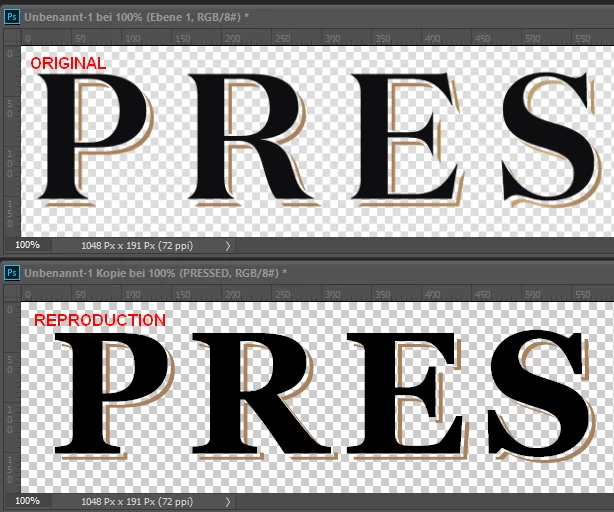
This topic has been closed for replies.
Correct answer

1. Make a copy of the black text layer.

2. Fill the lower text with gold color.

3. Move the golden text, say, about 3 pixels to the right and downwards.

4. Rasterize the golden text layer.

5. Make a selection of the black text, but DO NOT activate its layer.

6. The golden layer beeing active, press the delete key. There are just some bits of the characters left.

7. Now move the golden layer once more 3-4 pixels to the right and downwards.

Fenja

1 reply

Correct answer
March 30, 2017

1. Make a copy of the black text layer.

2. Fill the lower text with gold color.

3. Move the golden text, say, about 3 pixels to the right and downwards.

4. Rasterize the golden text layer.

5. Make a selection of the black text, but DO NOT activate its layer.

6. The golden layer beeing active, press the delete key. There are just some bits of the characters left.

7. Now move the golden layer once more 3-4 pixels to the right and downwards.

Fenja

ADoobieAuthor
Participant
April 3, 2017

Sorry to be a newb, but how to make a selection of the black text WITHOUT activating its layer?

Thanks!

Szalam
Community Expert
Community Expert
April 3, 2017

Control+Click (Win) or CMD+Click (Mac) on the layer thumbnail