
Line alignment issue in InDesign CS5
Hi all,
After many fruitless hours of Googling, I'm really, really hoping to find some help here with a small InDesign CS5 issue I'm having. I'll try and keep this brief.
I'm currently designing a book in InDesign CS5 that has chapters that run one after the other. Whereas in most books a new chapter will start on a new page, here they flow together. For each chapter heading, I'm using a font called Orial, size 18. For the main text, I'm using Adobe Garamond Pro, size 12. When I have two solid pages of 12 point Adobe Garamond Pro, all is well. The alignment of lines on both pages are level with one another. That's just what I want.
However, if I have a double page spread and one of the pages has an 18pt Orial title on it (within all the 12pt Adobe Garamond Pro), this throws things out of whack, as you can see in the image below:
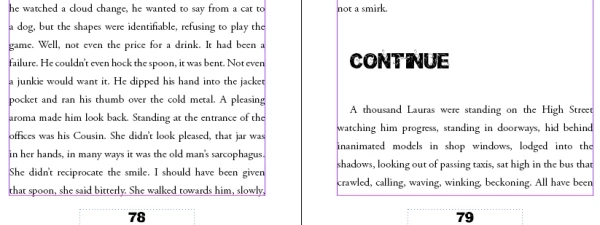
As you can see, the lines on page 79 are not level with those on page 78. Is there any way around this?
Many, many thanks for any help you can offer. I'm rather tearing my hair out here!


 AdChoices