
Participant
November 9, 2014
Answered

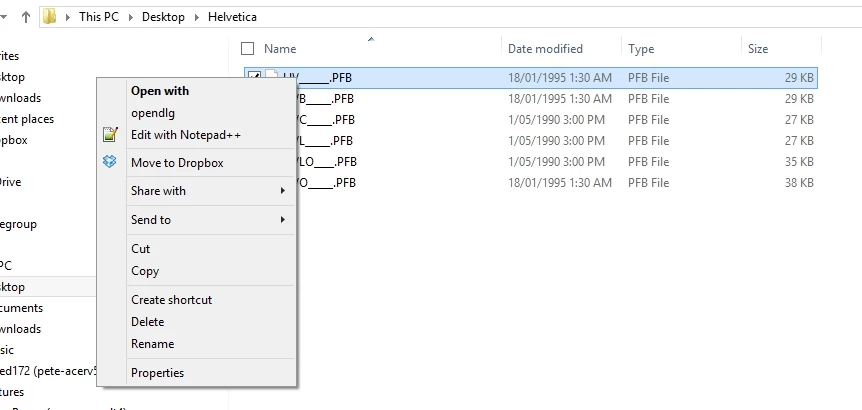
no option to install after right click on HV________.PFB font in Windows 8 64 bit

  • November 9, 2014
  • 2 replies
  • 743 views

I'm trying to install Helvetica on Windows 8.1 64 bit, every forum i read tells me to just right click on the font and hit the install...simple.

Well when i right click i don't get the option to install, any ideas??
    This topic has been closed for replies.
    Correct answer Dov Isaacs

    You either got bum advice or you didn't quite get the instructions correct.

    You need both the .PFB and the .PFM files associated with the font in the directory. You right-click on the .PFM file to install the font which then uses both of the files together for full and proper installation.

    If you don't have both files, you can't install the font. The .PFB file contains the font's outline and hinting information with rudimentary font metrics. The .PFM contains more complete font metrics information necessary for programs that need to format text using the font.

              - Dov

    2 replies

    peted172Author
    Participant
    November 11, 2014

    Thanks Dov, perfectly explained got .pfm file and they loaded just as you said they would.

    Cheers Pete

    Dov Isaacs
    Dov IsaacsCorrect answer
    Legend
    November 10, 2014

    You either got bum advice or you didn't quite get the instructions correct.

    You need both the .PFB and the .PFM files associated with the font in the directory. You right-click on the .PFM file to install the font which then uses both of the files together for full and proper installation.

    If you don't have both files, you can't install the font. The .PFB file contains the font's outline and hinting information with rudimentary font metrics. The .PFM contains more complete font metrics information necessary for programs that need to format text using the font.

              - Dov

    - Dov Isaacs, former Adobe Principal Scientist (April 30, 1990 - May 30, 2021)