
PDF file not showing Myriad Pro in Bold
Our organization has purchased the Myriad Pro font for use in generating billing statements. Our primary line of business application includes built-in PDF conversion capability, and the Myriad Pro font has been installed on its servers used to render print jobs, either directly to a Printer, or Print to PDF.
In the on-screen "Print Preview", the application displays the text correctly how it should look:
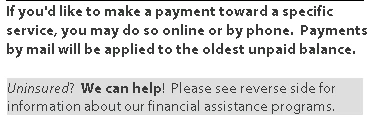
However, when the resultant PDF is then opened in most browsers and versions of Adobe Reader, the text looks a bit different and what is supposed to be bold is not:
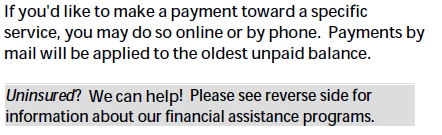
We've tried viewing the PDF file in Reader versions 9-11, on machines with and without the Myriad Pro font installed, and checking and unchecking the "Use Local Fonts" setting in Adobe reader to no success. We have had some users view the correct document using Foxit Reader, or Google Chrome, but have not been able to get a replicable pattern of success/failure.
Any suggestions or assistance from the community would be very helpful and appreciated.
Thank you


 AdChoices