
asdsadsg
Participant
July 27, 2015
Question

Purchased fonts have stopped working following Windows Update 3079904

  • July 27, 2015
  • 3 replies
  • 1119 views

Following this security patch, several purchased fonts are no longer in my font folder.

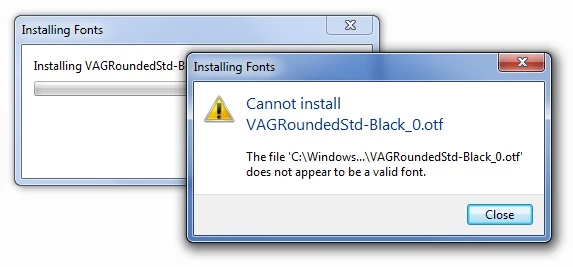
I've tried re-installing, and they're not showing as valid font types. I am using Windows 7.

Is this something Adobe are aware of and looking into? Any solution?
This topic has been closed for replies.

3 replies

asdsadsg
asdsadsgAuthor
Participant
August 3, 2015

Hi guys The problem has definitely been caused by the fix Windows pushed for the vulnerability in the OpenType manager module (atmfd.dll) which is provided by Adobe. I've been able to duplicate the issue on some of our PCs but not others - all of them are running Windows 7. Restoring a previous version of atmfd.dll enables us to reinstall/see/use the fonts, but I'm not keen to do so and potentially leave myself or our users compromised. What do you suggest, please?

Dov Isaacs
Legend
August 3, 2015

Please be assured that we are taking your report very seriously.

However, for your information, although the module atmfd.dll was originally code developed by Adobe, it was given over to Microsoft for subsequent development and maintenance. We haven’t had any responsibility for that code for many years now.

It is interesting that you can duplicate the issue on some of your systems, but not on others. That does mean that there is something different about one set of systems versus the others.

Our staff would like for you to run an experiment on one of the systems showing the wayward symptoms. We have seen in the past where there are issues due to duplicate fonts with the same font name (but not exactly the same file name) in the Windows font directory. The fact that one of the messages you initially displayed showed the file name VAGRoundedStd-Black_0.otf makes that issue a possibility for the root cause of this problem on some but not all systems.

I have sent you an e-mail with directions as to what we would like you to try and again requesting some critical system configuration information such that we can try to figure out what is going on with your systems and if necessary, get Microsoft involved.

       - Dov


- Dov Isaacs, former Adobe Principal Scientist (April 30, 1990 - May 30, 2021)
Dov Isaacs
Legend
July 28, 2015

We know of no “issues” such as you describe.

And in fact, I just tried installing Adobe's version of the VAGRoundedStd-Black font on my system with no problems whatsoever.

That having been said, the message on your screen may be the key to the problem!!!

The file name for the font should be VAGRoundedStd-Black.otf and not VAGRoundedStd-Black_0.otf as shown in your error dialog box. Did you modify the font in any way and save it with a new name because that is not the file name of the font if in fact you sourced it from Adobe.

              - Dov

- Dov Isaacs, former Adobe Principal Scientist (April 30, 1990 - May 30, 2021)
asdsadsg
asdsadsgAuthor
Participant
July 28, 2015

Hi Dov,

Well I guess now you do know about the issue As you can see below, I've not altered the fonts in any way (I don't know why the error message shows it in a different way. But whether I double click, or right click and Install, or move the files into my Fonts folder - all the same outcome I'm afraid.)

Just to be clear, following last week's Windows Update, the font no longer shows in my list of fonts. I've tried re-installing but to no avail. Now as the update specifically related to fonts - I thought it was a reasonable assumption it was the cause. My IT Company asked that in the first case I speak to who I purchased the font from, because it was highly likely this was a known issue with a fix.

In some ways I suppose I'm hoping now many others have a similar issue, so there can be a fix found...

July 31, 2015

Hi there. Having now examined and tested your specific Adobe font file (thank you for sending it), we here on the Adobe Type team are still unable to identify any technical problem with the font -- or reproduce what you are seeing in the specific Windows environment you've described and various other environments we've tried. A number of theories we've discussed here have been tested and ruled out.

Answering Dov's questions, above, might help our investigation. Without more information from you, and/or without reports about the same problem from other users, I'm afraid there's not much more we can do. Please let us know if you're interested in sharing more details about your own environment.

Regards,

Christopher

Atul_Saini
Community Manager
Community Manager
July 27, 2015

Moving the discussion to Adobe Type