


Participating Frequently
September 18, 2025
Answered

Specific Font character is not showing up in illustrator, but display fine in photoshop
  • September 18, 2025
  • 3 replies
  • 437 views

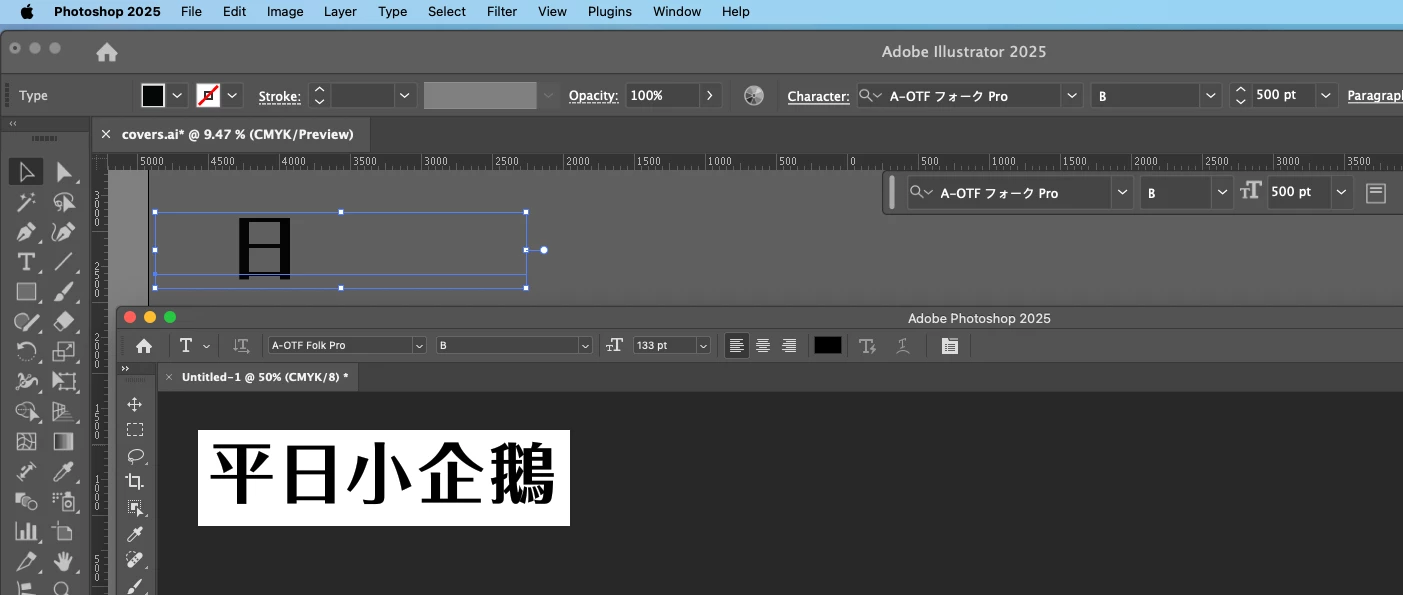
this specific font used to work fine across the apps, but this month I find that the characters are not showing up ONLY in illustrator. Screenshot shows illustrator text on top, and photoshop below.


font: A-OTF フォーク Pro (japanese)


Any idea what's causing this?

What i have tried:

removed all font style.
deleting the font and reinstalling it.
checked an made sure there's no duplicates.

restarted the mac several times.


Background:

illustrator 29.81 adobe CC, paid subscription.

photoshop 26.10

    3 replies

    Participating Frequently
    September 27, 2025

    thank you for the answer!

    Participating Frequently
    September 22, 2025

    help! anyone?

    Rene Andritsch
    Community Expert
    Community Expert
    September 23, 2025

    Did you already upgrade to macOS Tahoe (26)?

    Participating Frequently
    September 23, 2025

    I'm on OS Sequoia 15.6.1

    Participant
    September 19, 2025

    Can Adobe help solve this issue?

    Community Expert
    September 19, 2025

    Have you tried logging out of the Creative Cloud account and then logging back into it? This can be done using the Creative Cloud desktop app. This trouble-shooting step can force a refresh of fonts synced through the Adobe Fonts service.


    Deleting the font data cache can clear up some stubborn problems.
    https://helpx.adobe.com/fonts/kb/troubleshoot-fonts-illustrator-indesign.html

    Participating Frequently
    September 20, 2025

    thank you for the reply. I have followed your instruction, relogged in a few times in creative cloude. completely close and reopen creative cloude and illustrators; and I have no 3rd party font managed, cleared the system font cache via terminal twice, and all fonts are validate... yet the issue persist...