
TheSunsetsDown
Participant
May 28, 2015
Answered

Type kit font is displaying incorrectly

  • May 28, 2015
  • 1 reply
  • 517 views

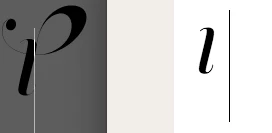
So I synced the memoriam headline pro font from Adobe TypeKit and the L is displaying incorrectly compared to what is online. I have included two screen shots. The left side is illustrator the right side is Adobe TypeKit. Anyone else experience this issue before? I have tried to unsync and resync, reboot illustrator etc and it has not corrected.

    This topic has been closed for replies.
    Correct answer benw525841597154115

    Hi TheSunsetsDown,

    This is Ben from Typekit. I've attached a screenshot to show how you can turn off the Contextual Alternates with the OpenType panel in Illustrator.

    Let us know if you need anything else.

    Cheers,

    Benjamin

    1 reply

    benw525841597154115Correct answer
    Adobe Employee
    May 28, 2015

    Hi TheSunsetsDown,

    This is Ben from Typekit. I've attached a screenshot to show how you can turn off the Contextual Alternates with the OpenType panel in Illustrator.

    Let us know if you need anything else.

    Cheers,

    Benjamin

    TheSunsetsDown
    Participant
    May 29, 2015

    Great! Thanks, Ben.

    John