Hi camillag30,
I'm sorry that you ran into trouble with this! Would you please check that you are signed in to Creative Cloud from the Help menu in Illustrator?
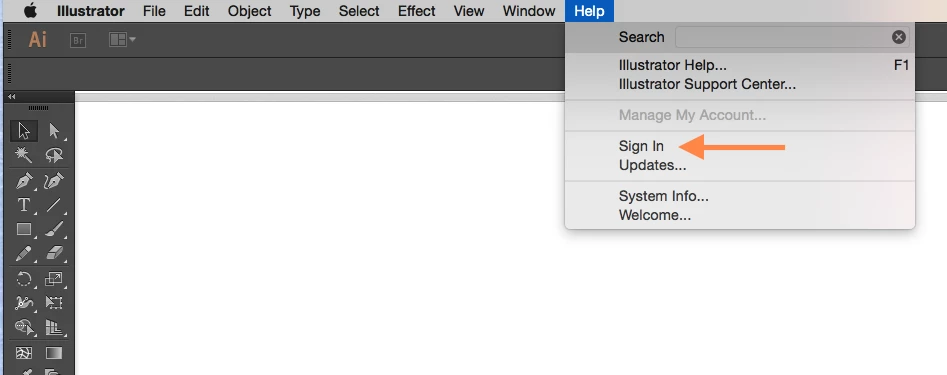
If you are already signed in, try these steps to clear any stale Creative Cloud session and start a new one:
1) sign out of Creative Cloud from the Illustrator Help menu
2) restart Illustrator
3) sign back in to Creative Cloud from the Illustrator Help menu
After you have signed in again, Illustrator should be able to find your Typekit account information and add the fonts you have selected for sync.
If that doesn't make a difference, please send some more information to support@typekit.com and we will look into it further:
- the recent sync log files from your computer: help.typekit.com/customer/portal/articles/1649149#logs
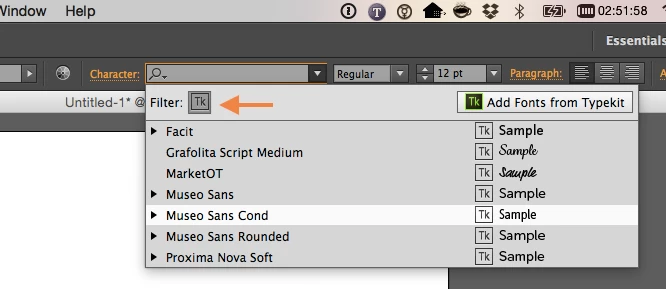
- a screenshot of the font menu in Illustrator with the Typekit filter turned on, similar to this one:
Please give that a try, and let me know if you have any other questions! Thank you,
-- liz
Adobe Typekit
Support Representative
support@typekit.com



 AdChoices