I'm sorry that you ran into trouble with this! If Photoshop thinks that font sync is off, it isn't going to be able to add new font selections to your Typekit account.
Would you please check that you are signed in to Creative Cloud from the Help menu in Photoshop?
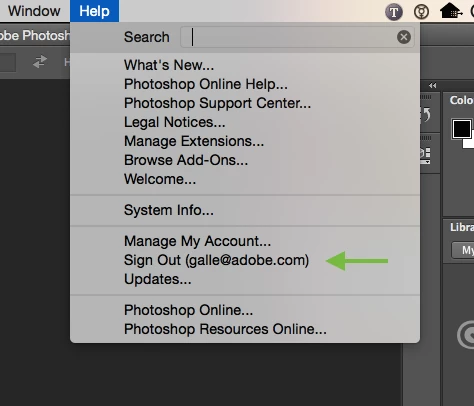
If you see the option to "Sign In" there, sign in with your Adobe ID & password.
If you are already signed in, as in the screenshot, try these steps to clear any "stale" Adobe ID session:
1) sign out of Creative Cloud from the Photoshop Help menu
2) restart Photoshop
3) sign back in to Creative Cloud from the Photoshop Help menu
After you have signed in again, Photoshop should be able to find your Typekit account information and let you sync new fonts.
Please give that a try, and let me know how it goes! Best,
-- liz



 AdChoices