
Participant
November 4, 2015
Question

Typekit only one font working on site

  • November 4, 2015
  • 2 replies
  • 435 views

I have inserted the stylesheet in the head of my HTML. The typekit has been Published and is linked to both my live website and local site. I have customized the CSS selectors and inserted them as follows.

h1{

    text-align:center;

    font-family:"blenny";

    margin:0;


}

p {

    text-align:center;

    font-family:"wide";

}

The "blenny" font is working but "wide" is not. I tried several different typefaces in replace of "wide" but can not get any of them to work. I put "blenny" in the place of wide and the font shows.
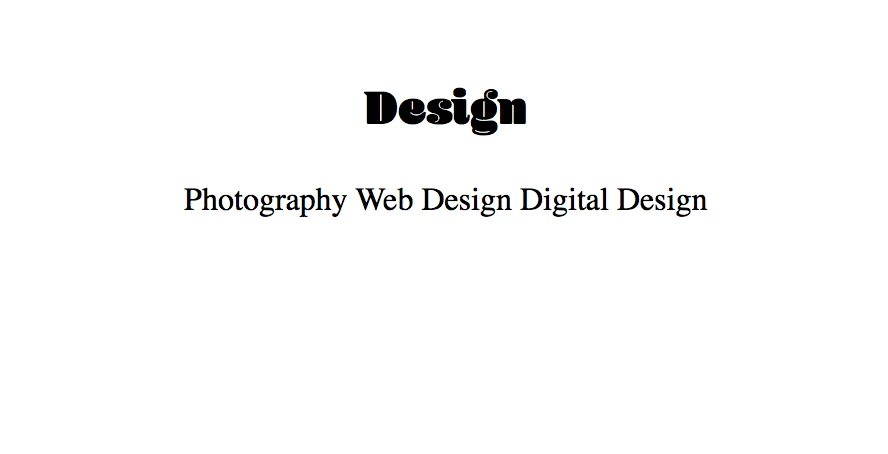
Please help.

This topic has been closed for replies.

2 replies

liz, Adobe Type
Community Manager
Community Manager
November 4, 2015

Hi Leaha91,

I'm sorry that you ran into trouble with this!  It looks like you are missing part of the font-family name in the paragraph CSS; there aren't any families that are named "wide" in the Typekit library.

You can check the Typekit family name in the Kit Editor by clicking the "Using fonts in CSS" link under Selectors:

http://help.typekit.com/customer/portal/articles/6859

If you are using Hellenic Wide, for example, the font family name is "hellenic-wide".

Update the CSS file to use the Typekit family name everywhere that you have "wide", and the fonts should start working as expected.

Please give that a try, and let me know if you have any other questions! Feel free to contact us at support@typekit.com as well, if you don't wish to share project details on the forum.

Best,

-- liz

Sheena Kaul
Community Manager
Community Manager
November 4, 2015

Moving to Adobe Type