Known Participant
April 29, 2011
Question

why are my fonts doing this?

  • April 29, 2011
  • 1 reply
  • 1897 views

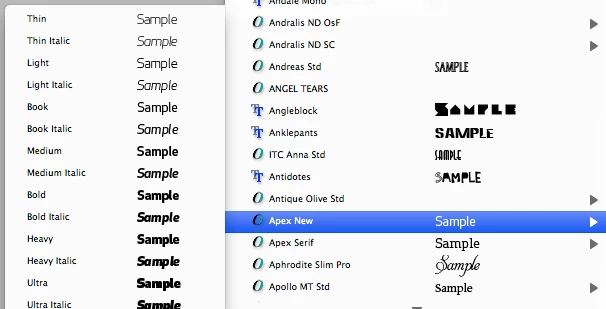
my fonts, of the same name, often show up seperately. i.e.  helvetica neue light and helvetica neue bold show up seperatley (fig. 1 is example). i just  want all of my fonts of the same name in one pop-out menu (fig. 2 is example). please help.

fig. 1

fig. 2

    This topic has been closed for replies.

    1 reply

    Inspiring
    April 29, 2011

    Hi William,

    The likely causes are that either this is due to the way the fonts are
    constructed, or a problem in an OS or Adobe font cache file.

    What application(s) is this happening in? All, or only in Adobe
    applications? Which one(s)?

    Were the same fonts formerly behaving the way you wanted, and then
    started misbehaving?

    What operating system are you on?

    Regards,

    T

    Known Participant
    April 29, 2011

    Thanks for your help, T.

    This problem is happening in the adobe creative suite. I'm running version 4. Specifically, InDesign and illustrator.

    It does seem like the problem is getting worse. It seems like more font families are ungrouping themselves.

    I am using the most current OS.

    MichaelKazlow
    Legend
    April 29, 2011

    The most current OS. Is that on the Mac or Windows platform? Are you using a font manager?