클립보드로 링크 복사
복사됨
설치하려고 하면 반복적으로 웹브라우저 로그인을 시도하다가 결국
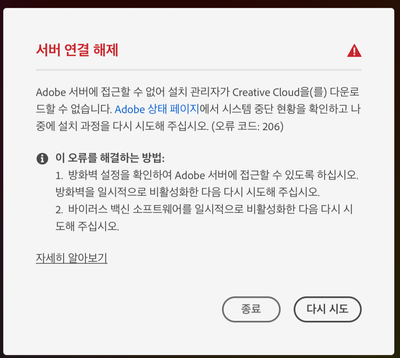
아래와 같은 문구가 나옵니다.
오류를 해결하는 방법에 나오는대로 진행을 해보았으나,
역시나 연결이 안되어 설치를 완료할 수 없습니다.
맥북에서 이러한 현상이 있어서 저의 아이맥에서도 똑같이 설치를 시도하였으나,
결과는 동일합니다.
왜그럴까요?
조회수
번역
신고
Have you updated Mac OS BigSur version to latest. Its 11..4.1??
Reference :
https://helpx.adobe.com/photoshop/kb/photoshop-and-macos-big-sur.html
If unable to install Adobe Creative Cloud app :
Try alternate download link:
https://helpx.adobe.com/kr/download-install/kb/creative-cloud-desktop-app-download.html
투표
Right, I've updated to BigSur 11.4.
I already tried to follow the guide in https://helpx.adobe.com, but unable to sign in my account in Creative Cloud App.
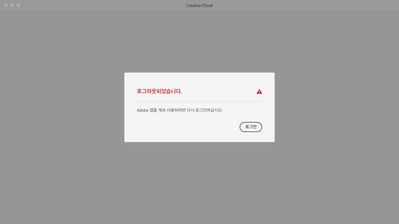
Only can see a message as below.
this message is continuously poping up window.
I can't read Korean, sorry.
Is that notice asking for your Creative Cloud or your computer user password?
Hello,
That means "It has been sign out, If you want to be continue, Please sign in."
But, even though click "sign in" button, it continuosly poping same message up.
Try with Solution 3:
https://helpx.adobe.com/kr/creative-cloud/kb/creative-cloud-missing-damaged.html
Also check whether if there is any Blocker entries in Hosts file:
Follow step2 in below link:
https://helpx.adobe.com/kr/x-productkb/policy-pricing/activation-network-issues.html
You may also try with steps provided in below link:
https://helpx.adobe.com/kr/manage-account/kb/troubleshoot-creative-cloud-sign-out-sign-in.html#:~:te....
never-displayed
새 Adobe 커뮤니티에서 더 많은 영감, 이벤트, 리소스를 찾아보세요




 5
답글
5
답글





 AdChoices