

UmairAliKhan
Participant
September 16, 2019
Answered

Error(44:23) in XD while share for development

  • September 16, 2019
  • 2 replies
  • 12386 views

I had about 300 artboard all of 1920x1080 and it didn't worked. I looked it up; and saw "Try reducing the number of artboards" so i chopped my file into multiple files respective of their areas... Now i have 44 screen in the file, still the same message. I have tried everything and now it came to the last step! Report over the community.
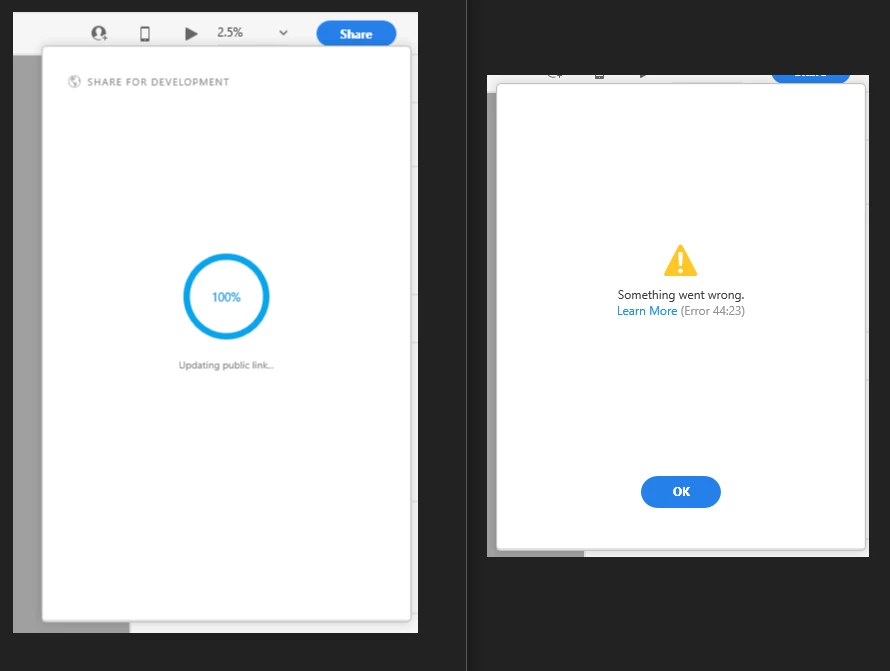
 

Funny thing is it goes till 100% then the

error appears. Please help me towards a solution, i have tried, my home wifi, office wifi, office hardline.. none helped. 


Now, as a fellow member shared his issue over, "https://community.adobe.com/t5/Adobe-XD/XD-Share-for-Development-wont-work/m-p/10548601#M15196", he was asked to share his OS and xD version...

- Operating System - Windows 10 (updated),
- xD version - Updated till 12 Aug '19.


<The Title was edited by moderator>

This topic has been closed for replies.
Correct answer Preran

The latest solutions have been posted on this thread https://community.adobe.com/t5/Adobe-XD/Error-44-when-sharing-documents/m-p/10635971/thread-id/16657


Please join us here for further discussion.

2 replies

Preran
Community Manager
PreranCommunity ManagerCorrect answer
Community Manager
September 27, 2019

The latest solutions have been posted on this thread https://community.adobe.com/t5/Adobe-XD/Error-44-when-sharing-documents/m-p/10635971/thread-id/16657


Please join us here for further discussion.

HARSHIKA_VERMA
Community Manager
Community Manager
September 16, 2019

Hi UmairAliKhan,


We apologize for the trouble you are facing and getting error while sharing file for development in Adobe XD. Please check the version of XD (22.3.12.2). If it's not updated, please update it to the latest version.  I would request you to please try the following steps:


Let us know if that helps.


Thanks,

Harshika

UmairAliKhan
Participant
September 16, 2019

Thanks a-lot for your prompt response Harshika.


Well, its not saying to update, i have mine set-up on auto update! From where can i check my version? And trust me its not because of assets (there are only 100n something in this files); i have created a link with 2000+ over number art-boards in the past. Before the merger of the link (review & dev tools), it used to work perfectly. Creating a new link! I have tried this method as well.


Let me know if you need anything from my side beside my actual working file.


Thanks and regards, Umair