
Inspiring
March 13, 2019
Answered

Missing eye icon to show password

  • March 13, 2019
  • 1 reply
  • 2061 views

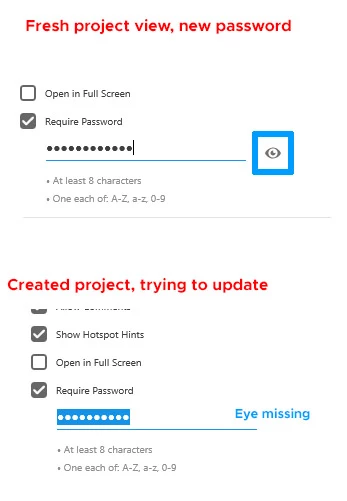
In my project I can't show password when I updating layout and share it on cloud for customer. Only in fresh, new project when I want to set password this eye icon is availible. How to show passwords in already created projects? What if I forgot my pass? I need to update it? Image below.
This topic has been closed for replies.
Correct answer elainecc

OK, so please tell my how cat I see my password without updating it?


Member of the product team here. This is intentional and is designed this way for security reasons. In other words, if you attach your .xd document to an Email or something, you don't want anyone who has the file (which could be anyone, once someone else forwards the Email along) to see your password.

The only thing you can do, as you mentioned, is to reset the password by changing it. Once you create a new password, you can enable the eye during the reset process.

Hope that helps!

-Elaine

Product Manager

Adobe XD

1 reply

Atul_Saini
Community Manager
Community Manager
March 13, 2019

Hi BryanPS,

Thanks for sharing this feedback, could you please share the version of Adobe XD which you are using? I would also like to know the OS version as well.

Thanks,

Atul_Saini

BryanPSAuthor
Inspiring
March 13, 2019

Hey! My Xd version is latest one (yesturday updated: 17.0.12.11). OS: Windows 10, 64-bit (always latest version)

elainecc
elaineccCorrect answer
Participating Frequently
March 14, 2019

OK, so please tell my how cat I see my password without updating it?


Member of the product team here. This is intentional and is designed this way for security reasons. In other words, if you attach your .xd document to an Email or something, you don't want anyone who has the file (which could be anyone, once someone else forwards the Email along) to see your password.

The only thing you can do, as you mentioned, is to reset the password by changing it. Once you create a new password, you can enable the eye during the reset process.

Hope that helps!

-Elaine

Product Manager

Adobe XD