
Known Participant
June 25, 2010
Question

air HTML HTMLLoader load https ssl with untrusted or unknown certificate, click 'yes' does nothing

  • June 25, 2010
  • 3 replies
  • 5167 views

When i go to a https website with an untrusted certificate i get this warning.
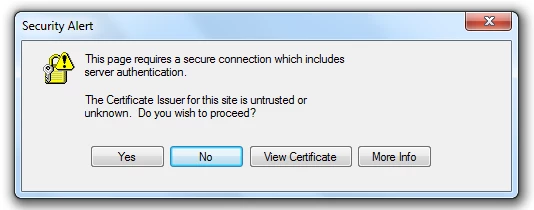
when i click "yes" the HTML component does not go anywhere. just a blank white screen.

tried this out with adobe air 1.5 and 2.0

This topic has been closed for replies.

3 replies

Participant
May 12, 2011

Hi,

I have the same problem on win 7 with my AIR project that worked fine with HTTP (HTTPService) and that has a chaotic behaviour with HTTPS, i.e. for each request the user need to clic 2 times on yes. The first time for accept the fact that the certificate is not validated by an offcial authority and the second time because the name in the certificate is not corresponding with the name of the server....

Do these two actions for each request makes the application unusable ! I already tried to add my certificate to CA Root on my machine but it didn't resolve anything. Is there a solution to disable these warning from my air application ? Can I continue to use HTTPService for my communication ? Need I use low level classes as SecureSocket ?

Thanks !

Julien

Message was edited by: JulienBu Additionnal info : I tried  to establish a socket connection on my server with SecureSocket class and I didn't find a way to bypass the blocking IOError #2031:Socket Error with the serverCertificateStatus = "principalMismatch". If I good understand, the socket do not want to connect to my server because it has not the good name and there is no way to accept to continue... That's it ?

chris.campbell
Community Manager
Community Manager
May 12, 2011

Hi Julien,

Thanks for bumping this thread.  The quick update is that the original bug (#2699857) is still open but I unfortunately don't have a timeframe for a fix.  If you wouldn't mind, could you open a new bug at bugbase.adobe.com?  Please reference this thread and post back with your bug URL.  We'll link the internal bug to yours.  I'd also recommend others following along to vote for the public bug and add comments if possible.

Thanks,
Chris

Participant
June 22, 2011

has a bug been opened for this yet so we can vote on it and get it rolling?

Adobe Employee
August 24, 2010

Hi,

Thank you for reporting this. This issue happens only Windows Vista and Windows 7, on Windows XP this is working as expected. I have reported this issue on our internal bug tracker (2699857) and sent it to be investigated.

In the meanwhile, one workaround that you could use is to install the untrusted or unknown certificate in your Trusted Root Certificate Authorities. You can install the certificate from Internet Explorer while accessing the same resource.

Best Regards,

-Catalin

December 9, 2010

Hi,

this workaround doesn't work in my application.

Is bug still open or has anyone fixed this problem?

Is it possible to extend class responsible for dispatching that particular exception that manages validity of certificate?

I was checking how SecureSocket class works but I still can't find a solution . Any advices?

Thanks in advance

Gianni

chris.campbell
Community Manager
Community Manager
December 9, 2010

Hi Gianni,

This bug is still open, but as far as we knew the workaround was still viable.  You might be running into another problem if it's not working for you.  Is it possible to post or send us some sample code that would illustrate the problem you're seeing?  Please feel free to email me at ccampbel@adobe.com if this is something you'd rather not make public.

Thanks,

Chris

chris.campbell
Community Manager
Community Manager
August 23, 2010

Moved thread to the Problems & Bugs forum.