
Inspiring
November 23, 2016
Answered

Dynamic text positions differently on browsers

  • November 23, 2016
  • 4 replies
  • 4541 views

Hi,

I have published an HTML Canvas file and for some reason the dynamic text sits differently on Chrome than it does on Firefox.

In the image below on Chrome the dynamic text sits perfectly, and how I have placed it in Animate within the buttons...
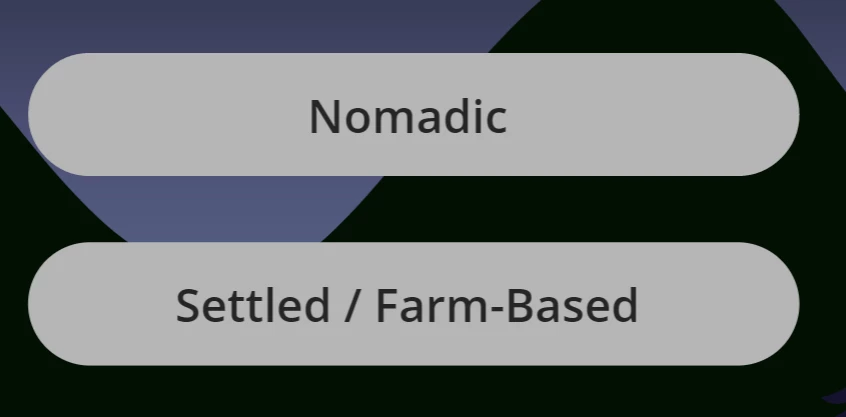
But below on Firefox the text displays a bit higher in the button...
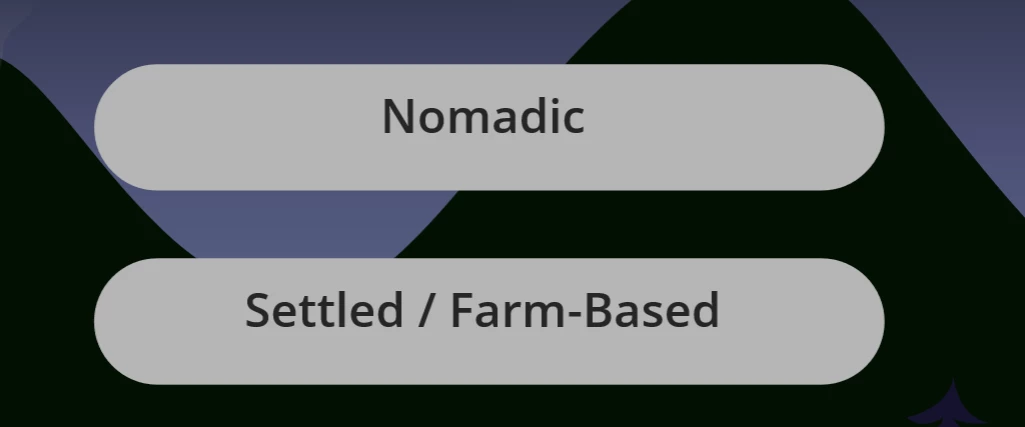
I use dynamic text as I reuse this code and FLA a lot.

It's not the worst but aesthetically looks bad in my opinion.

I am thinking this might just be a browser issue but thought I'd ask first.

Thanks

G

This topic has been closed for replies.
Correct answer gperry91

This is a bug with how Firefox handles the text baseline property. You are not doing anything wrong.

View the issue on GitHub:

Text Alignment issues with Firefox · Issue #650 · CreateJS/EaselJS · GitHub

You can add this bit of JavaScript to your project to see if it helps...

var firefox = navigator.userAgent.toLowerCase().indexOf('firefox') > -1;
if (firefox && createjs)
{
  createjs.Text.prototype._drawTextLine = function(ctx, text, y)
  {
  // Adjust text position only if textBaseline is "top"
  if (this.textBaseline === "top")
  {
  var lineHeight = this.lineHeight || this.getMeasuredLineHeight();
  y += lineHeight * 0.3;
  }
  // Chrome 17 will fail to draw the text if the last param is included but null, so we feed it a large value instead:
  if (this.outline) { ctx.strokeText(text, 0, y, this.maxWidth||0xFFFF); }
  else { ctx.fillText(text, 0, y, this.maxWidth||0xFFFF); }
  };
}

4 replies

gperry91Correct answer
Participating Frequently
November 23, 2016

This is a bug with how Firefox handles the text baseline property. You are not doing anything wrong.

View the issue on GitHub:

Text Alignment issues with Firefox · Issue #650 · CreateJS/EaselJS · GitHub

You can add this bit of JavaScript to your project to see if it helps...

var firefox = navigator.userAgent.toLowerCase().indexOf('firefox') > -1;
if (firefox && createjs)
{
  createjs.Text.prototype._drawTextLine = function(ctx, text, y)
  {
  // Adjust text position only if textBaseline is "top"
  if (this.textBaseline === "top")
  {
  var lineHeight = this.lineHeight || this.getMeasuredLineHeight();
  y += lineHeight * 0.3;
  }
  // Chrome 17 will fail to draw the text if the last param is included but null, so we feed it a large value instead:
  if (this.outline) { ctx.strokeText(text, 0, y, this.maxWidth||0xFFFF); }
  else { ctx.fillText(text, 0, y, this.maxWidth||0xFFFF); }
  };
}

GoryGregAuthor
Inspiring
November 24, 2016

Thanks gperry91- that works a treat on Firefox. I just had to tweak the y line to 0.2. And everything good with Chrome too. Cheers!

Hi just.emma - I am using Google fonts but might try Typekit Web fonts when I get the time to see if that help improves it, but as mentioned by gperry91 it seems to be a Firefox problem.

just.emma
Inspiring
November 23, 2016

Does it look more consistent if you use a Typekit or Google web font?

Using Google fonts in Animate CC

Using Typekit Web fonts in Animate CC

Legend
November 23, 2016

It's normal for canvas text to render slightly differently in different browsers, but not THAT differently. You must be doing something else that's throwing it off.

Colin Holgate
Inspiring
November 23, 2016

You may have noticed that the text in Firefox is a lot smaller. Could it be that Firefox is handling the text DPI setting differently? Does it change at all if you alter your system text scaling setting?

Legend
November 23, 2016

Colin Holgate wrote:

You may have noticed that the text in Firefox is a lot smaller. Could it be that Firefox is handling the text DPI setting differently?

The buttons are smaller too. For some reason the two screenshots have been scaled differently.

GoryGregAuthor
Inspiring
November 23, 2016

Hi Clay,

the final HTML Canvas file is from the same fla file, so is there a possibility that something in that is causing it?

Regarding the scaling of Chrome versus Firefox- I'm not aware of me changing any settings but you never know. I just published and tested the HTML in both browsers.