


Mysql module error

Copy link to clipboard
Copied
Your PHP server doesn't have the MySQL module loaded or you can't use the mysql_(p)connect functions...
i was following one guy on youtube, everything was good until i came on connecting database with dreamveawer. I get this error..what now? I bough dreamveawer today and i am lost...i have xampp running mysql and apache, one guy was on teamviewer and he said that it is dreamveawer thing and my codes are tight..he told me to quit dreamveawer lul


 25
Replies
25
25
Replies
25


Copy link to clipboard
Copied
Which version of DW do you have?
Copy link to clipboard
Copied
Have you created the MySQL database in your local testing server yet?
Have you populated it with some tables and data?
Generic Connection Script.
<?php
$con = mysqli_connect("localhost","username","password","database");
// Check connection
if (mysqli_connect_errno())
{
echo "Failed to connect to MySQL: " . mysqli_connect_error();
}
else echo "Successfully connected, happy coding!"
?>
<?php phpinfo() ?>
Copy link to clipboard
Copied
It writes sucessfully connected, but when i press + in dreamveawer it says same error
Copy link to clipboard
Copied
I don't understand what you mean by press + in Dreamweaver. Can you post a screenshot?
Copy link to clipboard
Copied
When i want to connect database with mysql in dreamw. i get that error
Copy link to clipboard
Copied
The deprecated server behavior panels were removed from DW CC because they are woefully outdated and not secure. You should not be using them for current projects.
If you're using a 3rd party extension from WebAssist, you will need to drop back to an earlier version of DW CS6 that has the old panels installed.
MySQLi Server Behaviors | Dreamweaver extension | WebAssist
Copy link to clipboard
Copied
You still have not answered my earlier questions.
- Which version of DW? Help > About Dreamweaver...
- Did you create a MySQL database on local server?
- Did you populate database with tables and data?
- Also, which verisn of PHP does your server have?

Copy link to clipboard
Copied
Does anyone found a positive answer for that question?
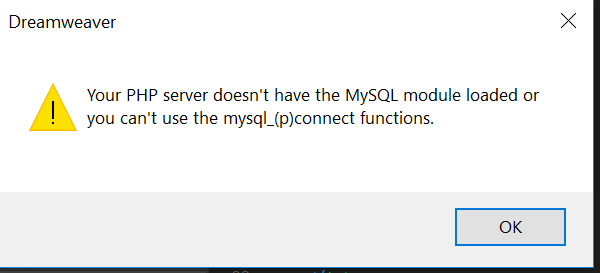
I am having the above screen at the time I try to "connect" to a sql database. I am using DreamW CC, and XAMPP V3.2.2. All services (apache, MySQL, Filezilla) are up and running. Need to connect to a MySQL database. Any inputs, please

Copy link to clipboard
Copied
What version of PHP?
Have checked to make sure its not commented out in php.ini ?
Copy link to clipboard
Copied
; extension=mysqli
change to:
extension=mysqli
save and restart apache
...Look at updating your site/application to PHP 7 & mySQLi in the near future if you can ....
Copy link to clipboard
Copied
Ok, assuming yuou're using PHP 5.6 with that build of XAMPP ?
Have a look in your php.ini file for:
extension=php_mysql.dll
if there is a semi-colon at the beiginning remove it, save the php.ini and restart apache.
Copy link to clipboard
Copied
As you were able to see in the last config file, there is not a DLL extension. I am not sure about the PHP version. See attachment.
Copy link to clipboard
Copied
from what I can see you do NOT have PHP 5.6 set up as default version - thats what you need to use if you're using the old mySQL extension
Copy link to clipboard
Copied
How can I found the PHP version, from XAMPP. As you can see I am using XAMPP, the Apache server is working, the MySQL server is up and running. The issue is between the DW connecting with the SQL_database. Any input?
Copy link to clipboard
Copied
I'm going to remove your post with the PHP inii file in it because it serves no purpose. and takes up far too much space.
Which version of Xampp do you have? See website below for details.
https://www.apachefriends.org/download.html
Another way to find out which PHP version you have is to copy and paste this code into a new document.
==================
<!doctype html>
<html>
<head>
<meta charset="utf-8">
<title>PHP info</title>
</head>
<body>
<?php phpinfo() ?>
</body>
</html>
=================
SaveAs php_info.php. Upload to server and open file in your browser.
Copy link to clipboard
Copied
How can I found the PHP version, from XAMPP. As you can see I am using XAMPP, the Apache server is working, the MySQL server is up and running. The issue is between the DW connecting with the SQL_database. Any input?
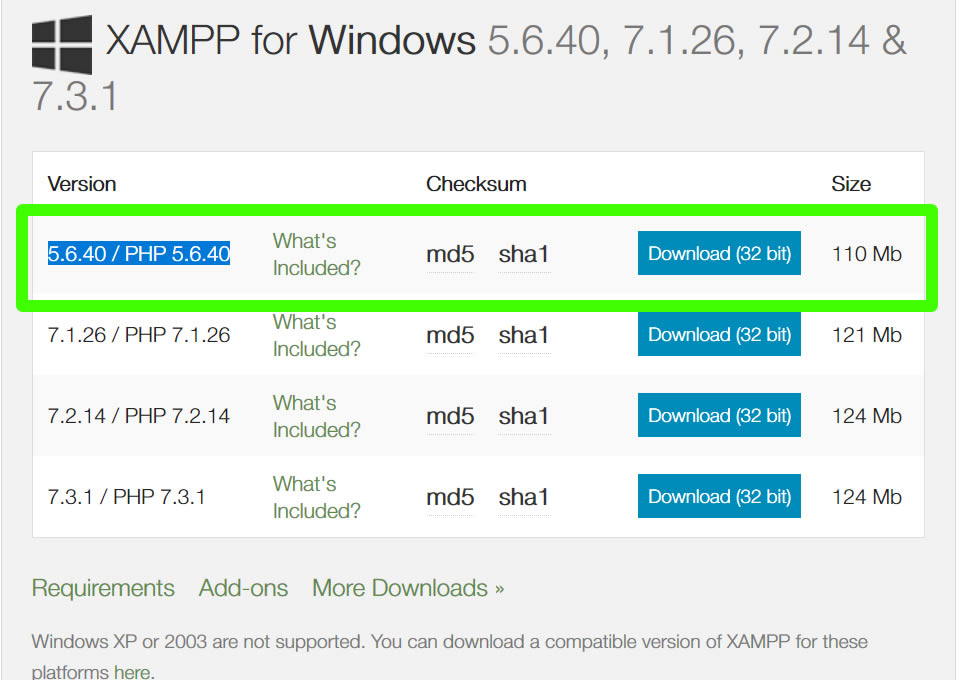
It sounds to me like you have PHP7 intalled. The mysql extenion was completely removed in PHP 7, you need to run PHP 5.6 if you want to work with the old MySQL extension.
When you downloaded XAMPP from here: https://www.apachefriends.org/download.html did you download the PHP 5.6 version?
Copy link to clipboard
Copied
Whichever PHP version is installed locally must match the production server's PHP. Otherwise, the site won't work as expected.
Copy link to clipboard
Copied
Whichever PHP version is installed locally must match the production server's PHP. Otherwise, the site won't work as expected.
to a degree .... depending on whether were talking of leaping from 5.2 to 5.6 or 5.5 to 5.6 for example, (I'm not sure the latter would make a lot of difference) , I'm trying to keep it simple....
Copy link to clipboard
Copied
You're right of course about not much difference between PHP 5x versions. But PHP 5x code will not always work on PHP 7x servers and vice versa. So it is helpful to know which version the remote server has.
Copy link to clipboard
Copied
You're right of course about not much difference between PHP 5x versions. But PHP 5x code will not always work on PHP 7x servers and vice versa. So it is helpful to know which version the remote server has.
Well, it won't work on PHP 7 if we're talking about the mysql extenion, a lot of big hosts have support for multiple versions of PHP going back to PHP 5x, so unless you're tied rigidly to a host it shouldn't be an issue to run older codebases.
I feel like your trying to create more problems before we are even at the point where its a problem. I'm not advocating people use the mysql extenion or run on older 5x version of PHP either, I'm trying to answer the question and keep it as uncomplicated as possible.
Copy link to clipboard
Copied
Following your suggestion, I install the EASYPHP. Still issues. I am not able to connect in to the MySQL database (xammp, EASYPHP), no difference at all.

Copy link to clipboard
Copied
I am able to do a preview of my html file, but trying to connect with the Database has been very difficult. Check the screen below

Copy link to clipboard
Copied
An unidentified error in Dreamweaver, could be any number of things
1) Firstly, is this a completely new project or an existing one that you are trying to work on?
2) I'm assuming you have created a database already in you local MySQL or you have cloned the databse from the existing site?
3) You then need to define your site in Dreamweaver and a testing server
Have you done all of these things?
Copy link to clipboard
Copied
This connection string should work. Change the items in red as requierd.
<?php
$con = mysqli_connect("localhost","your_username","your_password","database_name");
// Check connection
if (mysqli_connect_errno())
{
echo "Failed to connect to MySQL: " . mysqli_connect_error();
}
else echo "Successfully connected, happy coding!"
?>

-
- 1
- 2
Get ready! An upgraded Adobe Community experience is coming in January.
Learn more
 AdChoices