Participating Frequently
February 22, 2017
解決済み

Unable to update our website with Dreamweaver CS4

  • February 22, 2017
  • 返信数 2.
  • 1236 ビュー

Hi again

I wrote this 3-4 months ago: Our domain host One.com recently changed their infrastructure on their site and since then I have been unable to update our website.

Pziecina then replied: "This is a problem that you should discuss with your host. If they have changed something then it is obviously something they have done, and not a problem with dreamweaver".


I have of course been in a dialogue with One.com since then, but they can't solve the problem.

Later I found out, that I could upload one file at the time manually to One.com by clicking on them from my local files, but I can not synchronize my whole site at once to One.com. It is not acceptable, since it takes a long time, when I have many files to upload.

Does anyone of you have an idea about, why I can update one file at the time while I am unable to synchronize the whole site at once?

Is it possible, that my Dreamweaver CS4 program has some problems or is it most likely, that the problem is situated at One.com?

Looking very much foreword for any reply.


Regards Marita

    このトピックへの返信は締め切られました。
    解決に役立った回答 Nancy OShea

    Filezilla client is not complicated at all.  Simply download & iinstall.

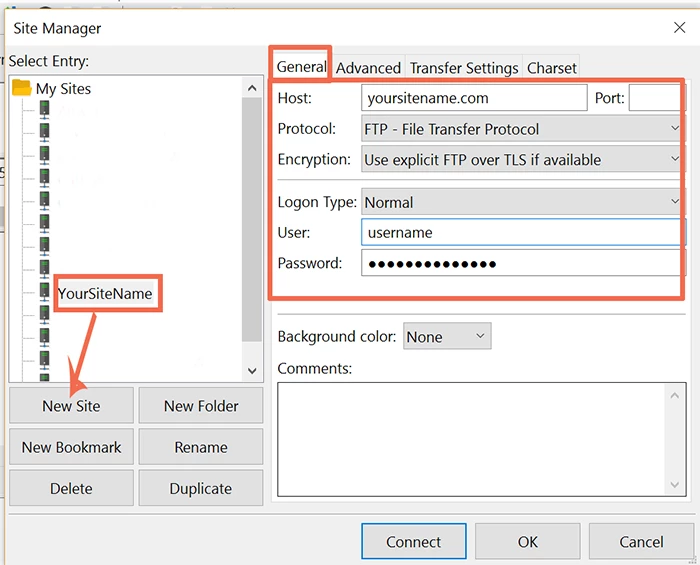
    Launch the application.  Go to File > Site Manager and click the New Site button.    Enter your server's FTP log-in information the same as you did in Dreamweaver.  See screenshots below.

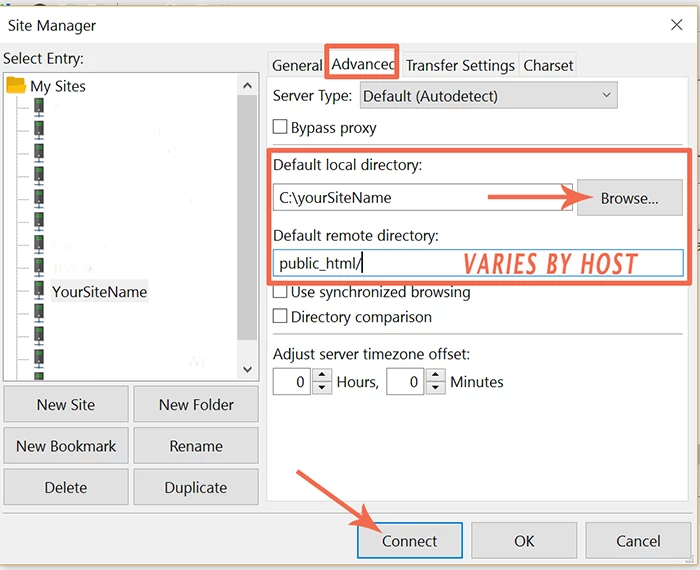
    Advanced tab:  Enter you local site folder and remote server's root directory (public_html or htdocs, etc... )

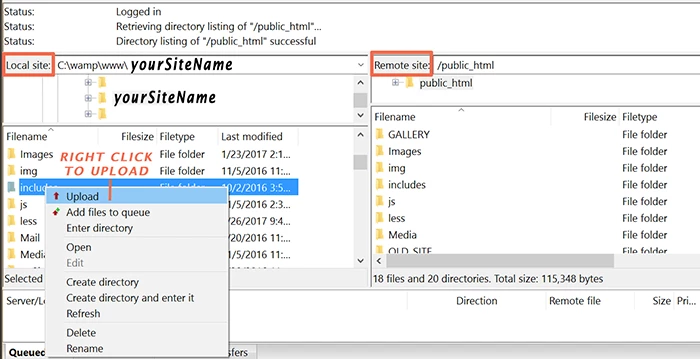
    When you connect to the server, you should see your local site on the left panel and your remote server on the right.   To upload files or folders to server, select and right click.

    Post back if you have any problems.

    Nancy

    返信数 2

    Nancy OShea
    Community Expert
    Community Expert
    February 22, 2017

    +1 Rob's suggestion.  Try another dedicated FTP application to rule out conflicts between your computer and the remote server.   If you have no problems using Filezilla, at least you have the means to upload files as needed.

    Legacy CS4 is no longer sold, supported or updated.  A lot has changed on the web since it came out in April 2008.  CS4 officially reached it's end-of-life around Oct 2011.   Since then, your operating system has probably been updated many, many times but CS4 has not.   So you have what's known as a compatibility gap with your current OS and legacy CS4.  At some point, you may have to step up to newer software. 

    The links below may or may not fix the problem.  But it's worth a try.

    Restore preferences in Dreamweaver CS4, CS5, and CS5.5

    Use the CS Cleaner Tools below followed by a software re-install.

    http://helpx.adobe.com/creative-suite/kb/cs5-cleaner-tool-installation-problems.html

    Good luck!

    Nancy

    Nancy O'Shea— Product User & Community Expert
    Participating Frequently
    February 22, 2017

    Hi Nancy

    Thanks for your fast reply.

    I have thought the same as well - that my Dreamweaver might be to old. And yes, I have bought at least two new pc's since I bought my Dreamweaver program. Earlier I bought the CS version, then the CS3 version and now I hoped to be able to keep my CS4 version, but of course it might be outdated, since all my other programs on the pc are regularly updated ...

    The main reason why I would like to be able to continue to use the CS4 version is of course, that I am so used to use it. I have seen the CC version and it is completely strange for me. Also I prefer to have a copy of our complete site as a local version on my pc instead of only storing it somewhere in the Cloud

    Thanks a lot for the links. I will try them tomorrow.

    Regards Marita

    Rob Hecker2
    Legend
    February 22, 2017

    I prefer to have a copy of our complete site as a local version on my pc

    With the Creative Cloud, you can still store your site on your local computer. I don't use the cloud storage. The CC programs themselves install on your computer. You don't even have to be continually connected to the internet.

    Rob Hecker2
    Legend
    February 22, 2017

    Strange. I can't think of an explanation, but you should try a different FTP program, like filezilla.

    Participating Frequently
    February 22, 2017

    Hi Rob

    Thanks for your fast reply.

    Stupid question I guess, but can Filezilla be installed directly in my Dreamweaver program or does it work as a seperate program on my pc?

    Just watched some videos about how to use Filezilla, and it looked quite complicated ...

    Regards Marita

    Rob Hecker2
    Legend
    February 22, 2017

    Filezilla does not install within Dreamweaver.

    and it looked quite complicated

    I don't use Filezilla myself. I use the FTP in ZendStudio. Most FTP programs do have more features than Dreamweaver, which could make them seem complicated for you, but really they are all pretty simple.