


Flash-Based BBC h264 Videos Freeze After 8 Seconds
Hello,
I like to view BBC news videos since March on my new Desktop Windows 7 64 bit Pro system. For about 2 weeks now, I've been having trouble viewing about half of these videos. Half play all the way through fine and the other half freeze after 8-10 seconds. I have a CAT 5e 7 mbit cable modem connection so speed is not an issue. My Wi-Fi connected Windows 7 Home Premium laptop uses the same router and can play the same videos with no problems.
On my Desktop, this freezing happens on both FireFox 12 and Internet Explorer 9. I did all the usual things to try to fix the problem. I cleared the caches on both FF12 and IE9. Yesterday, I uninstalled both the Adobe Flash FF12 plug-in and IE9 Active-X versions and reinstalled with the latest version, 11,3,300,262. Today, I upgraded to the latest version, 11,3,300,265. Nothing has solved the problem.
Here are the specs for the BBC Flash-based player:
Problem Videos:
URL: http://www.bbc.co.uk/news/uk-northern-ireland-18819815
EMP v.3.1.0.r749603_749269_749444_5
18819815 | 800kbps | h264 | AK 4.5 (1) | 640x360
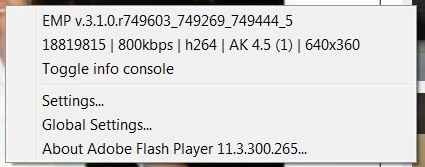
URL: http://www.bbc.co.uk/news/world-middle-east-18733664
EMP v.3.1.0.r749603_749269_749444_5
18733664 | 800kbps | h264 | AK 4.5 (1) | 640x360
URL: http://www.bbc.co.uk/news/world-asia-china-18818139
EMP v.3.1.0.r749603_749269_749444_5
18818139 | 800kbps | h264 | AK 4.5 (1) | 640x360
This video plays OK:
URL: http://www.bbc.co.uk/news/world-us-canada-18801596
EMP v.3.1.0.r749603_749269_749444_5
18801601 | 800kbps | h264 | AK 4.5 (1) | 640x360
The only difference I noticed was the initial screen size of the video. On the problem videos, the size is bigger than the OK one. I assume the BBC videos are h264 encoded. On both my Desktop and my laptop, I have 2 msmpeg2vdec.dll files. 1 in C:\Windows\System32 and another in C:\Windows\SysWOW64. They are both v6.1.7140.0. On both my Desktop and laptop, the sizes are different, 2.52 MB & 2.03 MB.
I am using the latest nVidia driver v301.42 which I installed 5/30/2012, over a month ago. The only recent change which happened to my system on 7/4/2012 was my Norton Internet Security 2012 subscription expired. NIS2012 then disabled itself and activated the built-in Windows firewall. 3 days ago I uninstalled NIS2012. I also used the Norton Removal Tool. I then installed a new NIS2012 with a new legitimate key. However, I am still getting this freezing and I don't remember if I got this freezing before 7/4/2012.
On both FF12 and IE9, I can play Hulu, YouTube, Yahoo!, and Amazon videos with no problems. When you right-click on any of these other flash players, nowhere does it say "h264."
My questions are:
1) does the Adobe Flash Player, for both the FF12 plug-in and IE9 ax players, use the Windows7 CODEC?
2) Which file is the h264 CODEC, is it msmpeg2vdec.dll or something else?
3) Will installing a new CODEC pack fix this problem?
4) Is there anything else I have overlooked? Is there anything else I can do to fix this problem?
Thanks.


 AdChoices