
rowana84771233
Participant
November 6, 2018
Question

Adobe Media Encoder: Grace period has expired; purchase a CC subscription

  • November 6, 2018
  • 3 replies
  • 8358 views

I have a user that experiences this once a month.  He has an active Creative Cloud, all apps, subscription.  Every month Media Encoder throws this error:
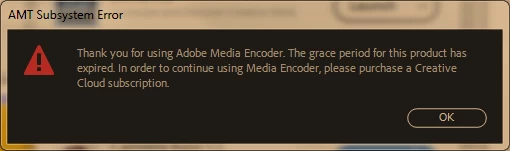
I have tried other suggestions I've found via Google: updating (if necessary) Media Encoder to latest version, signing out and back in to Adobe account but these haven't worked.  The only solution that works is to uninstall and reinstall Media Encoder.  This is an unacceptable disruption and means my user can't use the software we've paid for until I intervene (we have a very locked down environment and software installation by ordinary user is strictly forbidden).

The subscription has never been on a trial basis, license was purchased before the software was installed.  Computer in question is Windows 7 Pro x64.

Any ideas?


This topic has been closed for replies.

3 replies

caroline_edits
Community Manager
Community Manager
November 28, 2018

Hey RowanA!

Did either of these ideas work for you?

Let us know!

Caroline

rowana84771233
Participant
November 28, 2018

Hi Caroline

No neither of these ideas worked for me.  I haven't tried them since they were suggested as the 30 day grace period since hasn't expired, but these are actions I have previously taken without success.

Participant
April 2, 2019

Hi Caroline

Thanks for the suggestion, I've been waiting for the problem to recur to see whether these solutions would work.  Today it did, so have checked connection to Adobe Activation servers, reset host file using tool and also manually, have checked can access secure sites and checked the GlobalSign Root CA cert is enabled for server authentication.  All checks have passed.

So, *shrugs shoulders*, I'm sure this is "something" to do with the computer in question as nobody else has the same issue.  It's going to be replaced in 2019 as we migrate to Win10, so I'll just have to live with it till then and revisit if it's still a problem.

Thanks for your help, appreciate it.

Cheers, Rowan


Hola yo también intente todas las opciones de solución que dio adobe y no funciono, intente desactivando todos los dispositivos asociados a creative cloud, y con eso se arreglo y pude iniciar el media Encoder

Peru Bob
Community Expert
Community Expert
November 7, 2018

You may need to reinstall the Adobe Desktop App:

Download Creative Cloud desktop app

rowana84771233
Participant
November 28, 2018

Thanks Peru Bob.  Indeed, reinstalling the CC Desktop App 'fixes' the problem in the same way that reinstalling AME 'fixes' the problem.  But only for 30 days, so not a fix but a restart of the grace period.

Adobe Employee
November 7, 2018

Sounds like AME didn't get licensed properly.  It went to 30 days grace launch and expired after 30days.  Could you go to Creative Cloud app and launch AME by clicking "Open" button?  If you don't see the "Open" button, please wait for a moment till Creative Cloud app communicates with the licensing server.  This should license AME.

rowana84771233
Participant
November 28, 2018

Thanks for the suggestion, but this doesn't fix the problem.  It's by clicking on 'Open' that the message about grace period expiring appears.