Exit
  • Global community
    • Language:
      • Deutsch
      • English
      • Español
      • Français
      • Português
  • 日本語コミュニティ
  • 한국 커뮤니티
2

Acrobat DC Crashes when renaming layer group

New Here ,
Jul 11, 2022 Jul 11, 2022


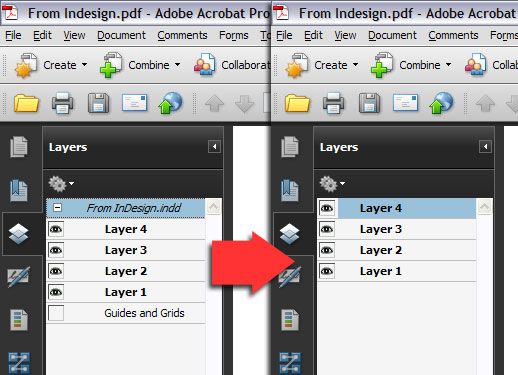
AcrobatLayersGroup.jpg

Whenever I try and rename the layer group, Acrobat crashes to desktop. All of my co-workers have reported the same issue. Following all of the usual troubleshooting steps haven't fixed the issue, and it's only started in the last three weeks.


I'm not 100% layer group is the right term for the area I'm talking about, so I've attached an image.

TOPICS
Crash or freeze
514
Translate
Report
Community guidelines
Be kind and respectful, give credit to the original source of content, and search for duplicates before posting. Learn more
community guidelines
Adobe Employee ,
Jul 12, 2022 Jul 12, 2022

Hi Donald,


Thanks for sharing the screenshot. 

As per the description above, the application only crashes when trying to rename the layer group. Is this a behavior with a particular file where you have been trying to edit the layers? If yes, then try a couple of steps suggested below-

1- It could be one document that's causing trouble. Kindly check the same with another file that contains the layers and see if that lets you edit or not.

2- Are you on the most recent version of Acrobat? To check that, Open Acrobat>help>check for updates.

3- Navigate to Acrobat>Edit>Preferences>Security (Enhanced)>disable "Protected View" and "Enhanced Security">OK>close and reopen Acrobat.

Note: these changes are only for testing purposes. Once tested, please change it back to the previous setting.


Thanks,

Akanchha

Translate
Report
Community guidelines
Be kind and respectful, give credit to the original source of content, and search for duplicates before posting. Learn more
community guidelines
New Here ,
Jul 12, 2022 Jul 12, 2022

Hey Akanchha, I've already completed all of those steps, that's what I meant by usual troubleshooting steps. Every file we try to edit has the same behavior. And the other two steps I've already completed and they didn't affect anything.

Translate
Report
Community guidelines
Be kind and respectful, give credit to the original source of content, and search for duplicates before posting. Learn more
community guidelines
Community Expert ,
Jul 12, 2022 Jul 12, 2022

Can't help for renaming, but this free utility for Acrobat Pro removes the "InDesign layers group", I use it often:

https://www.uvsar.com/projects/acrobat/indesignfixups/


It can remove the "Guides and Grids" too.


ungroup_nested_layers


Acrobate du PDF, InDesigner et Photoshopographe
Translate
Report
Community guidelines
Be kind and respectful, give credit to the original source of content, and search for duplicates before posting. Learn more
community guidelines
Community Beginner ,
Dec 12, 2024 Dec 12, 2024

I've been having the same issue for years now, persisting over several different files and machines. I've asked friends and colleagues, and this crashing behavior is 100% reproducable.

Translate
Report
Community guidelines
Be kind and respectful, give credit to the original source of content, and search for duplicates before posting. Learn more
community guidelines
Adobe Employee ,
Dec 27, 2024 Dec 27, 2024
LATEST

Hi,

I hope you're doing well, and we apologize for the trouble.

Please ensure you have the latest version of Acrobat DC Standard installed (24.005.20320). To check for updates:

Open the app and go to the Help menu.
Select Check for Updates.
Download and install any pending updates.
Restart the app and, if possible, your machine.
For additional guidance, refer to this helpful article: Troubleshoot Acrobat Crashes.

Try using the application after completing these steps, and let us know how it goes.

If the issue persists, please share the affected file, collect the crash logs from the affected machine, and share them with us for further investigation. To collect the logs, please see this article: https://adobe.ly/4gN6LRb.

Thanks,
Anand Sri

Translate
Report
Community guidelines
Be kind and respectful, give credit to the original source of content, and search for duplicates before posting. Learn more
community guidelines