Exit
  • Global community
    • Language:
      • Deutsch
      • English
      • Español
      • Français
      • Português
  • 日本語コミュニティ
  • 한국 커뮤니티
3

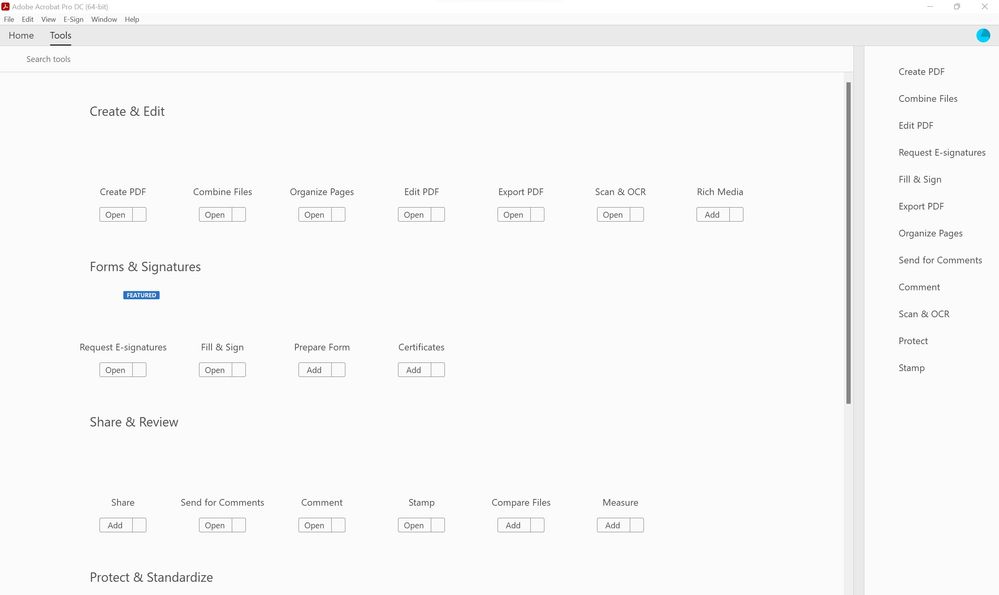
Acrobat DC icon missing in TOOL tab

Community Beginner ,
Mar 26, 2022 Mar 26, 2022

Hi, 
after restart PC all the icons and graphic in ACROBAT PRO DC in the TOOL tab are missing
can't use it at all
I lready tried to uninstall, and using the cleaning tool already, 
also to reset the preference as in another post, but didn't solve.


please help

Screenshot 2022-03-26 083908.jpg

TOPICS
Edit and convert PDFs
10.4K
Translate
Report
Community guidelines
Be kind and respectful, give credit to the original source of content, and search for duplicates before posting. Learn more
community guidelines
2 ACCEPTED SOLUTIONS
Community Beginner ,
Mar 30, 2022 Mar 30, 2022

Hi, 
after reinstalling the SW with a stand alone file, the problem disappeared, 
so i can't upload the file you requested. 
thanks for helping me 

have a nice day

Marco

View solution in original post

Translate
Report
Community guidelines
Be kind and respectful, give credit to the original source of content, and search for duplicates before posting. Learn more
community guidelines
New Here ,
Apr 05, 2023 Apr 05, 2023

I have solved the problem by unistalling the Acrobat DC with the adobe cleaner and Adobe Cloud.

Then install the Acrobat DC solely.

View solution in original post

Translate
Report
Community guidelines
Be kind and respectful, give credit to the original source of content, and search for duplicates before posting. Learn more
community guidelines
New Here ,
Mar 30, 2023 Mar 30, 2023

Guys, I think I found a solution to this issue.  Go to Preferences / Color Management. Try to change CMYK, I have changed mine to the U.S. Web Coated (SWOP) v2, and the toolbars icons and everything else is visible now. You can try the options one by one until it is fixed. You can also change RGB and Grayscale settings as well. 

Translate
Report
Community guidelines
Be kind and respectful, give credit to the original source of content, and search for duplicates before posting. Learn more
community guidelines
New Here ,
Apr 04, 2023 Apr 04, 2023

Hi Erdem28342880x6o0


Your solution works like a charm...! thank you so much man, I have tried multiple, from uninstall, install from the offline installer or the cloud, changing permission tried too but nothing helo, except your color management settings.


Thank you again and have a nice day.

Translate
Report
Community guidelines
Be kind and respectful, give credit to the original source of content, and search for duplicates before posting. Learn more
community guidelines
New Here ,
Apr 05, 2023 Apr 05, 2023

thanks dude, that works

Translate
Report
Community guidelines
Be kind and respectful, give credit to the original source of content, and search for duplicates before posting. Learn more
community guidelines
New Here ,
Apr 18, 2023 Apr 18, 2023

You're the f'n man/my hero

Translate
Report
Community guidelines
Be kind and respectful, give credit to the original source of content, and search for duplicates before posting. Learn more
community guidelines
New Here ,
Apr 05, 2023 Apr 05, 2023

I have solved the problem by unistalling the Acrobat DC with the adobe cleaner and Adobe Cloud.

Then install the Acrobat DC solely.

Translate
Report
Community guidelines
Be kind and respectful, give credit to the original source of content, and search for duplicates before posting. Learn more
community guidelines
New Here ,
Jun 05, 2023 Jun 05, 2023
LATEST

This worked for me also.


Translate
Report
Community guidelines
Be kind and respectful, give credit to the original source of content, and search for duplicates before posting. Learn more
community guidelines