



Copy link to clipboard
Copied
Hi, I have Adobe Reader, I want to add a view after I have open a 3d pdf file. But the create View button is inactivated. How can I activate it ?


 Correct answer by
Guest
AUTHOR
Correct answer by
Guest
AUTHOR
Copy link to clipboard
Copied
HI. I have now a trial of Adobe Acrobat Pro DC. I have tried the camera Properties and the create view function. I have three questions:
1) Is it possible to make views in x-y, y-z and x-y directly or do I need to use camera settings and select a face in the model ?
2) Is it possible to save these views and import them into another 3dpdf file ?
3) Is it possible to make a template with the views and then import the 3dpdf file into this template ?
 5
Replies
5
5
Replies
5



Copy link to clipboard
Copied
Reader cannot add a view because that changes the PDF file in a way that Reader isn't permitted to do. However, as a work around, you can add a comment to the 3D annotation which will create a view that's associated with the comment.
Copy link to clipboard
Copied
thanks
Correct answer by
Guest
AUTHOR
Copy link to clipboard
Copied
HI. I have now a trial of Adobe Acrobat Pro DC. I have tried the camera Properties and the create view function. I have three questions:
1) Is it possible to make views in x-y, y-z and x-y directly or do I need to use camera settings and select a face in the model ?
2) Is it possible to save these views and import them into another 3dpdf file ?
3) Is it possible to make a template with the views and then import the 3dpdf file into this template ?
Copy link to clipboard
Copied
HI. I have now a trial of Adobe Acrobat Pro DC. I have tried the camera Properties and the create view function. I have three questions:
1) Is it possible to make views in x-y, y-z and x-y directly or do I need to use camera settings and select a face in the model ?
2) Is it possible to save these views and import them into another 3dpdf file ?
3) Is it possible to make a template with the views and then import the 3dpdf file into this template ?

Copy link to clipboard
Copied
Hi,
You can add default views using the "Properties" dialog in Adobe Acrobat by doing the following:
1) Activate the 3D artwork by clicking the model
2) Activate the context menu by right clicking in the 3D artwork
3) Select the "Properties" menu item. The "Edit 3D" dialog box will appear.
4) Select the "3D" tab from the "Edit 3D dialog box
5) Select the "Add Default Views" check box and select which views you want to add
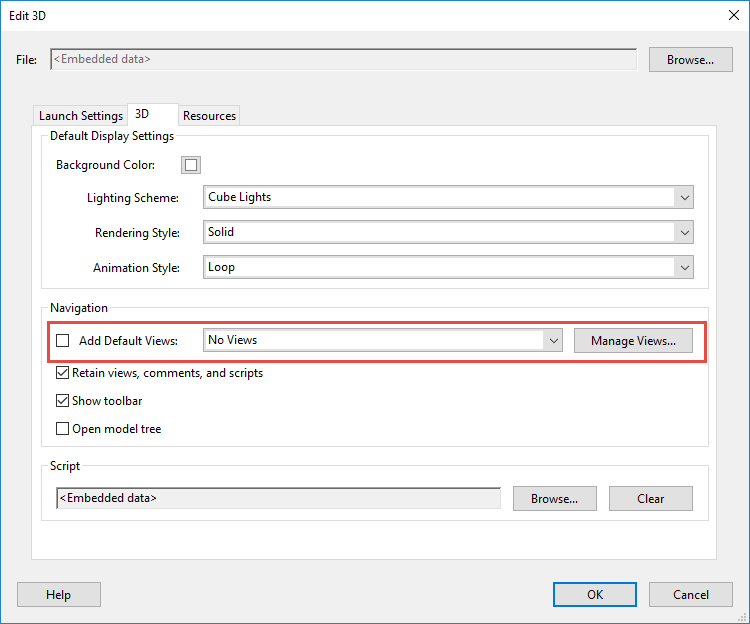
6) Save the PDF file


Get ready! An upgraded Adobe Community experience is coming in January.
Learn more
 AdChoices