Exit
  • Global community
    • Language:
      • Deutsch
      • English
      • Español
      • Français
      • Português
  • 日本語コミュニティ
  • 한국 커뮤니티
0

Adding custom font to PDF

New Here ,
Aug 22, 2017 Aug 22, 2017

Hello,

W are generating a PDF by using our own font. But when viewing PDF, we are not able to view PDF.

The error is: Can not find or create font.

How we can over come this error?

[Question moved to the Creating PDFs forum. -Moderator]

TOPICS
Create PDFs
8.8K
Translate
Report
Community guidelines
Be kind and respectful, give credit to the original source of content, and search for duplicates before posting. Learn more
community guidelines
1 ACCEPTED SOLUTION
Aug 23, 2017 Aug 23, 2017
LATEST

The problem would appear to be the Qatar fonts. I suspect that the fonts do not allow embedding in the PDF. Under Windows, right click on the font file and look at the details tab of the file's properties. Under font embeddability, you should see installable. If not, values of either editability or preview and print should allow font embedding, at least if you were using Adobe's PDF creation tools.

However, we cannot speak for what or how Microsoft Dynamcis CRM Reports creates PDF files and whether they follow the proper conventions for font embedding within a PDF file.

          - Dov

- Dov Isaacs, former Adobe Principal Scientist (April 30, 1990 - May 30, 2021)

View solution in original post

Translate
Report
Community guidelines
Be kind and respectful, give credit to the original source of content, and search for duplicates before posting. Learn more
community guidelines
Aug 22, 2017 Aug 22, 2017

“Generating a PDF by using our own font” doesn't give us enough information to assist you.

What is the source of the original document? (Microsoft Word for example.) Can we assume that you installed the custom font in question on your computer and that the text was formatted using that font in whatever word processor or layout program you were using? Then, how did you crate the PDF file? And did you specify that the font was to be embedded in the PDF file?

          - Dov

- Dov Isaacs, former Adobe Principal Scientist (April 30, 1990 - May 30, 2021)
Translate
Report
Community guidelines
Be kind and respectful, give credit to the original source of content, and search for duplicates before posting. Learn more
community guidelines
New Here ,
Aug 23, 2017 Aug 23, 2017

We are generating PDF from Microsoft Dynamcis CRM reprots.

Yes, correct, we have installed our own custom font on our system.

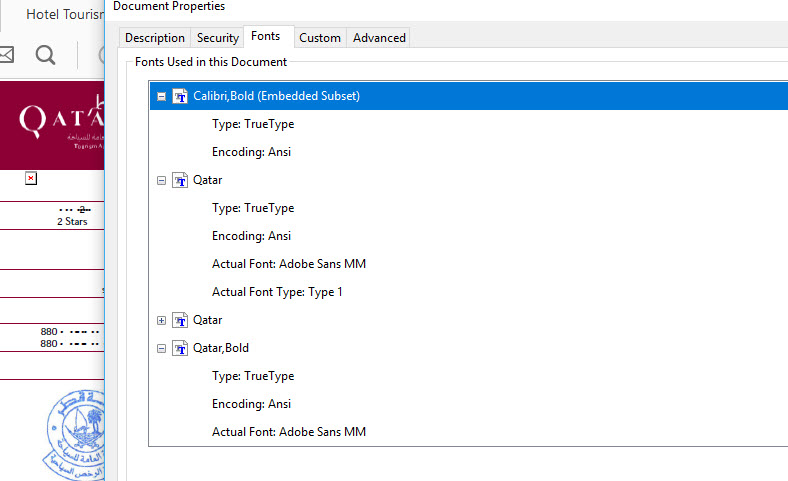
This is the screenshot:

Report Font.jpg

Translate
Report
Community guidelines
Be kind and respectful, give credit to the original source of content, and search for duplicates before posting. Learn more
community guidelines
Aug 23, 2017 Aug 23, 2017
LATEST

The problem would appear to be the Qatar fonts. I suspect that the fonts do not allow embedding in the PDF. Under Windows, right click on the font file and look at the details tab of the file's properties. Under font embeddability, you should see installable. If not, values of either editability or preview and print should allow font embedding, at least if you were using Adobe's PDF creation tools.

However, we cannot speak for what or how Microsoft Dynamcis CRM Reports creates PDF files and whether they follow the proper conventions for font embedding within a PDF file.

          - Dov

- Dov Isaacs, former Adobe Principal Scientist (April 30, 1990 - May 30, 2021)
Translate
Report
Community guidelines
Be kind and respectful, give credit to the original source of content, and search for duplicates before posting. Learn more
community guidelines