Exit
  • Global community
    • Language:
      • Deutsch
      • English
      • Español
      • Français
      • Português
  • 日本語コミュニティ
  • 한국 커뮤니티
0

adobe reader print problem

New Here ,
Dec 02, 2017 Dec 02, 2017

recently reader formats some documents as 8.5x 14 sheets and cannot find way to change.  this is new in last few weeks.  Documents formally foramted and printed as 8.5x11 now changed ot 8.5x14.  And suggestions

TOPICS
Print and prepress
600
Translate
Report
Community guidelines
Be kind and respectful, give credit to the original source of content, and search for duplicates before posting. Learn more
community guidelines
Community Expert ,
Dec 03, 2017 Dec 03, 2017

Please post also your OS and version and the Acrobat readers version.

In general terms, Adobe Acrobat does print documents on the paper at the size as defined by your printer driver. This is the same for all Acrobat flavours and versions I know about.

So look at this screen:
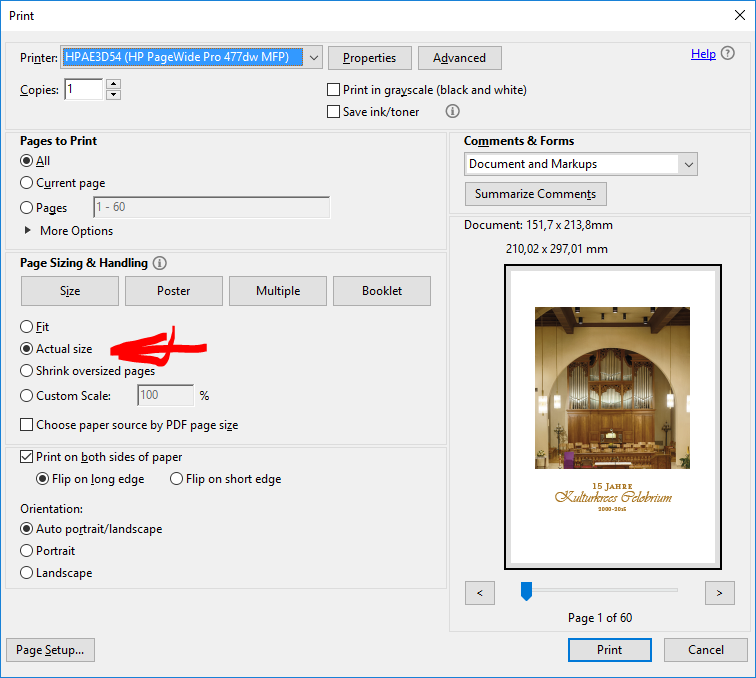
The document is an A5(+bleed) in page size, but it prints on A4 paper, because the printer driver says that A4 paper is loaded.

Page set-up confirms this, and it is here where you should choose other paper formats loaded in your printer.

This said, you can also choose the "Choose paper source by PDF page size" and Acrobat will ask the printer to have the paper size loaded as defined in the PDF.

ABAMBO | Hard- and Software Engineer | Photographer

Translate
Report
Community guidelines
Be kind and respectful, give credit to the original source of content, and search for duplicates before posting. Learn more
community guidelines
New Here ,
Dec 04, 2017 Dec 04, 2017

pre questions

     OS Windows 10 home, Version 1703, OS Build 15063.729

Adobe acrobat reader DC (18.009.20050)

     Adobe says not new updates

Have Canon MX922 Printer and downloaded and reinstalled driver

suggested steps did not help

tired "actual size" ( had tried but usually use "fit")  had page size set for 8.5 x 11 anb tied "A4"  - no success stil get 3/4 of page.

Translate
Report
Community guidelines
Be kind and respectful, give credit to the original source of content, and search for duplicates before posting. Learn more
community guidelines
Adobe Employee ,
Feb 13, 2018 Feb 13, 2018
LATEST

Hi JJimdb,

Is the issue still persists, would you share the file with us?

And when you open a file in Adobe Reader hower your mouse pointer towards the lower left corner, it will show you page dimensions. Are those the same you are expecting? Have you tried printing to a different printer? Also, is this happening with all the files?

Is it possible to share the file with us, if yes: How to share a file using Adobe Document Cloud

-Tariq Dar

Translate
Report
Community guidelines
Be kind and respectful, give credit to the original source of content, and search for duplicates before posting. Learn more
community guidelines


