Exit
  • Global community
    • Language:
      • Deutsch
      • English
      • Español
      • Français
      • Português
  • 日本語コミュニティ
  • 한국 커뮤니티
0

Batch Conversion word,excel,powerpoint, tiff, jpeg, email message to PDF A/2U format

New Here ,
May 21, 2020 May 21, 2020

Hi Support,


Is there a way to perform batch conversion of multiple word,excel,powerpoint, tiff, jpeg, email message to PDF A/2U format in one short?


TOPICS
Edit and convert PDFs , How to
961
Translate
Report
Community guidelines
Be kind and respectful, give credit to the original source of content, and search for duplicates before posting. Learn more
community guidelines
1 ACCEPTED SOLUTION
Community Expert ,
May 21, 2020 May 21, 2020

Yes, if you have Acrobat Pro. In that case you can use an Action to convert multiple files to PDF and then save them as PDF/A-2u. This requires a bit of set-up, though.

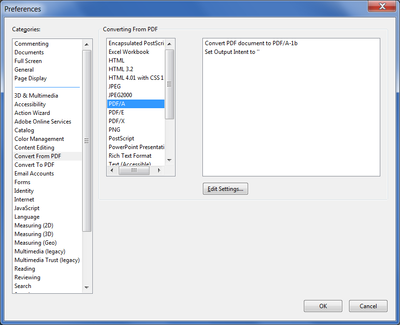
First go to Edit (or the Acrobat menu on a Mac) - Preferences - Convert from PDF and select "PDF/A" and then click on Edit Settings:
 

try67_0-1590054925933.png


Then select the "Save as PDF/A-2u" option and any other settings you wish to have:

try67_1-1590054961834.png


Now, close the Preferences window and go to Tools - Action Wizard and create a new Action.

Add to it a Save command from the left-hand panel and click Specify Settings in the right-hand panel:


try67_2-1590055027945.png


In the window that opens select "Export file(s) to Alternate Format" and then select "PDF/A" from the drop-down menu:

try67_3-1590055061065.png


Now save your Action.

To use it go back to the Action Wizard panel and it should appear at the top of the window. Click it, select the folder where the files you want to convert are located and then click on Start. It will go file by file, converting them to PDF and then saving them as PDF/A-2u, in the same folder as the originals. This is a pretty slow process, so give it some time.

View solution in original post

Translate
Report
Community guidelines
Be kind and respectful, give credit to the original source of content, and search for duplicates before posting. Learn more
community guidelines
Community Expert ,
May 21, 2020 May 21, 2020

Yes, if you have Acrobat Pro. In that case you can use an Action to convert multiple files to PDF and then save them as PDF/A-2u. This requires a bit of set-up, though.

First go to Edit (or the Acrobat menu on a Mac) - Preferences - Convert from PDF and select "PDF/A" and then click on Edit Settings:


try67_0-1590054925933.png


Then select the "Save as PDF/A-2u" option and any other settings you wish to have:

try67_1-1590054961834.png


Now, close the Preferences window and go to Tools - Action Wizard and create a new Action.

Add to it a Save command from the left-hand panel and click Specify Settings in the right-hand panel:


try67_2-1590055027945.png


In the window that opens select "Export file(s) to Alternate Format" and then select "PDF/A" from the drop-down menu:

try67_3-1590055061065.png


Now save your Action.

To use it go back to the Action Wizard panel and it should appear at the top of the window. Click it, select the folder where the files you want to convert are located and then click on Start. It will go file by file, converting them to PDF and then saving them as PDF/A-2u, in the same folder as the originals. This is a pretty slow process, so give it some time.

Translate
Report
Community guidelines
Be kind and respectful, give credit to the original source of content, and search for duplicates before posting. Learn more
community guidelines
Community Expert ,
May 21, 2020 May 21, 2020
LATEST

PS. This is not Adobe Support. Almost all the people posting here are users, just like you. Only those with the "Adobe Employee" label next to their names work for Adobe directly.

Translate
Report
Community guidelines
Be kind and respectful, give credit to the original source of content, and search for duplicates before posting. Learn more
community guidelines

