


- Home
- Acrobat
- Discussions
- Click a checkbox - field text changes script
- Click a checkbox - field text changes script

Copy link to clipboard
Copied
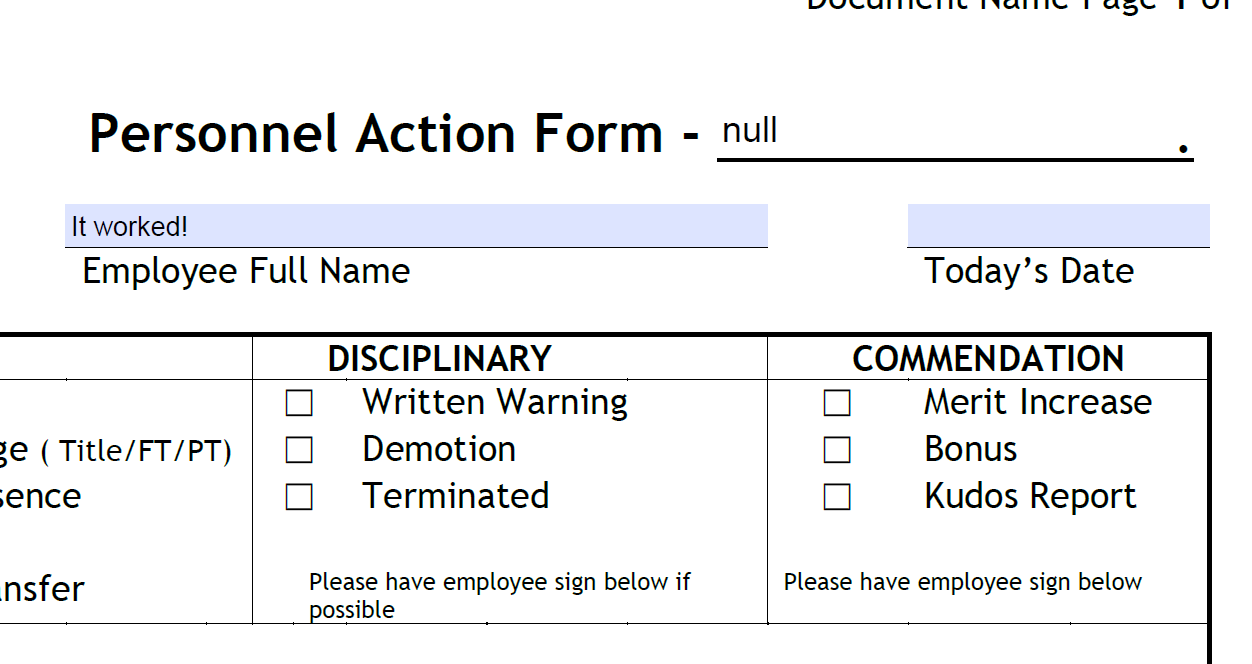
I'm not an absolute beginner to JavaScript, but I'm struggling in DC Pro to get this seemingly simple task to work
If a manager clicks that this is a written warning, the field next to Personnel Action Form at the top should say "Written Warning."
If the manager clicks the box that this is a demotion, the field should say "Demotion."
I've tried quite a few combinations of code in the "Document JavaScripts" console to get this to work, and so far that "null" is the closest I've gotten to any action. Help please! 





Copy link to clipboard
Copied
Sure. You can then use something like this as the custom calculation script of the text field:
var fields = ["Field 1", "Field 2"]; // enter actual field names here
var values = [];
for (var i in field) {
var f = this.getField(fields);
if (f==null) {console.println("ERROR: " + fields); continue;}
if (f.valueAsString!="Off") values.push(f.valueAsString);
}
event.value = values.join(", ");
 8
Replies
8
8
Replies
8


Copy link to clipboard
Copied
What are the names and export values of those two check-boxes? If they don't have the same name, what should happen if both are ticked?
Copy link to clipboard
Copied
They are all named simply "disciplineWarning", or "disciplineDemotion" and their export values are just set to "Yes". Should the export value for each be unique, even though they're not a group?
Oh, and I'm not really caring if multiple values are selected. I assume each check would change the text field so the last one checked would be it, even if there are multiple selections. That's fine with me.
Copy link to clipboard
Copied
- No, the values don't have to be unique if they have unique field names.
- This is not how it will work. The way to do it is by using the calculation script of the text field, so the order in which they are ticked doesn't matter. You need to clearly define how it needs to work. Either decide what should happen when both fields are ticked, or change it so that scenario is not possible.
Copy link to clipboard
Copied
That is one of the the things that has actually been perplexing me in searching for answers to this. I am not given the option to add scripts or even calculations to fields in the properties, when I've seen videos and screenshots showing those tabs.
This is definitely Acrobat Pro DC verision 2019.010.20100 - activated and legit through my office, but it seems to be missing that functionality.

Copy link to clipboard
Copied
You clicked the check-box that says "This file requires signatures" (or something like that) when you created it, right? This is a common problem. To fix it, click on Tools - Prepare Form and then click on "More" at the right side of the window and then on "Revert to Acrobat Form".
Copy link to clipboard
Copied
Wow, thanks so much, that really fixed it, bringing back those extra tabs! Now I feel like I have more options.
As far as being specific if multiple values are checked, very well, if I must, I must. Assuming I changed the export value of every checkbox to be unique, is there a simple code that would allow the field to equal the return value of each checked box - kind of a concatenation?
Copy link to clipboard
Copied
Sure. You can then use something like this as the custom calculation script of the text field:
var fields = ["Field 1", "Field 2"]; // enter actual field names here
var values = [];
for (var i in field) {
var f = this.getField(fields);
if (f==null) {console.println("ERROR: " + fields); continue;}
if (f.valueAsString!="Off") values.push(f.valueAsString);
}
event.value = values.join(", ");
Copy link to clipboard
Copied
Thanks for everything!


Get ready! An upgraded Adobe Community experience is coming in January.
Learn more
 AdChoices