


Copy link to clipboard
Copied
I know in Acrobat Pro it is possible to create an email submit button that only submits the data from selected fields.
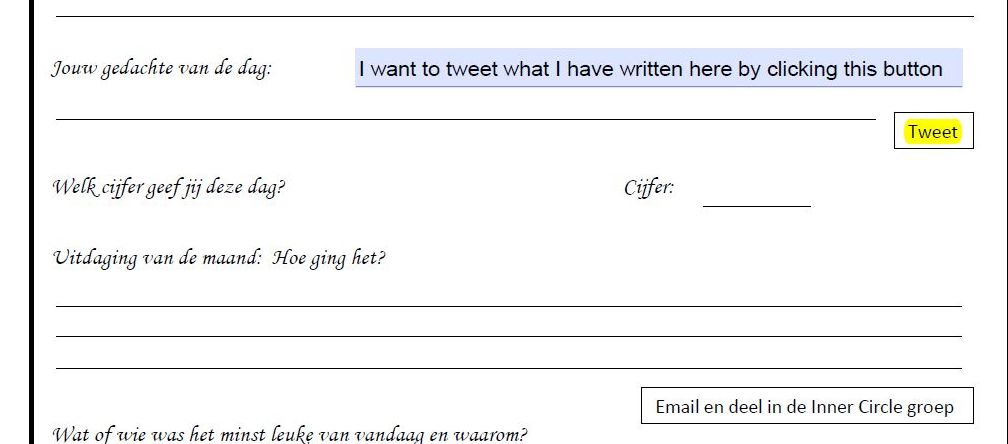
Is it possible to create a 'Click to Tweet' button that takes the text from one field and Tweets it?
Thanks in advance for any answers.
Alan





Copy link to clipboard
Copied
You would need to incorporate it into your script.
Something like this:
app.launchURL("https://twitter.com/intent/tweet?text=" + this.getField("TweetText").valueAsString);
 14
Replies
14
14
Replies
14


Copy link to clipboard
Copied
You'll need to study the Twitter API and see if there's an option to send a tweet via a URL or even an email.
This page might be helpful: Web Intents — Twitter Developers
Copy link to clipboard
Copied
I had a quick look at the API and this seems to be the basic URL to use to generate a new Tweet (remove the asterisk after twitter.com... I added it so that the URL doesn't get replaced with the title by the forums system) :
https://twitter*.com/intent/tweet?text=Hello%20world
Of course, the user has to be logged in to their Twitter account for it to be posted.
Copy link to clipboard
Copied
Thank you. How does this 'take the text entered in to a text field' and tweet it?
Copy link to clipboard
Copied
Copy link to clipboard
Copied
You would need to incorporate it into your script.
Something like this:
app.launchURL("https://twitter.com/intent/tweet?text=" + this.getField("TweetText").valueAsString);
Copy link to clipboard
Copied
Thank you. That's very helpful. Would you be kind enough to give me a step by step guide as I haven't a clue what I'm supposed to do.
Thanks
Alan
Copy link to clipboard
Copied
Put that code as the Mouse Up action of your Tweet button. You just need to adjust the name of the text field to match the one in your file (where the user is supposed to enter their "thought of the day").
Copy link to clipboard
Copied
Perfect - thank you very much.
Copy link to clipboard
Copied
Thank you very much for taking the time to answer my question. Your solution works perfectly.
While I have you attention, may I push my luck and ask if you know if it is possible to take text from a field and add it to the body of an email (as opposed to an attachment) by clicking a button?
Thanks in advance.
Copy link to clipboard
Copied
Yes, it's possible. See this tutorial: https://acrobatusers.com/tutorials/dynamically-setting-submit-e-mail-address
Copy link to clipboard
Copied
Thanks for trying to help but again, not knowing javascript or being familiar with the language being used on the tutorial, I haven't a clue what it is talking about or what part of it is relevant to my question.
I am pretty sure that to do a simple thing like adding some data from a text field to the body of an email doesn't require line after line of code such as there is on this tutorial.
I am sure there is a simple answer just like the one you gave before.
If you know the way to do this, would you be able to just tell me exactly what is required.
I just want to add a button that when pressed sends the text from a particular field to a particular email address.
I really don't know what part of this tutorial is relevant to this question: https://acrobatusers.com/tutorials/dynamically-setting-submit-e-mail-address
Thanks again - take care
Copy link to clipboard
Copied
Problem solved.
I managed to do this by splicing together various bits of code from several tutorials and to my surprise, it works perfectly.
app.mailMsg({bUI:false, cTo:"taggalan@hotmail.co.uk",
cSubject: "Add subject line text here",
cMsg: this.getField("Text1").value,});
Thanks again for your 'Tweet' solution.
Alan
Copy link to clipboard
Copied
You see? I gave you a fishing pole instead of a fish, and you were able to
catch one yourself...

Copy link to clipboard
Copied
Hi.
http://twitter.com/intent/tweet/?url={url}&text={text}&via={via}
{url} : URL to share
{text} : message to tweet (optionnel)
{via} : Twitter id (optionnel)
You can find more info and a sample here: http://abracadabrapdf.net/ressources-et-tutos/edition-modification/partager-sur-twitter-depuis-un-pd...
(Google Translate is your friend)
Acrobate du PDF, InDesigner et Photoshopographe


Get ready! An upgraded Adobe Community experience is coming in January.
Learn more
 AdChoices