


ChickenDiesel
New Participant
January 13, 2023
Question

Computer can't shut down because software is being installed - acrobat

  • January 13, 2023
  • 3 replies
  • 19344 views

Just went to shut down my computer and the following message popped up on my screen.
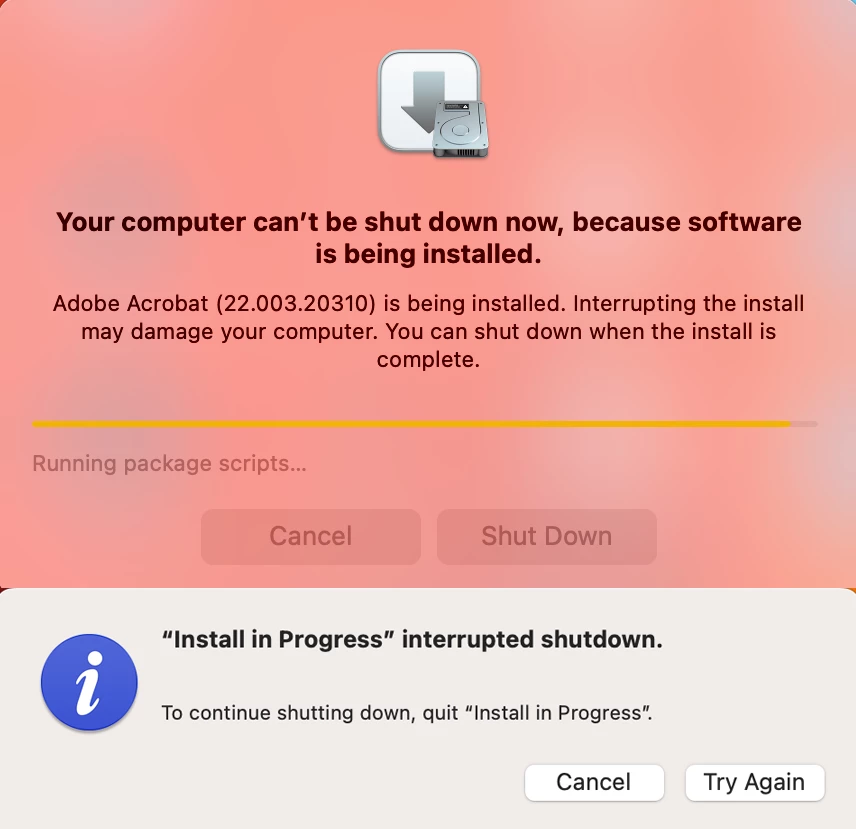


Firstly: is it even possible for Adobe software installs to cause damage to my computer?

Secondly: has anyone ever seen this message before? I've never had an active Adobe install interrupt shutting down of the computer!


I want to check this as it feels suspiciously out of character for Adobe and also if they have changed and this is now what happens, we need to know.


Thank you

3 replies

Inspiring
November 14, 2024

FRIST of all, why is Acrobat allowed to update/auto-update OUTSIDE of the Creative Cloud application where I seen and handle ALL OTHER UPDATES?! 


SECOND, the tone of this message "may damage your computer"? Come on Adobe, shame on you for taking some position of control over my machine where I have no idea what is going on in the background. I've seen this error about 3 times, and every time I've been needing to restart my computer because of some issue while working, assuming always in some other Adobe application, and I need to get restarted and back up and running again quickly. This interruption is NOT ideal or appreciated. Its a bit stess inducing. 


I've shut off the auto updater inside the Adobe settings to hopefully never see this mesage again. WHich prompted "Adobe Inc." to add a background Login Item for Adobe Acrobat Reader DC (I have Pro installed) but I've shut that off as well. 

content1971
Known Participant
November 14, 2024

Yes this! And for anyone wondering, you must:

  1. Open Acrobat app
  2. Open preferences (Acrobat -> Preferences)
  3. Scroll to bottom of left panel -> Updater settings
  4. Uncheck

and Adobe will immediate ask your system permission to install a "Helper App" which if you deny, will leave the Updater set to automatic. So you need to give permission to that mysterious helper app and install it, whatever it does.


Then go your System -> Users & Groups and select your account, then select Login Items, then turn off that Adobe Helper app and then delete it by clicking the little minus button.


Then wipe hands on pants and thank Adobe for wasting your time.

Inspiring
November 25, 2024

On both my Mac's that I have turned off the auto update, I CONTINUE to get harrased by a pop up that WON'T GO AWAY. Hitting the Escape key makes it go away, as does "Open System Settings" however it still come back. Obviously no intention of hitting "Remind me later". 


Adobe:

Please add Acrobat to Creative Cloud like EVERY OTHER app to manage updates. 

OR, figure out how get this mess cleared up. There are other resources for making and viewing PDFs. Acrobat doesn't need to do stuff on its own without my knowledge and just update whenever it wants to and stop restarts or other user opterations. Its overstepping. 


New Participant
November 10, 2024

Same here. I only have Adobe reader installed on my Macbook, and now I'm also stuck (can't reboot it, can't abort the update). It's especially upsettings because I DID disable automatic updates. Seriously Adobe, fix your stuff.

Amal.
Community Manager
Community Manager
January 13, 2023

Hi @ChickenDiesel 


Hope you are doing well and am sorry for the trouble.


A new version of Adobe Acrobat (22.3.20310) is out now and it looks like it was getting installed on your computer when you tried to shut down it down.


As the installation was in progress and got interrupted, you got the above-shared pop messages. the statement 'Interrupting the install may damage the computer' means that the Acrobat application may not work properly due to the same reason.


Hope this information will help


Regards

Amal

content1971
Known Participant
September 23, 2023

Hi Amal, thanks but this answer doesn't help. Since when does Adobe get unilateral access to my computer? I never gave permission to update this software - I was not notified it was happening. It just started in the background. The reason I discovered it was because my computer was hanging up and was basically unusable – so in the middle of my work I stopped everything to restart my system and I get this pop up explaining that an acrobat update is in fact going on. No idea it was started, no indication of how long MY comptuer will be tied up for. Adobe is acting very Microsoftian, and whether or not it's good for me that I have constantly updated Acrobat software, this model is wrong. Be more transparent. Be better.

Amal.
Community Manager
Community Manager
September 25, 2023

Hi there


You may also go to Edit or Ctrl+K (Win), Adobe Acrobat (Mac) > Preferences > Updater > Uncheck 'Automatically install updates' > Click OK and reboot the application and check.


~Amal