


- Home
- Acrobat
- Discussions
- Re: Conditional Formatting Color fill in Adobe Acr...
- Re: Conditional Formatting Color fill in Adobe Acr...

Copy link to clipboard
Copied
I am trying to conditionally format a field in my PDF to fill with a certain color based on the selected dropdown list's value. It seems i have gotten some traction, but the only color that works is red, and it does not change colors if I select a different value from my dropdown. I need help with my Javascript. Here is what I have so far:
var v = this.getField("Dropdown4.5").value;
if (v="Business Now") {event.target.fillColor = color.green;}
if (v="Business Future") {event.target.fillColor = color.blue;}
if (v="Daily To-Do's") {event.target.fillColor = color.red;}
if (v="Marketing") {event.target.fillColor = color.orange;}
if (v="Learning Plan") {event.target.fillColor = color.yellow;}





Copy link to clipboard
Copied
That first line is missing getField, so it should be:
var v = getField("Dropdown4.8").value;
though it's best to get into the habit of using the valueAsString property instead when you'll be dealing with a field value as a string:
var v = getField("Dropdown4.8").valueAsString;
 33
Replies
33
33
Replies
33




Copy link to clipboard
Copied
You're using the wrong operator. The comparison operator in JS is "==". So change all the instances of this code:
if (v="Business Now")
To:
if (v=="Business Now")
Copy link to clipboard
Copied
try67 it still seems to not be working. I added the double equal sign, but now no color fills no matter which value is selected. Is the rest of my script correct?


Copy link to clipboard
Copied
Well, you've switched from DropDown4.5 in your first example to DropDown4.8 in your new one.
Copy link to clipboard
Copied
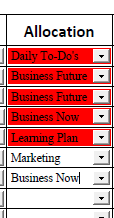
I tried to format dropdown4.5 too and had no luck, I continued on with a few more drop-down fields and also had no luck. I screenshot the dropdown 4.8 for reference, but it is not changing fill color at all (currently selected "Business Now" that should fill green)
Copy link to clipboard
Copied
That first line is missing getField, so it should be:
var v = getField("Dropdown4.8").value;
though it's best to get into the habit of using the valueAsString property instead when you'll be dealing with a field value as a string:
var v = getField("Dropdown4.8").valueAsString;
Copy link to clipboard
Copied
Boom! That worked exactly as expected. Thank you George_Johnson
Copy link to clipboard
Copied
You had it correct in the original code you posted... Not sure why you changed it later on.

Copy link to clipboard
Copied
Hi George, I am trying the below Code and it's giving me "SyntaxError Unterminted literal". What Am I Doing Wrong?
var v = getField("Dropdown9”).valueAsString;
if (v="Compliant") {event.target.fillColor = color.green;}
if (v="best Practice") {event.target.fillColor = color.blue;}
if (v="Critical") {event.target.fillColor = color.red;}
if (v="Major") {event.target.fillColor = color.orange;}
if (v="Minor") {event.target.fillColor = color.yellow;}
Thank you in Advance!
Copy link to clipboard
Copied
Hi George, I am trying the below Code and it's giving me "SyntaxError Unterminted literal". What Am I Doing Wrong?
var v = getField("Dropdown9”).valueAsString;
if (v="Compliant") {event.target.fillColor = color.green;}
if (v="best Practice") {event.target.fillColor = color.blue;}
if (v="Critical") {event.target.fillColor = color.red;}
if (v="Major") {event.target.fillColor = color.orange;}
if (v="Minor") {event.target.fillColor = color.yellow;}
Thank you in Advance!

Copy link to clipboard
Copied
Unterminated Literal means that the ending delimiter for a literal value was not found. It boils down to a missing quote on one of your string literal. In this case, what looks like a ending quote is not really a compliant quote, on the word "Dropdown9". JavaScript syntax is all in ASCII characters, and the ending quote on that word is UNICODE. This is the kind of thing that gets inserted when code is edited in a word processor, so don't edit code in a word processor.
Just replace it and you are good.
Use the Acrobat JavaScript Reference early and often
Copy link to clipboard
Copied
Thank you so much for the help. So what should i change? Can you please give me and example on how it should be worded.No really an expert on on Adobe.
Thanks again
Copy link to clipboard
Copied
> Just replace it and you are good.
Not quite... There are plenty of other errors in their code.
- Change all instances of:
if (v="Compliant")
To:
if (v=="Compliant")
- There's no such thing as color.orange. Replace it with a color object, like this:
event.target.fillColor = ["RGB", 255/255, 165/255, 0/255];
- This seems wrong:
if (v="best Practice")
It should probably be:
if (v=="Best Practice")
Remember that JS is case-sensitive!
Copy link to clipboard
Copied
Thank you sir. I tried == form your advise on this thread, did not work. Got the same error.
Copy link to clipboard
Copied
You got the same error because you didn't fix the syntax error. Take a closer look at the quotes, at the location I specified. I mean really look at it. Can you see a difference between the ending double quote and all the other double quotes?
And this is not related to Adobe, or Acrobat. The syntax error is a JavaScript issue.
Use the Acrobat JavaScript Reference early and often
Copy link to clipboard
Copied
My corrections are not related to the error message. Follow Thom's good advice to solve that one first, then do the rest.
Copy link to clipboard
Copied
Thanks for catching these. I was just looking for the syntax error and not the logic.
Use the Acrobat JavaScript Reference early and often
Copy link to clipboard
Copied
Thank you Gentlemen!! This correction worked I am no longer getting the Error. However, the fill color is not populating. Here is what I have in there so far:
var v = getField("Dropdown9").valueAsString;
if(v=="Compliant"){event.target.fillColor=color.green;}
if(v=="Critical"){event.target.fillColor=color.red;}
if(v=="Minor"){event.target.fillColor=color.yellow;}
if(v=="Major"){event.target.fillColor=["RGB", 255/255, 165/255, 0/255];}
if(v=="Best Practice"){event.target.fillColor=color.blue;}
Any suggestions?
Copy link to clipboard
Copied
Move the code to the field's custom Calculation script. If it still doesn't work, and no error messages appear in the console, share the file for further help.
Copy link to clipboard
Copied
PS. You have to disable the fields highlighting to see the fill color, while the field is not in focus.
Copy link to clipboard
Copied
Thank you. Got no Errors, buit still the fill color is not populating. Here is a snapshot


Copy link to clipboard
Copied
Forgot to mention that i did disable the Highlight exsisting Filed
Copy link to clipboard
Copied
Never mind, it worlked!! The name of the dorpdown list was chanaged , that's why it did not at first but I caughtt that and changed it in the code..
Thank you guys so much!!!
Copy link to clipboard
Copied
I am also having issues with the conditional formatting of cells, but I'm not using dropdown menus. I'm trying to conditionally format cells based on their individual value. The JavaScript I'm using is
var triggerValue = this.getField("Vendor Score").value;
var targetField = this.getField("Vendor ScoreRow2");
if (triggerValue === "100") {targetField.fillColor = color.green;
} else if (triggerValue === "75") {targetField.fillColor = color.blue;
} else if (triggerValue === "50") {targetField.fillColor = color.yellow;
} else if (triggerValue === "25") {targetField.fillColor = color.orange;
} else if (triggerValue === "0") {targetField.fillColor = color.red;
}
I'm not receiving any error codes, however, the field doesn't seem to change color.

Thoughts on where I'm going wrong?
Copy link to clipboard
Copied
1. Change this line:
var targetField = this.getField("Vendor ScoreRow2");
To:
var targetField = this.getField("Vendor ScoreRow2").valueAsString;
2. There's no such thing as color.orange. Change it to:
} else if (triggerValue === "25") {targetField.fillColor = ["RGB", 255/255, 165/255, 0/255];

-
- 1
- 2

Get ready! An upgraded Adobe Community experience is coming in January.
Learn more
 AdChoices
