


- Home
- Acrobat
- Discussions
- Hi Shivam this was very helpful, however, how ca...
- Hi Shivam this was very helpful, however, how ca...
Default to show file name vs. title of doc when converting from Word to PDF

Copy link to clipboard
Copied
Is it possible to convert a Word doc to a PDF and have the default be to show the "file" name, not the "title" of the previous document?


 6
Replies
6
6
Replies
6


Copy link to clipboard
Copied
If you mean in the Acrobat/Reader window title, no. You will need to open the PDF in Acrobat and set the parameter in the "Initial View" property. This can be done in a batch, Action, mode with Acrobat Professional.
Apache OpenOffice.org can set the title to display and option of it's Export as PDF settings.
Copy link to clipboard
Copied
I meant to add that I'm working with Adobe Acrobat Standard 2017. Any ideas on that version? Many tx!


Copy link to clipboard
Copied
Hi Mishala,
Sorry for the delayed response.
You can access document's initial view settings by opening pdf file in Acrobat > click File > Properties > Initial View > Window Options.
Show > file name/document title. (below is the screenshot):
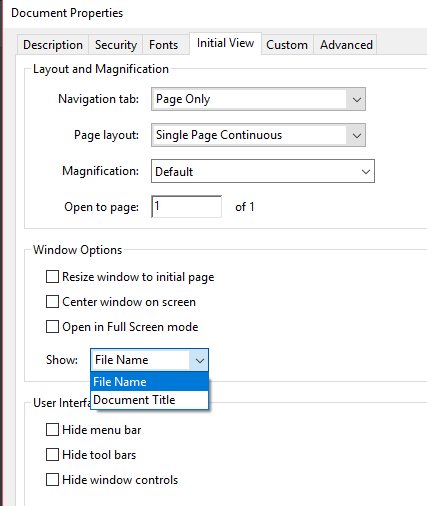
Let us know if you need any help.
Shivam

Copy link to clipboard
Copied
Hi Shivam
this was very helpful, however, how can I store this setting as default?
(when I close the PDF and open another one, the setting is back to "Document title)...
Cheers
Sab

Copy link to clipboard
Copied
This setting is file-specific, not application-specific.
That means it is set for each individual file rather than for all files that Acrobat opens.
Returning to your original post, I think you're trying to set the Word-to-PDF conversion settings to always set "Title" rather than "File Name" in each exported PDF.
Adobe PDF Maker doesn't allow us to choose that option when exporting PDFs from Word. However, Adobe does have that option in InDesign in its similar module to export PDFs from InDesign. So Adobe has done it in at least one other program.
This feature has been requested at Adobe's user feedback forum, https://acrobat.uservoice.com/forums/590923-acrobat-for-windows-and-mac/suggestions/38024752-documen...
Visit it and VOTE! Adobe records the number of votes an idea gets before they decide to build it into the program. And if you have colleagues who must make accessible PDFs, encourage them to visit the webpage and vote for this much-needed feature.
| PubCom | Classes & Books for Accessible InDesign, PDFs & MS Office |


Copy link to clipboard
Copied
You can remove the title from the Word document.


Get ready! An upgraded Adobe Community experience is coming in January.
Learn more
 AdChoices