Copy link to clipboard
Copied
How do I change the Default View Size? When I open a document in Adobe Acrobat XI Pro, it opens at 198%. I would really like to have it open at 75% so I can see the full page right away. I would like to know if the program can be adjusted so that ALL documents can be opened at 75% automatically.
Copy link to clipboard
Copied
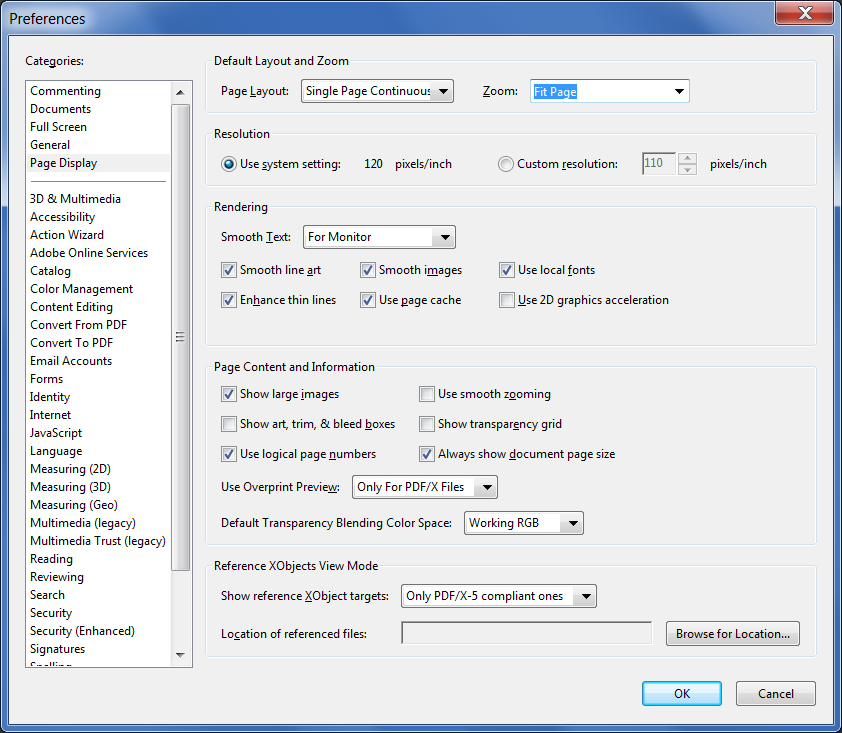
Yes, but if you want to view the full page size it's better to use something like Fit Page or Fit Height, not a pre-defined zoom level. Either way, you can do it by going to Edit (or the app menu if you're on a Mac) - Preferences - Page Display and setting the Zoom setting to the desired value:
Copy link to clipboard
Copied
Hi ,
I don't have Acrobat XI to test with , but I am pretty sure there is a setting in preferences which is like this
Which is under Page Display, where you can set you defaults.
Get ready! An upgraded Adobe Community experience is coming in January.
Learn more




