
Participant
April 23, 2020
Answered

Distiller can't find an installed font

  • April 23, 2020
  • 4 replies
  • 14628 views

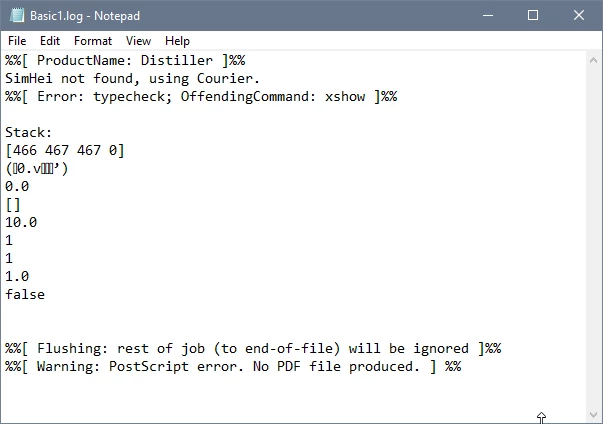
I have been using the SimHei font for a long time with no problem. Now when I try to print to Adobe PDF from FrameMaker, Distiller gives an error that the font is not found. I can save as PDF from FrameMaker with no error, so the font is installed and working properly. This is also causing a problem with distilling graphics from FrameMaker files for use in RoboHelp. Distiller worked fine with this font 4 months ago. I have tried reinstalling the font and changing permissions on the font file, to no avail. Any help would be much appreciated, because I'm out of ideas! Here's the error:
 

Correct answer mch58997416

Hi @Andreas31574567aglb, thank you for posting that. Unfortunately for me it doesn't solve the problem. I always install my fonts directly into c:\windows\fonts. The only thing that is working for me is to remove the check from "Rely on system fonts only, do not use document fonts" in the printer properties when printing the document to Adobe PDF.
Of course there is always the solution of using Microsoft Print to PDF, which works without issues.

4 replies

mikes15457966
Participant
June 24, 2025

Hi, I have been having this problem for a while with both Win 10  & 11 with a 2004 era ttf.


This is how you fix it:

1. Delete the problematic font in C\windows>fonts folder.

2. Right click the the font

3. Select adminstrative\"install for all users".  The font will go to the correct  C:windows\fonts folder. 


I think MS goofed up/reversed this code. If you select "install", it inserts the font into C:\Users\xxx\AppData\Local\Microsoft\Windows\Fonts, allowing roaming with 365. The font doesnt actually end up in C:\windows\fonts folder, and distiller will not pick it up on launch.

Participant
August 9, 2023

Hi, for anyone facing the same issue: For me the solution was to install the fonts in the correct C:\Windows\Fonts directory. Windows placed my manually installed fonts in some Word Roaming directory for my Windows user account but not for all users into the default Windows fonts directory. After I fixed this by uninstalling the fonts and installing them directly into the Windows fonts directory everything worked as expected.

Hope this helps.

mch58997416Correct answer
Participating Frequently
August 9, 2023

Hi @Andreas31574567aglb, thank you for posting that. Unfortunately for me it doesn't solve the problem. I always install my fonts directly into c:\windows\fonts. The only thing that is working for me is to remove the check from "Rely on system fonts only, do not use document fonts" in the printer properties when printing the document to Adobe PDF.
Of course there is always the solution of using Microsoft Print to PDF, which works without issues.

Participant
August 9, 2023

Did you check the c:\windows\fonts directory in the Windows command line tool? I also saw the manually installed font when accessing the fonts directory in Explorer. But when I've run (WIN+R) "cmd", then "cd C:\Windows\Fonts" and finally "dir". I didn't see the font files I've installed manually.

Another way to find out the real location of the font files is to open the properties dialogue for the missing font in the fonts directory in Explorer and then look for the location info.

Participant
October 7, 2020

I have the same problem when I try to save the resultung PDF to a Folder which is synchronised by Microsoft Onedrive.

When I choose another location, the file is created as expected.


%%[ ProductName: Distiller ]%%
DINOffc not found, using Courier.
DINOffc-Bold not found, using Courier.
DINOffc-Medi not found, using Courier.
DINOffc-Light not found, using Courier.
%%[ Error: invalidfont; OffendingCommand: xshow ]%%

Stack:
[100 96 91 91 46 96 54 54 97 46 46 161 46 115 77 97 46 97 98 61 47
100 97 103 97 61 46 99 61 97 103 46 101 97 87 61 97 46 82 97 161 46
108 61 96 61 103 91 46 79 110 103 61 132 104 77 57 79 0]
(
0 , -
 2" 3  4)


%%[ Flushing: rest of job (to end-of-file) will be ignored ]%%
%%[ Warning: PostScript error. No PDF file produced. ] %%

Participating Frequently
October 8, 2020

Sorry to hear you're experiencing the same software bug in Acrobat. OneDrive wasn’t involved in our problem, so this error may have multiple causes. What's clear is that the error message generated "Font not found, using Courier" is NOT the problem, nor is the solution likely to be something that involves re-embedding the font.

Can we get someone from Adobe to investigate this?

It's really helpful to have a community of knowledgeable users, but that's not a substitute for Adobe's requirement to provide customer support!

Participant
April 11, 2021

I encountered this same problem as well. The instructions on this page fixed it for me. Hope it works for you too! https://techraptor.net/article/adobe-printing-error-productname-distiller-cambria-not-found-using-courier

Participating Frequently
August 12, 2020

I'm having same problem trying to use Acrobat to print to PDF from PowerPoint.

Font installed, fonts embedded when printing from PP. 

Over to you, Adobe. What's up??