Exit
  • Global community
    • Language:
      • Deutsch
      • English
      • Español
      • Français
      • Português
  • 日本語コミュニティ
  • 한국 커뮤니티
0

Dynamic Stamp Dialog box doesn't populate text field

New Here ,
Jun 02, 2021 Jun 02, 2021

Good Afternoon,


Asking for help. I am creating a simple script with radio buttons and a test field. I created the code, I am not getting any errors. However the text field SmTx is returning undefined and I can't figure out why: This is my stamp:
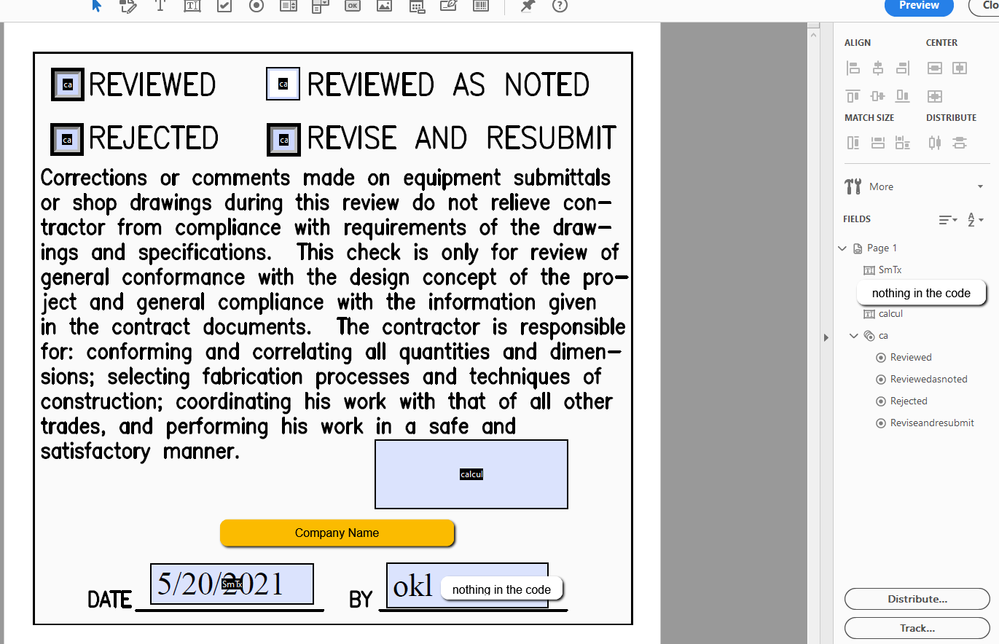
2021-06-02_17-48-42.png

The company name and extra text field has been masked. I am just trying to get one text field to work. Please see my code below:

//console.log("Hello, World!");
// Setup List values
var oList = {Reviewed:-1, Reviewedasnoted:-1, Rejected:-1, Reviseandresubmit:-1};

// Dialog Object definition
var dlg = { strText:"",
initialize: function(dialog)
{
var dlgInit = {
"SmTx": this.strText,
lst1:oList
};
dialog.load(dlgInit);

},
commit: function(dialog)
{
var oRslt = dialog.store();
//this.oSelect = dialog.store().lst1;
this.oSelect = oRslt.lst1;
this.strText = oRslt.Smtx;

},
description:
{
name:"List Select Dlg",
elements:
[
{
type:"view",
elements:
[
{
type:"static_text",
item_id:"stat",
name:"Choose Your Path",
},
{
type:"popup",
item_id:"lst1",
char_width:6

},
{
type: "static_text",
item_id: "sta0",
name: "Stamp Text",
alignment: "align_right"
},
{
type: "edit_text",
item_id: "SmTx",
width: 100
}
]
},
{type:"ok_cancel"}
]
}
};

//call a stamp
if(event.source.forReal && (event.source.stampName == "#C4ca"))

{

if ("ok" == app.execDialog(dlg))

{

var cRtn = "Off";
for(cRtn in dlg.oSelect)
if(dlg.oSelect[cRtn] > 0) break;
this.getField("ca").value = cRtn;
this.getField("SmTx").value = dlg.strText;

}

}

I have searched all the internet and have purchased the all about pdf stamps book, everything is very help full but I can't find the error. Anyone please help.

1.1K
Translate
Report
Community guidelines
Be kind and respectful, give credit to the original source of content, and search for duplicates before posting. Learn more
community guidelines
1 ACCEPTED SOLUTION
Community Expert ,
Jun 04, 2021 Jun 04, 2021

JS is case-sensitive.

Change this line in your code:

this.strText = oRslt.Smtx;

To:

this.strText = oRslt.SmTx;

View solution in original post

Translate
Report
Community guidelines
Be kind and respectful, give credit to the original source of content, and search for duplicates before posting. Learn more
community guidelines
Community Expert ,
Jun 02, 2021 Jun 02, 2021

Please post the exact name of the Adobe program you use so a Moderator may move this message to that forum

Translate
Report
Community guidelines
Be kind and respectful, give credit to the original source of content, and search for duplicates before posting. Learn more
community guidelines
New Here ,
Jun 04, 2021 Jun 04, 2021

I am using Adobe Acrobat Pro DC, THank yoU!!

Translate
Report
Community guidelines
Be kind and respectful, give credit to the original source of content, and search for duplicates before posting. Learn more
community guidelines
Community Expert ,
Jun 04, 2021 Jun 04, 2021

JS is case-sensitive.

Change this line in your code:

this.strText = oRslt.Smtx;

To:

this.strText = oRslt.SmTx;

Translate
Report
Community guidelines
Be kind and respectful, give credit to the original source of content, and search for duplicates before posting. Learn more
community guidelines
New Here ,
Jun 04, 2021 Jun 04, 2021
LATEST

Thank so much!! once I fixed the case it worked like a charm!

Translate
Report
Community guidelines
Be kind and respectful, give credit to the original source of content, and search for duplicates before posting. Learn more
community guidelines

