New Participant
April 28, 2024
Answered

Enable scrolling on all PDFs by default.

  • April 28, 2024
  • 3 replies
  • 27042 views

I open and close PDFs all day every day. I always have to go in and Enable Scrolling. I have it set to remember last time, but that doesn't work either. The default page view setting Single Page Continuous does nothing. This amounts to a considerable time sink every day.

Correct answer Dustin_W2

You are correct.  Adobe acrobat has an issue where selecting "continuous scrolling" in Page Display Preferences is ignored in  Version: 24.2.20854.0, Creation Date: 2024/06/14.  I'm told it is "fixed" in more recent versions as of 2024/08/01.


I agree, it is super annoying to click through all the menus to re-enable this. on. every. pdf. you. open.  Yeesh.


Workaround was to pin the button to the sidebar, so you can single click toggle on/off. 


1. On the sidebar, find the Page View button, that will pop-up a menu where you can easily enable scrolling. 

2. If you also hover there and click the pin icon. 
3. That will place that button on your sidebar for quick access.
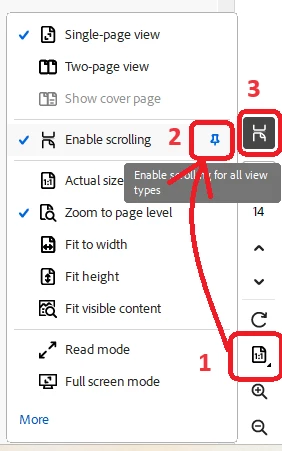


Afterwhich, scrolling enable becomes a SINGLE click enable.  It's not default like you wanted, but is better than the old four click method below.  Seriously, 4 clicks. for. every. pdf. every. time.
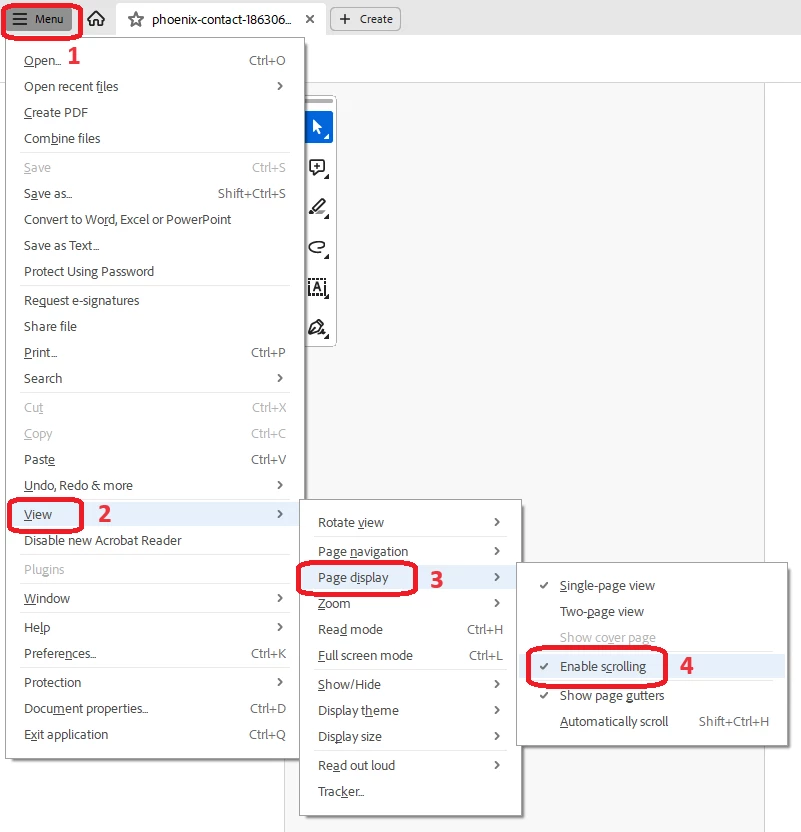


3 replies

Dustin_W2Correct answer
New Participant
August 13, 2024

You are correct.  Adobe acrobat has an issue where selecting "continuous scrolling" in Page Display Preferences is ignored in  Version: 24.2.20854.0, Creation Date: 2024/06/14.  I'm told it is "fixed" in more recent versions as of 2024/08/01.


I agree, it is super annoying to click through all the menus to re-enable this. on. every. pdf. you. open.  Yeesh.


Workaround was to pin the button to the sidebar, so you can single click toggle on/off. 


1. On the sidebar, find the Page View button, that will pop-up a menu where you can easily enable scrolling. 

2. If you also hover there and click the pin icon. 
3. That will place that button on your sidebar for quick access.


Afterwhich, scrolling enable becomes a SINGLE click enable.  It's not default like you wanted, but is better than the old four click method below.  Seriously, 4 clicks. for. every. pdf. every. time.



New Participant
September 26, 2024

Thank you so much, I was going crazy. Its the bar on the RIGHT!! 

New Participant
September 3, 2025

Thanks mate. Going crazy not finding it...

Abambo
Community Expert
April 28, 2024

I'm sorry, but my documents scroll. What is your OS and version, and what is your Acobat and version?

ABAMBO | Hard- and Software Engineer | Photographer
New Participant
April 28, 2024

Ah, my bad. I use an iphone 12pro, ipad pro 5th gen 12.9", and a Windows 11 pro laptop.

*Scrolling doesn't default specifically on my Windows 11 pro laptop. *

Abambo
Community Expert
April 28, 2024

On my iPad, I just swipe up or down.

ABAMBO | Hard- and Software Engineer | Photographer
kglad
Community Expert
April 28, 2024

assuming acrobat...


in the future, to find the best place to post your message, use the list here, https://community.adobe.com/

p.s. i don't think the adobe website, and forums in particular, are easy to navigate, so don't spend a lot of time searching that forum list. do your best and we'll move the post (like this one has already been moved) if it helps you get responses.


<"moved from using the community bugs">