Copy link to clipboard
Copied
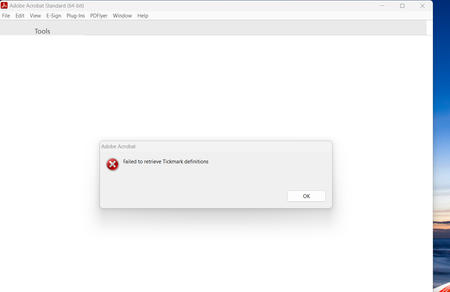
I have been getting the below error message indicating "Failed to retrieve Tickmark definitions". Any idea how to stop this from happening? I have had to uninstall and reinstall Adobe Acrobat almost every day to be able to utilize the software. It seems to happen after I open a PDF from Outlook (could be a coincidence but thought it was worth mentioning in case it was not). Thank you in advance for any insight!!
Copy link to clipboard
Copied
I started experiencing the same problem. However, mine occurs when i open Adobe from any source or if i open Adobe Acrobat Pro on its own without opening a file.
I noticed my issue start when i modified my registry key:
HKEY_LOCAL_MACHINE\SYSTEM\CurrentControlSet\Control\Session Manager
Multi-string Value: PendingFileRenameOperations
I had to modify this registry value to complete a test installation of another piece of software and ever since then, Adobe has not worked for me. Unfortunately i havent found a soluton yet.
Not sure if this applies to your system in any way, but may help lead you to a solution.
Thank You!
Regards,
GL

Copy link to clipboard
Copied
I've got the same issue but I have no idea how to correct for it. I recently uninstalled CCH Engagement, which had an add-in to Acrobat that used Tickmark Definitions so this may well have caused the issue because Acrobat may still be looking for that control set. So how do I get it to stop? Acrobat automatically shuts down after I click OK on that error, yet I can't do anything else until I click OK.
Copy link to clipboard
Copied
CCH Engagement solution found on the CCH website for my issue. I'm back up and running.
Get ready! An upgraded Adobe Community experience is coming in January.
Learn more