After discovering this "new feature" in Pro 2020 upon "upgrading" from Pro X, I found a partial workaround to make Acrobat behave like it did before.
If you have access to an old version of Acrobat Pro (say, 9 or X), you can create the action in that program, export it (as a .sequ file), and then imported in the newer version of Acrobat. The prompts in Pro 2020 indicate the action won't be able to take advantage of the "latest features" but it doesn't matter, since after experimenting I found there were no really beneficial "features" at all over and above the functionality provided in earlier Acrobat Pro versions (i.e., 9 and X). While the imported action is not editable, it does run silently, just as it did in the older version and without opening each file and requiring user prompting for each step, and otherwise slowing down the entire goal of the automation. What I see is simply a watch icon as the action executes. In Pro X, it would show me some information about the number of files to be processed and its progress.
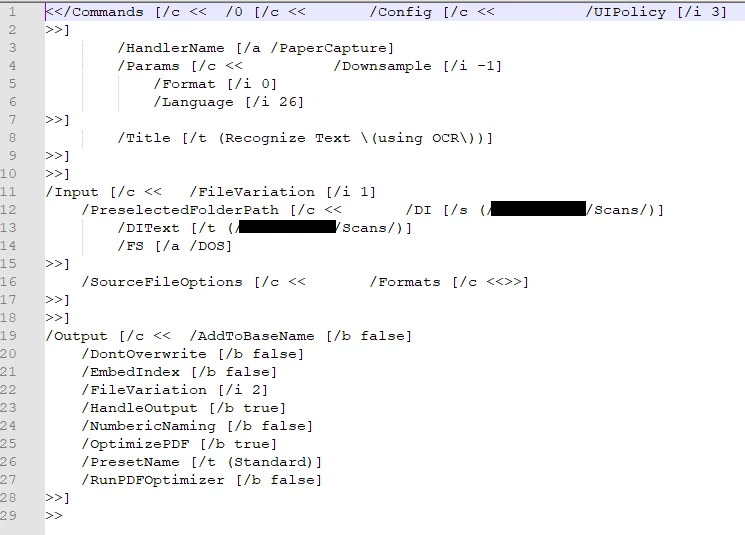
Alternatively, the same can be accomplished by direct code. Using a text editor, I see that the code inside the .sequ files is plaintext and relatively simple. For example, one of my actions is simply OCR'ing files from my scanner in a particular network folder, and it looks like this:
With some experimenting, one might be able to identify popular actions and the corresponding code inside the .sequ files and then write custom code into a .sequ file that can then be imported into the latest version of Acrobat. It seems that Acrobat still recognizes these old filetypes (code, really), even though the code in new .sequ files is XML.
If I was OCR'ing a lot of files or a really large PDF, I would just start a new instance of Acrobat in Windows via the Run command and
acrobat.exe /n
command.
Why Adobe decided to force the action Wizard to grab focus and otherwise require more user input to execute the desired steps is beyond me. This seems to be a significant step backwards in functionality for many users like myself who have simple and small automation needs. If Adobe simply wanted to prevent large-scale batch file automation, it probably could've written some code to prevent that at a certain threshold. Instead it chose to dumb-down the program and remove features that users have come to rely upon. That seems to be the plague of Silicon Valley: make it "better" by eliminating features, but saying the simplified and less-usable software has "new" features, and provide little-to no warning (read: transparency) for buyers who are "upgrading" from older software.


 AdChoices