


- Home
- Acrobat
- Discussions
- I can't open Adobe Reader DC that I paid for a reg...
- I can't open Adobe Reader DC that I paid for a reg...
I can't open Adobe Reader DC that I paid for a registered last year

Copy link to clipboard
Copied
I paid for Adobe Reader DC last year and registered it. Now I can't open any files because it says I need to license it. It will not take my serial number that I was given last year that is still on my account when I sign in. Why do I need to pay for a subscription to use something I paid $299.99 for at Office Max??? How to I fix this??? Please help me if you can. Thanks.
Yvette76991965


 22
Replies
22
22
Replies
22



Copy link to clipboard
Copied
Adobe Acrobat Reader DC is free software and doesn't require a serial number.
By chance do you mean Adobe Acrobat DC instead of Acrobat Reader DC? If so, did you install from the disk that you got from Office Max or did you find an installer somewhere else? What actual product are you trying to install (like I mentioned, if it requires a serial number, it ain't Reader)?

Copy link to clipboard
Copied
Did you by any chance try to reinstall it? Probably downloaded the wrong thing.
Copy link to clipboard
Copied
I bought the Adobe Acrobat Standard DC from Office Max for $299. It was a card with a redemption code on the back. I did go the the adobe.com to enter the code and get the serial number. Now when I open Adobe Acrobat DC it wants me to license the product and to use the trial for 30 days. This was paid for. It also was not a CD product since I had to download it from Adobe. When I sign in, I see my products with the serial numbers. I do understand why the product will not work now. I have a dell computer with windows 10.
Copy link to clipboard
Copied
Make sure you downloaded Adobe Acrobat Standard DC instead of Adobe Acrobat Pro DC.
Copy link to clipboard
Copied
I looked on my account and it says adobe acrobat version 12 windows platform. The release was 2015 windows adobe acrobat standard DC. I do not want to pay monthly for something I paid $299.99 for. I can't open any PDF. I can't reinstall unless adobe allows we too. I tried to put in my old redemption code and it said it was no longer valid. I have a serial number listed under my products on my account.
Sent from my iPhone
Copy link to clipboard
Copied
yvetteb76991965 wrote:
I looked on my account and it says adobe acrobat version 12 windows platform.
Don't look at your account. Please do what Test Screen Name mentioned. Go to Help>About... from within the actual program. What does it say next to "about"? Then click on that and let us know what it says next to "version" on the splash screen.
We're trying to determine what you installed, not what you bought.
Copy link to clipboard
Copied
I just clicked on the program and it comes up as sign in, does not open program. After signing in, it says acrobat trial. 30 days remaining or buy now. At bottom, it shows license this software, or start trial. ???
Sent from my iPhone
Copy link to clipboard
Copied
Please check the version number shown in Help > About. Let us know the full version number, something like 2015.123.12434. Also, there is a word "Classic" or "Continuous". And it may say "Standard" or "Pro". Please let us know what you see.
Copy link to clipboard
Copied
we assumed you'd clicked start trial and were running the software while trying to sort this out.
Copy link to clipboard
Copied
I can try that
Sent from my iPhone
Copy link to clipboard
Copied
We're also assuming you've at some time clicked License This Software, tried your serial number and had it rejected. how right are we with these two guesses?
Copy link to clipboard
Copied
The version is 2015.006.30279
Sent from my iPhone
Copy link to clipboard
Copied
It also says Adobe Acrobat Pro DC.
Sent from my iPhone
Copy link to clipboard
Copied
Yes. It looks like you downloaded the wrong version for your serial number. Go to this link: Download Pro or Standard versions of Acrobat DC, XI, or X and choose Acrobat DC Serial Number
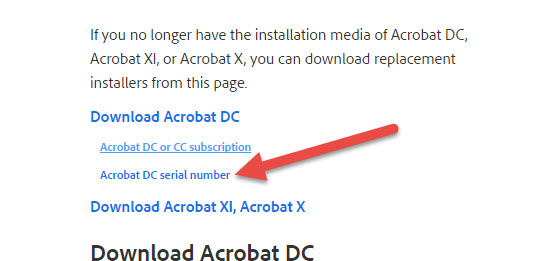
Then choose Acrobat Standard DC installer

You will see the download for the Windows OS installer on that page.
Copy link to clipboard
Copied
Thanks. I may be wrong, but it looks as if someone has downloaded Acrobat Pro when you need Acrobat Standard. It is the serial number version though. But it JUST MIGHT WORK.
Please let us know exactly what happens when you use License This Software
Copy link to clipboard
Copied
Right now it does not show to license the product. If indeed I accidentally downloaded the wrong software last year how do I fix it?
Sent from my iPhone
Copy link to clipboard
Copied
Oh and before installing, uninstall the Pro version that you currently have.
Copy link to clipboard
Copied
This seems to have worked. I uninstalled acrobat DC Pro and reinstalled Acrobat Standard DC. I input my serial number from the original emai. Seems to work. Thank you for the help.
Copy link to clipboard
Copied
You're welcome. Glad we got that figured out.

Copy link to clipboard
Copied
dear - graffiti,
i am having a similar, but slightly different issue. i got a new IMac 27", and the local mac guy (not apple) just hooked a cable up to my old macbook pro - which was full of bugs he couldn't fix - and transferred everything from my laptop to the new desktop. now, when i open acrobat reader DC, it wants a 5-digit code or serial number. i got it as part of the PDF Pak for $10/mo.
i wrote to adobe support, but they didn't have a clue. said they couldn't help.
i imagine you probably can...which i would deeply appreciate. thanks so much. if you can, great, if not, i'll call adobe tomorrow, and see if a live person also says they don't know about adobe products, as their chat person did...alas.
Copy link to clipboard
Copied
should i just erase it and download a new version with my adobe id?
Copy link to clipboard
Copied
Acrobat Reader DC shouldn't ask for a serial number and the PDFPack will just want you to log-in (no serial number either). Sounds like you may have signed up for the PDFPack but accidentally downloaded the trial version of Acrobat. Remove that from your system then download and install Reader from here: Adobe Acrobat Reader DC Install for all versions


Get ready! An upgraded Adobe Community experience is coming in January.
Learn more
 AdChoices